Shoplist product demo
See your next growth move take shape.
Watch Shoplist turn app usage into account research and a saved shortlist. Explore real product screens, then run the workflow with a practical playbook.
One workflow. A usable account list.
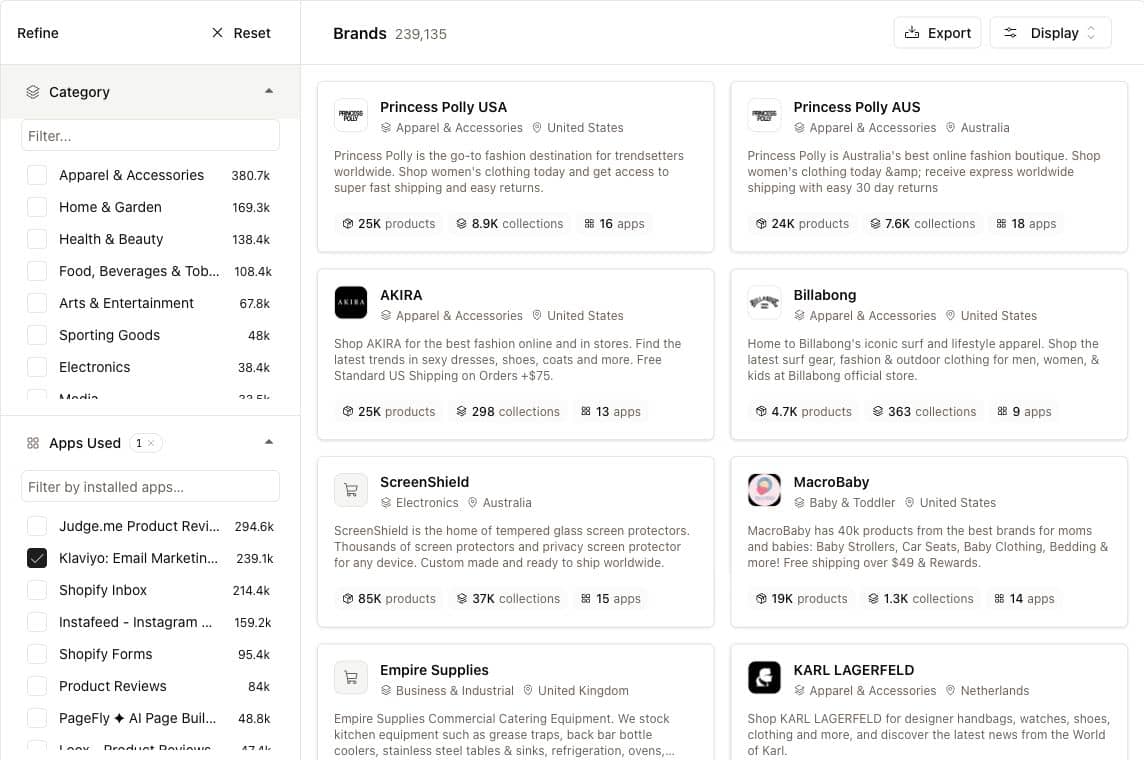
Princess Polly USA
- Appeared in the Klaviyo-filtered brand results on October 26, 2026.
- Open Apps and Activity to understand the recorded stack and changes.
- Selected and saved to a dedicated demo research list.
Next action Write the fit hypothesis and next discovery question.
What can I do with Shoplist?
Find Shopify brands by the apps they use, inspect their stack and observed activity, and save the accounts that fit your product. Shoplist brings that account research together with app-market intelligence so your next commercial move starts with a specific reason to act.
- Find
- Relevant accounts
Start from an app your target merchants already use.
- Understand
- The commercial fit
Inspect the stack and observed changes behind each account.
- Keep
- A working shortlist
Save your selected brands and turn research into a concrete brief.
Watch the work happen
A 72-second walkthrough: from app usage to a saved shortlist.
Six steps from app usage to an account you can work. Product screens captured October 26, 2026.
Silent walkthrough with English captions. Explore each captured step below.
On this page
Make this workflow yours.
Pick the app that makes your own sales motion specific. A competing app gives you a switching conversation to prepare. A complementary app gives you a shared workflow to demonstrate. Inspect each shortlisted brand before deciding on the angle.
Leave the research with something you can use.
The saved list holds the accounts. Use the downloadable account-brief template to retain the source, observation date, fit hypothesis and next question. Your product’s actual capabilities supply the commercial argument.
Keep your best accounts in view.
Use Track on a brand to follow it, then choose the relevant topic and delivery cadence in Notifications. Market moves covers observed app activity for followed brands; App changes covers app listing and pricing changes.
Good questions. Straight answers.
Frequently asked questions
Is this a live product walkthrough?
The screens come from the live Shoplist product on October 26, 2026. The walkthrough uses those captured screens to explain the steps. The account was inspected and saved to the demo list; notification settings are shown as a configuration reference.
Can I repeat this with a different app?
Yes. Open Brands, expand Apps Used and select the app that fits your prospecting motion. Inspect the resulting accounts and save the ones that meet your criteria. The playbooks give you a repeatable research structure and a template for the output.
Which plan should I use?
Free access supports initial exploration. Search, filter, list, export and notification limits depend on your workspace access. Check the current pricing page for the allowance and workflow you need.
Make your next move
Build the list your next growth move deserves.
Start with an app your target merchants use. Find the accounts, understand the fit and make your next move with Shoplist.