

Minmaxify Order Limits vs P: Order Limits Quantity
Two Shopify apps, side by side: detected stores, momentum, reviews, plans, listed features and who runs each. Store counts as of Nov 8, 2026.
The short answer
- P: Order Limits Quantity is detected on 38× as many Shopify stores as Minmaxify Order Limits: 825 vs 22 as of Nov 8, 2026.
- On the Shopify App Store: Minmaxify Order Limits 4.8 from 179 reviews and P: Order Limits Quantity 4.9 from 148 reviews.
- Only P: Order Limits Quantity lists a free plan. Paid plans start at $10/month for Minmaxify Order Limits and $8.99/month for P: Order Limits Quantity.
- Minmaxify Order Limits lists 4 features P: Order Limits Quantity’s listing doesn’t mention, including Cart-based, Customer tags, Pop-ups.
Head to head


- United States
- United Kingdom
- Australia
- United States
- Australia
- United Kingdom
Momentum
New reviews each month
Review pace is the clearest public read on how fast an app is winning new merchants.
Standard
- · Checkout validations/functions
- · General per-cart limits
- · Single language messages
Premium
- · Checkout validations/functions
- · Multilingual Messages
- · Rules/Groups
- · Support for Buy Now Buttons
Plus
- · Checkout UI extensions
Free
- · 24/7 live chat support
- · Custom limit message
- · Max quantity per customer
- · Min/max product quantity, MOQ
- · Order limits on up to 5 products
- · Order quantity, value & weight limits
Basic
- · Based on your Shopify plan
- · Customer tag & market targeting
- · Discount usage limit per customer
- · Max quantity per day, month & lifetime
- · Quantity, value & weight limits
- · Scheduled limits for drops & sales
Advanced
- · Auto-adjust limits by stock
- · Auto-translated limit messages
- · Based on your Shopify plan
- · Checkout timer & inventory lock
- · Checkout validation rules
- · IP-based limits to stop scalpers
Shopify Plus
- · All features in Advanced plan
- · B2B case-pack multiples
- · Checkout page limit alerts
- · Exclusive to Shopify Plus
- · One-in-One Technical Support
- · Per-company B2B order limits
Coverage counts what each App Store listing names. Every feature, checked off app by app, is in Shoplist.
See every featureImprove the shopping experience with min & max order limits on collections, product types, & tags. Save money with convenient limit-setting rules to avoid over-selling products to specific audiences. Easily set purchase limits on the number of products customers can purchase.
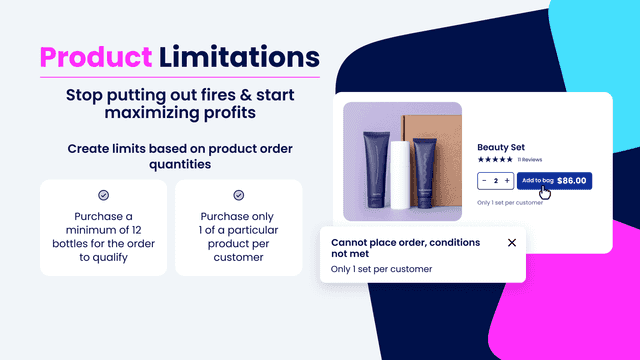
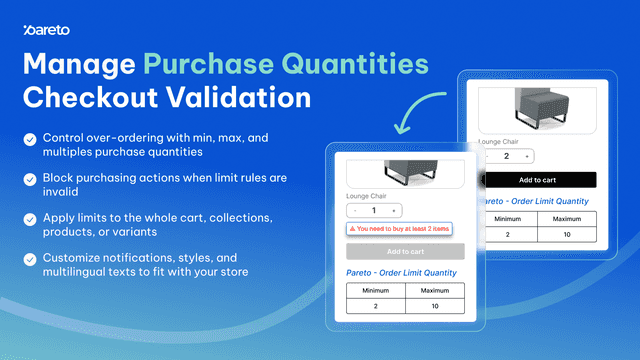
Pareto lets you set order limits and a max quantity per customer on any product, so no one can bulk buy your drops, flash sales or freebies. Limit purchases per order, day or lifetime, with every order limit enforced at checkout, including orders placed through AI agents. Need more? Add minimum order quantity (MOQ), sell in multiples or packs, and wholesale quantity limit rules by customer tag or B2B company.
- Create Customer Tag-Based Limits, Collection-Specific Limits & Weight Limits
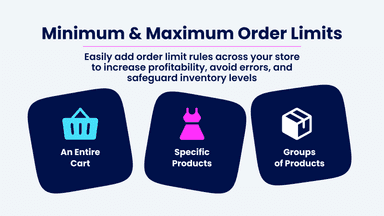
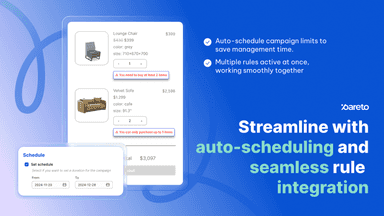
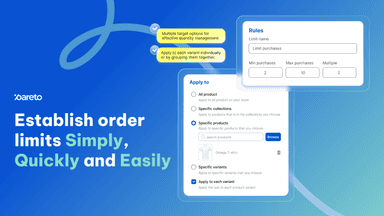
- Apply Restrictions for an Entire Cart, Specific Products, or Groups of Products
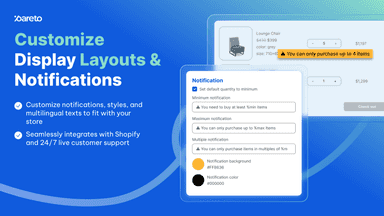
- Shoppers Receive Notifications to Add or Remove Products in the Cart at Checkout
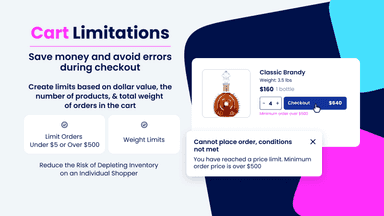
- Set Up Conditional Rules Based on Minimum & Maximum Prices, Quantity & Weight
- Set order limits with min, max and multiple quantity, value, or weight rules
- Auto-translate messages based on your store's languages
- Set checkout rules for different customer segments and auto-schedule
- Set threshold to show low stock counter/ countdown to create scarcity



All the numbers
Every figure, side by side
A green dot marks the app ahead on a measured figure. Estimates, gaps and apps that leave no storefront trace never take the lead.
Adoption
| Measure |  Minmaxify Order Limits |  P: Order Limits Quantity |
|---|---|---|
| Detected stores | 22 | 825(ahead) |
| Net store change, 28 days | 0 | +14 |
| Stores added, 28 days | Not enough data | 35 |
| Big-brand share | Not enough data | 10% |
| Top store categories | Health & Beauty, Apparel & Accessories, Food, Beverages & Tobacco | Food, Beverages & Tobacco, Apparel & Accessories, Health & Beauty |
| Top store countries | United States, United Kingdom, Australia | United States, Australia, United Kingdom |
Reviews
| Measure | Minmaxify Order Limits | P: Order Limits Quantity |
|---|---|---|
| App Store rating | 4.8 ★ | 4.9 ★(ahead) |
| App Store reviews | 179(ahead) | 148 |
| New reviews, 28 days | 0 | Not enough data |
| Reviewers a year or more in | Not enough data | 24% |
Pricing
| Measure | Minmaxify Order Limits | P: Order Limits Quantity |
|---|---|---|
| Free plan | Not listed | Yes |
| Lowest paid monthly plan | $10/month | $8.99/month(ahead) |
| Longest free trial | 7 days | 7 days |
| Plans listed | 3 | 4 |
Listing
| Measure | Minmaxify Order Limits | P: Order Limits Quantity |
|---|---|---|
| Shopify category rank | #30 | #7(ahead) |
| Shopify App Charts | #2 on Featured by Shopify in Order limits | #6 in Order limits |
| Built for Shopify | No | Yes |
| Launched | Oct 29, 2012 | Nov 18, 2024 |
| Languages | 1 | 1 |
| Developer | Intillium | Pareto |
FAQ
Minmaxify Order Limits and P: Order Limits Quantity: common questions
- Which is more popular, Minmaxify Order Limits or P: Order Limits Quantity?
- P: Order Limits Quantity is detected on 38× as many Shopify stores as Minmaxify Order Limits: 825 vs 22 as of Nov 8, 2026.
- Is Minmaxify Order Limits or P: Order Limits Quantity cheaper?
- Only P: Order Limits Quantity lists a free plan. Paid plans start at $10/month for Minmaxify Order Limits and $8.99/month for P: Order Limits Quantity. Shoplist compares base prices only between monthly plans in the same currency; usage charges and annual plans vary, so check each plan’s limits.
- Which has better reviews, Minmaxify Order Limits or P: Order Limits Quantity?
- On the Shopify App Store: Minmaxify Order Limits 4.8 from 179 reviews and P: Order Limits Quantity 4.9 from 148 reviews.
- What features does each app list that the other doesn’t?
- Minmaxify Order Limits lists 4 the others don’t mention, such as Cart-based, Customer tags, Pop-ups, Price-based. P: Order Limits Quantity lists 1 the others don’t mention, such as Custom branding. A feature missing from a listing may still be supported; this compares what each App Store listing says.
- Where does this comparison’s data come from?
- Shoplist crawls Shopify storefronts to detect which apps each store runs, and reads each app’s Shopify App Store listing for reviews, pricing, features and integrations. Store counts are as of Nov 8, 2026; estimated figures are labeled.
How Shoplist compares apps
Store counts come from Shoplist’s crawl of Shopify storefronts, which detects the apps each store runs; they are as of Nov 8, 2026. Reviews, ratings, plans, features and integrations come from each app’s Shopify App Store listing. 28-day figures are labeled when estimated, and a figure that is missing or estimated never decides who leads. Read the methodology.