

Upatra: Bulk Image Upload vs Uploado
Two Shopify apps, side by side: detected stores, momentum, reviews, plans, listed features and who runs each. Store counts as of Sep 3, 2026 for Upatra, Oct 28, 2026 for Uploado.
The short answer
- Upatra lists 3 features Uploado’s listing doesn’t mention, including Data sync, Products, Variants.
Head to head


Momentum
New reviews each month
Review pace is the clearest public read on how fast an app is winning new merchants.
Free
Nano
- · 2000 uploads, $0 recurring charges.
Micro
- · 5000 uploads, $0 recurring charges.
Mega
- · 8000 uploads, $0 recurring charges.
Coverage counts what each App Store listing names. Every feature, checked off app by app, is in Shoplist.
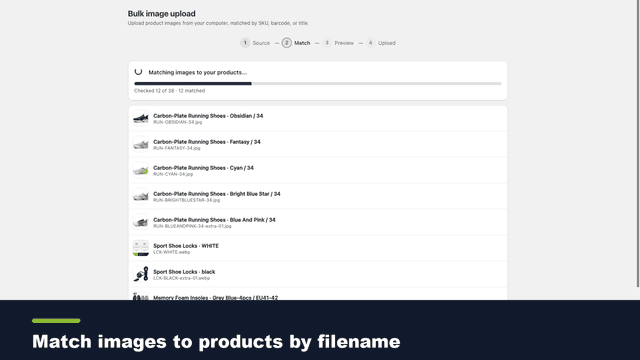
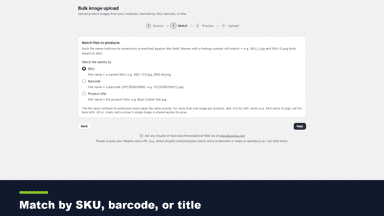
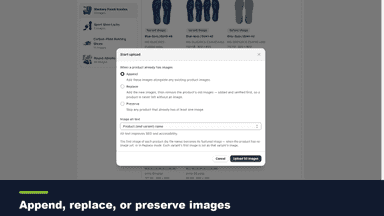
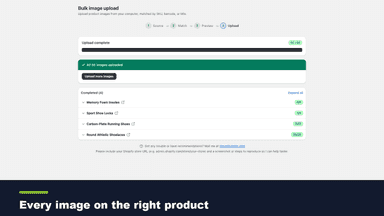
See every featureShopify has no built-in bulk image import — native upload is one at a time. Bulk Image Upload fixes that: point it at a Google Drive or Dropbox folder, or pick files from your computer, and each image is matched to its product or variant by filename (SKU, barcode, or title). Preview every match before it's written, then add, replace, or keep existing.
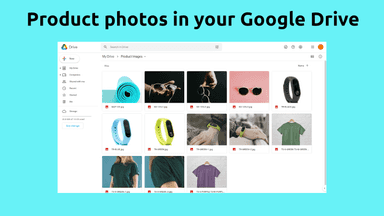
No time to upload hundreds or even tens of thousands of product images to your store? Your solution is Uploado. Uploado works with our FTP server or your Google Drive for easy, stress-free and cost-effective uploading of product images. You don’t need to be a technical wizard to setup product images for your store.
- Upload product images in bulk from your computer.
- Auto-match each file to its product or variant by SKU, barcode, or title.
- Preview every match before anything is written — no surprises, no manual fixes.
- Safe replace: add new images before deleting old, never leaving a product blank.
- Works seamlessly with our FTP server, or your Google Drive (15GB free storage)
- Easily upload hundreds or tens of thousands of product images to your store.
- Works with product variants
- Replace existing product images at specific positions.


All the numbers
Every figure, side by side
A green dot marks the app ahead on a measured figure. Estimates, gaps and apps that leave no storefront trace never take the lead.
Adoption
| Measure |  Upatra |  Uploado |
|---|---|---|
| Detected stores | Not published | Not published |
| Net store change, 28 days | 0 | 0 |
| Stores added, 28 days | Not enough data | Not enough data |
| Big-brand share | Not enough data | Not enough data |
| Top store categories | Not published | Not published |
| Top store countries | Not published | Not published |
Reviews
| Measure | Upatra | Uploado |
|---|---|---|
| App Store rating | Not published | 5.0 ★ |
| App Store reviews | Not published | 4 |
| New reviews, 28 days | Not enough data | Not enough data |
| Reviewers a year or more in | Not enough data | Not enough data |
FAQ
Upatra and Uploado: common questions
- What features does each app list that the other doesn’t?
- Upatra lists 3 the others don’t mention, such as Data sync, Products, Variants. A feature missing from a listing may still be supported; this compares what each App Store listing says.
- Where does this comparison’s data come from?
- Shoplist crawls Shopify storefronts to detect which apps each store runs, and reads each app’s Shopify App Store listing for reviews, pricing, features and integrations. Store counts are as of Sep 3, 2026 for Upatra, Oct 28, 2026 for Uploado; estimated figures are labeled.
How Shoplist compares apps
Store counts come from Shoplist’s crawl of Shopify storefronts, which detects the apps each store runs; they are as of Sep 3, 2026 for Upatra, Oct 28, 2026 for Uploado. Reviews, ratings, plans, features and integrations come from each app’s Shopify App Store listing. 28-day figures are labeled when estimated, and a figure that is missing or estimated never decides who leads. Read the methodology.