
Spec Pins vs SpecFlow
Two Shopify apps, side by side: detected stores, momentum, reviews, plans, listed features and who runs each. Store counts as of Sep 25, 2026 for Spec Pins, Oct 14, 2026 for SpecFlow.
The short answer
- Only SpecFlow lists a free plan.
Head to head


Free
- · 3 visual themes
- · Global spec table
- · Storefront app block
- · Table layout
- · Up to 5 rows & columns
Pro
- · Custom CSS & JavaScript
- · Custom theme & fonts
- · Everything in Free
- · File attachments (PDFs)
- · Per-product spec overrides
- · Unlimited rows & columns
Growth
- · Bulk CSV import/export
- · Everything in Pro
- · Geo-shipping banner
- · Priority support
- · Tabs & Accordion layouts
- · Variant-specific specs
Coverage counts what each App Store listing names. Every feature, checked off app by app, is in Shoplist.
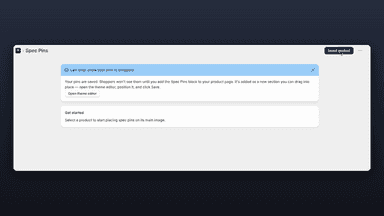
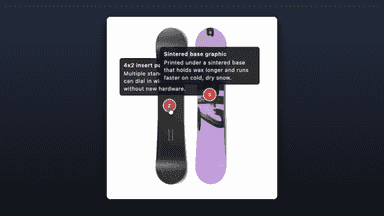
See every featureSpec Pins helps you point out the details that sell a product. Open the editor, pick a product, and click anywhere on its image to drop a numbered pin. Add a short label and description for each one, then save. On the product page, shoppers tap a pin to read that feature in a tooltip. It works with your existing theme through a block you add in the theme editor, so there's no code to write and nothing to redesign.
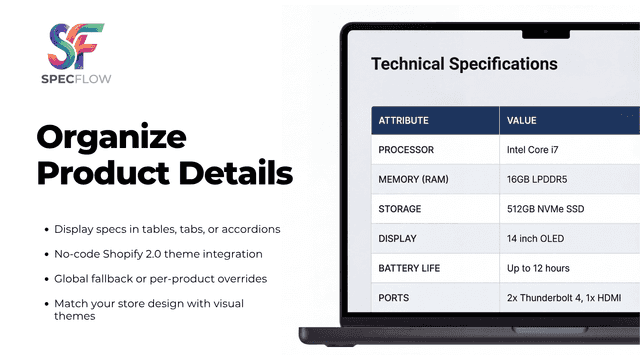
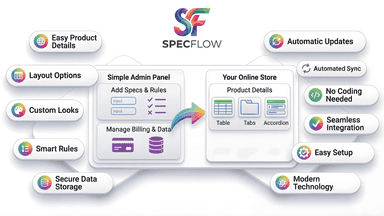
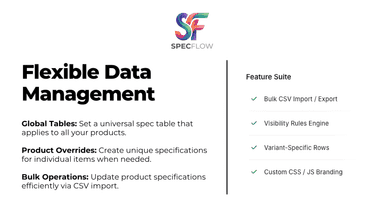
SpecFlow organizes complex product info into structured tables, tabs, or accordions. Display technical details clearly without cluttered descriptions. You can apply a global spec table across your entire catalog or set specific overrides per product. Built natively on Shopify metafields, it operates entirely within your store without external dependencies.
- Highlight product features right on your product images
- Let shoppers tap a pin to read a feature's details in a tooltip
- Match your store with custom pin colors and tooltip styles
- Add it through your theme with no code or theme edits
- Display specifications in custom table, tab, or accordion layouts.
- Set a global specification table for all items or customize per product.
- Show or hide specific details using conditional visibility rules.
- Assign different specification rows to specific product variants.


All the numbers
Every figure, side by side
A green dot marks the app ahead on a measured figure. Estimates, gaps and apps that leave no storefront trace never take the lead.
Adoption
| Measure |  Spec Pins |  SpecFlow |
|---|---|---|
| Detected stores | Not published | Not published |
| Net store change, 28 days | 0 | 0 |
| Stores added, 28 days | Not enough data | Not enough data |
| Big-brand share | Not enough data | Not enough data |
| Top store categories | Not published | Not published |
| Top store countries | Not published | Not published |
Reviews
| Measure | Spec Pins | SpecFlow |
|---|---|---|
| App Store rating | Not published | Not published |
| App Store reviews | Not published | Not published |
| New reviews, 28 days | Not enough data | Not enough data |
| Reviewers a year or more in | Not enough data | Not enough data |
FAQ
Spec Pins and SpecFlow: common questions
- Is Spec Pins or SpecFlow cheaper?
- Only SpecFlow lists a free plan. Shoplist compares base prices only between monthly plans in the same currency; usage charges and annual plans vary, so check each plan’s limits.
- Where does this comparison’s data come from?
- Shoplist crawls Shopify storefronts to detect which apps each store runs, and reads each app’s Shopify App Store listing for reviews, pricing, features and integrations. Store counts are as of Sep 25, 2026 for Spec Pins, Oct 14, 2026 for SpecFlow; estimated figures are labeled.
How Shoplist compares apps
Store counts come from Shoplist’s crawl of Shopify storefronts, which detects the apps each store runs; they are as of Sep 25, 2026 for Spec Pins, Oct 14, 2026 for SpecFlow. Reviews, ratings, plans, features and integrations come from each app’s Shopify App Store listing. 28-day figures are labeled when estimated, and a figure that is missing or estimated never decides who leads. Read the methodology.