
Oops: Order Editing & Address vs Weighwise: Catch Weight Orders
Two Shopify apps, side by side: detected stores, momentum, reviews, plans, listed features and who runs each. Store counts as of Oct 13, 2026 for Oops, Nov 13, 2026 for Weighwise.
The short answer
- Both list a free plan. Paid plans start at $14.99/month for Oops and $14.99/month for Weighwise.
- Oops lists 5 features Weighwise’s listing doesn’t mention, including Address, Cancellations, Custom rules.
Head to head

Free
- · 50 edits a month
- · Address checker with warnings
- · Address, size, colour, quantity, cancel
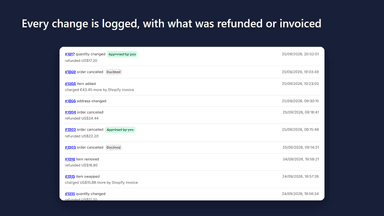
- · Log of every change
- · Refunds at once, or approve first
Pro
- · Everything in Free
- · Unlimited edits
- · Up to six suggested products
Free
- · 30 weighed orders a month
- · All features included
Unlimited
- · All features included
- · Unlimited weighed orders
Coverage counts what each App Store listing names. Every feature, checked off app by app, is in Shoplist.
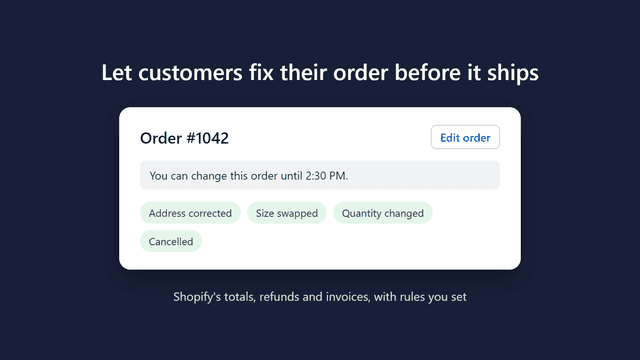
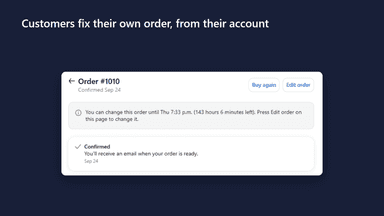
See every featureAn email to fix an address or swap a size means a wait, while the order sits unfixed. Oops adds an Edit order button to the customer's account. In the window you set, they can fix the address, swap a size or colour, change quantity, remove an item or cancel. A lower total is refunded or held for approval; a higher one is invoiced by Shopify. Oops stops once anything ships, or it is cancelled or archived.
Sell items whose exact weight you only know after packing. Customers pay the listed price at checkout. When you pack the order, enter the actual weight on the order page and Weighwise refunds the difference automatically, or sends a payment link if the item came out heavier. It adjusts the payment instead of editing the order, so it works with shipping, pickup and local delivery.
- Customers fix the address, swap a size or colour, change the quantity or cancel.
- Shows Shopify's new total and the difference before the customer confirms.
- A lower total is refunded at once, or held for your approval first.
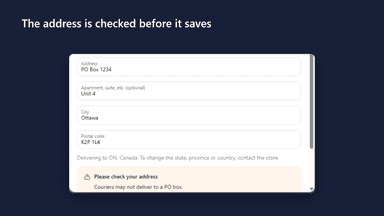
- An address checker blocks missing essentials and warns about PO boxes.
- Enter actual weights on the order page and see the new price instantly
- Refund the difference automatically when an item weighs less
- Email a payment link, collect in person, or waive when it weighs more
- Works with shipping, in-store pickup and local delivery orders
All the numbers
Every figure, side by side
A green dot marks the app ahead on a measured figure. Estimates, gaps and apps that leave no storefront trace never take the lead.
Adoption
| Measure |  Oops | |
|---|---|---|
| Detected stores | Not published | Not published |
| Net store change, 28 days | 0 | 0 |
| Stores added, 28 days | Not enough data | Not enough data |
| Big-brand share | Not enough data | Not enough data |
| Top store categories | Not published | Not published |
| Top store countries | Not published | Not published |
Reviews
| Measure | Oops | |
|---|---|---|
| App Store rating | Not published | Not published |
| App Store reviews | Not published | Not published |
| New reviews, 28 days | Not enough data | Not enough data |
| Reviewers a year or more in | Not enough data | Not enough data |
FAQ
Oops and Weighwise: common questions
- Is Oops or Weighwise cheaper?
- Both list a free plan. Paid plans start at $14.99/month for Oops and $14.99/month for Weighwise. Shoplist compares base prices only between monthly plans in the same currency; usage charges and annual plans vary, so check each plan’s limits.
- What features does each app list that the other doesn’t?
- Oops lists 5 the others don’t mention, such as Address, Cancellations, Custom rules, Customer portal. Weighwise lists 2 the others don’t mention, such as Draft orders, Prices. A feature missing from a listing may still be supported; this compares what each App Store listing says.
- Where does this comparison’s data come from?
- Shoplist crawls Shopify storefronts to detect which apps each store runs, and reads each app’s Shopify App Store listing for reviews, pricing, features and integrations. Store counts are as of Oct 13, 2026 for Oops, Nov 13, 2026 for Weighwise; estimated figures are labeled.
How Shoplist compares apps
Store counts come from Shoplist’s crawl of Shopify storefronts, which detects the apps each store runs; they are as of Oct 13, 2026 for Oops, Nov 13, 2026 for Weighwise. Reviews, ratings, plans, features and integrations come from each app’s Shopify App Store listing. 28-day figures are labeled when estimated, and a figure that is missing or estimated never decides who leads. Read the methodology.