

LSC ‑ Low Stock Counter vs StockSpot ‑ Stock by Location
Two Shopify apps, side by side: detected stores, momentum, reviews, plans, listed features and who runs each. Store counts as of Oct 13, 2026 for LSC, Oct 14, 2026 for StockSpot.
The short answer
- Only StockSpot lists a free plan. Paid plans start at $4.99/month for LSC and $6.99/month for StockSpot.
Head to head


Basic
- · 25,000 widget impressions / month
- · All designs, icons & emoji
- · Countdown timer
- · Widget on all products
Standard
- · 250,000 widget impressions / month
- · All designs, icons & emoji
- · Countdown timer
- · Widget on all products
Unlimited
- · All designs, icons & emoji
- · Countdown timer
- · Unlimited impressions
- · Widget on all products
Free
- · Custom colours, text, order and CSS
- · Low-stock and out-of-stock messaging
- · Stock at every location on product pages
Pro
- · Country rules and cart stock check
- · Everything in Free
- · Nearest store first with distances
Coverage counts what each App Store listing names. Every feature, checked off app by app, is in Shoplist.
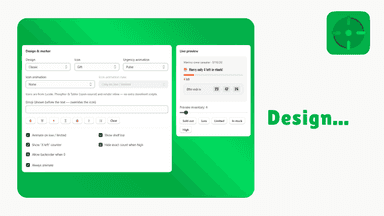
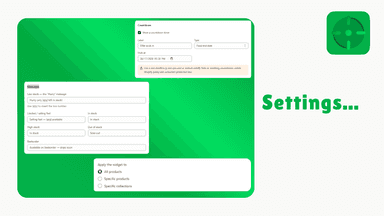
See every featureLow Stock Counter shows shoppers how many units are left on each product page, using your store's live inventory. When stock falls below the limits you set, it displays a low-stock message and a progress bar so customers can see an item is running out. You control the wording, colors, icons, fonts, and layout so the widget matches your theme, and you can apply different rules to specific products or collections.
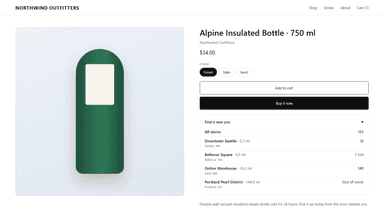
StockSpot shows customers how much stock each of your locations has, directly on the product page. Shoppers see at a glance which store or warehouse has the item, so they can arrange a pickup or trust that it will ship. The widget installs as a theme app extension with no code changes and refreshes when the customer switches variants.
- Live stock counts and low-stock alerts on each product page
- Stock progress bar that shows how close an item is to selling out
- Choose from four layouts and customize icons, fonts, and colors
- Countdown timer for real sale or restock deadlines
- Live stock per location on product pages, refreshed on variant change
- Choose, rename and order the locations shown; mark a primary store
- Match your theme with colours, wording, position and custom CSS





All the numbers
Every figure, side by side
A green dot marks the app ahead on a measured figure. Estimates, gaps and apps that leave no storefront trace never take the lead.
Adoption
| Measure |  LSC |  StockSpot |
|---|---|---|
| Detected stores | Not published | Not published |
| Net store change, 28 days | 0 | 0 |
| Stores added, 28 days | Not enough data | Not enough data |
| Big-brand share | Not enough data | Not enough data |
| Top store categories | Not published | Not published |
| Top store countries | Not published | Not published |
Reviews
| Measure | LSC | StockSpot |
|---|---|---|
| App Store rating | Not published | Not published |
| App Store reviews | Not published | Not published |
| New reviews, 28 days | Not enough data | Not enough data |
| Reviewers a year or more in | Not enough data | Not enough data |
FAQ
LSC and StockSpot: common questions
- Is LSC or StockSpot cheaper?
- Only StockSpot lists a free plan. Paid plans start at $4.99/month for LSC and $6.99/month for StockSpot. Shoplist compares base prices only between monthly plans in the same currency; usage charges and annual plans vary, so check each plan’s limits.
- Where does this comparison’s data come from?
- Shoplist crawls Shopify storefronts to detect which apps each store runs, and reads each app’s Shopify App Store listing for reviews, pricing, features and integrations. Store counts are as of Oct 13, 2026 for LSC, Oct 14, 2026 for StockSpot; estimated figures are labeled.
How Shoplist compares apps
Store counts come from Shoplist’s crawl of Shopify storefronts, which detects the apps each store runs; they are as of Oct 13, 2026 for LSC, Oct 14, 2026 for StockSpot. Reviews, ratings, plans, features and integrations come from each app’s Shopify App Store listing. 28-day figures are labeled when estimated, and a figure that is missing or estimated never decides who leads. Read the methodology.