

Commision Pro: Chat & Files vs UploadsPro
Two Shopify apps, side by side: detected stores, momentum, reviews, plans, listed features and who runs each. Store counts as of Oct 13, 2026.
The short answer
- Only UploadsPro lists a free plan. Paid plans start at $9.99/month for Commision Pro and $9.99/month for UploadsPro.
- UploadsPro lists 9 features Commision Pro’s listing doesn’t mention, including Custom rules, Excel, Image crop.
Head to head


Momentum
New reviews each month
Review pace is the clearest public read on how fast an app is winning new merchants.
Basic
Pro
Basic
- · 100 customer uploads per month
- · 50MB per file maximum
- · 7 days file retention
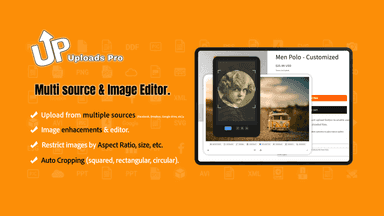
- · File/Camera Image cropping & enhancement
- · Images only (JPG, PNG, WebP, HEIC)
- · Unlimited orders with uploaded files
Professional
- · 2GB (2000Mb) per file maximum
- · 6 months file retention - No logo
- · Add Amount feature - Charge extra fees
- · All file types (PDF, DOCX, ZIP, etc.)
- · Basic + Unlimited Upload fields
Coverage counts what each App Store listing names. Every feature, checked off app by app, is in Shoplist.
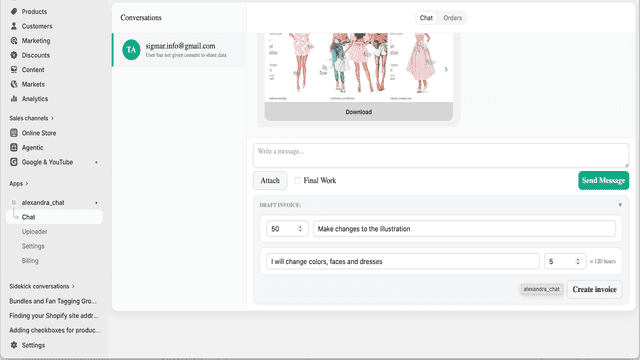
See every featureCommision Pro: Chat and Files helps merchants manage customer communication for custom orders. Customers can send messages and upload reference images through an embedded chat and optional product uploader. Uploaded files are saved to Shopify Files and added to the order as clickable links. Merchants can view conversations, send invoices, and track commission orders in the app admin.
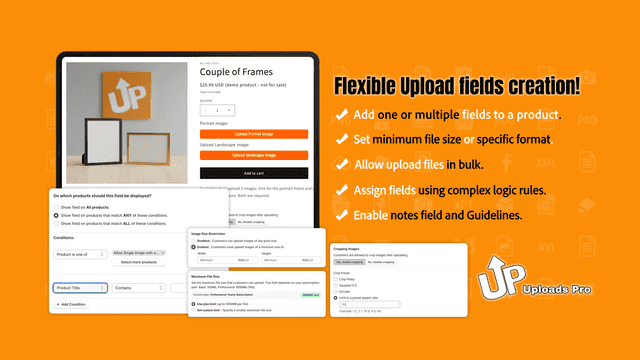
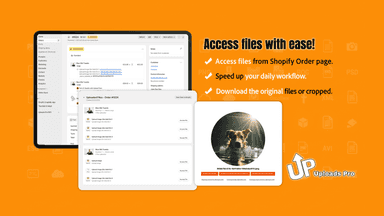
Stop chasing customers for design files. UploadsPro lets buyers upload high-res images and large files (up to 2Gb per file) directly on your product pages. Perfect for custom orders and print-on-demand. Automatically add custom fees to the cart when files are uploaded to monetize your processing work. You have total control: set allowed file types, strict size limits, and make uploads mandatory.
- Customer chat with image attachments on your storefront
- Optional product page uploader to collect reference images for custom orders
- Automatically save uploads to Shopify Files and attach clickable links to orders
- Create and send draft order invoices from the admin chat
- Customers upload files on product pages. No emails or external tools needed
- Set file type restrictions, size limits, and required vs optional upload rules
- Add upload fees to cart automatically. Monetize file processing or premium servi
- All customer files linked to orders. Instant fulfillment access from dashboard



All the numbers
Every figure, side by side
A green dot marks the app ahead on a measured figure. Estimates, gaps and apps that leave no storefront trace never take the lead.
Adoption
| Measure |  Commision Pro |  UploadsPro |
|---|---|---|
| Detected stores | Not published | Not published |
| Net store change, 28 days | 0 | 0 |
| Stores added, 28 days | Not enough data | Not enough data |
| Big-brand share | Not enough data | Not enough data |
| Top store categories | Not published | Not published |
| Top store countries | Not published | Not published |
Reviews
| Measure | Commision Pro | UploadsPro |
|---|---|---|
| App Store rating | Not published | 5.0 ★ |
| App Store reviews | Not published | 1 |
| New reviews, 28 days | Not enough data | Not enough data |
| Reviewers a year or more in | Not enough data | Not enough data |
Pricing
| Measure | Commision Pro | UploadsPro |
|---|---|---|
| Free plan | Not listed | Yes |
| Lowest paid monthly plan | $9.99/month | $9.99/month |
| Longest free trial | 7 days | Not listed |
| Plans listed | 2 | 2 |
Listing
| Measure | Commision Pro | UploadsPro |
|---|---|---|
| Shopify category rank | #177 | #55(ahead) |
| Shopify App Charts | Not on this week’s charts | Not on this week’s charts |
| Built for Shopify | No | No |
| Launched | Jul 13, 2026 | Dec 17, 2025 |
| Languages | 1 | 6 |
| Developer | AlexApps | Big Van Studio |
FAQ
Commision Pro and UploadsPro: common questions
- Is Commision Pro or UploadsPro cheaper?
- Only UploadsPro lists a free plan. Paid plans start at $9.99/month for Commision Pro and $9.99/month for UploadsPro. Shoplist compares base prices only between monthly plans in the same currency; usage charges and annual plans vary, so check each plan’s limits.
- What features does each app list that the other doesn’t?
- Commision Pro lists 3 the others don’t mention, such as Custom fields, Import and export, Printing. UploadsPro lists 9 the others don’t mention, such as Custom rules, Excel, Image crop, Image rotate. A feature missing from a listing may still be supported; this compares what each App Store listing says.
- Where does this comparison’s data come from?
- Shoplist crawls Shopify storefronts to detect which apps each store runs, and reads each app’s Shopify App Store listing for reviews, pricing, features and integrations. Store counts are as of Oct 13, 2026; estimated figures are labeled.
How Shoplist compares apps
Store counts come from Shoplist’s crawl of Shopify storefronts, which detects the apps each store runs; they are as of Oct 13, 2026. Reviews, ratings, plans, features and integrations come from each app’s Shopify App Store listing. 28-day figures are labeled when estimated, and a figure that is missing or estimated never decides who leads. Read the methodology.