

Autophoto Bulk Image Editing vs Pixc: AI Image Editing
Two Shopify apps, side by side: detected stores, momentum, reviews, plans, listed features and who runs each. Store counts as of Oct 13, 2026 for Autophoto Bulk Image Editing, Oct 23, 2026 for Pixc.
The short answer
- Only Autophoto Bulk Image Editing lists a free plan. Paid plans start at $35/month for Autophoto Bulk Image Editing and $79/month for Pixc.
- Autophoto Bulk Image Editing lists 12 features Pixc’s listing doesn’t mention, including AI generation, Auto-optimization, Background removal.
Head to head


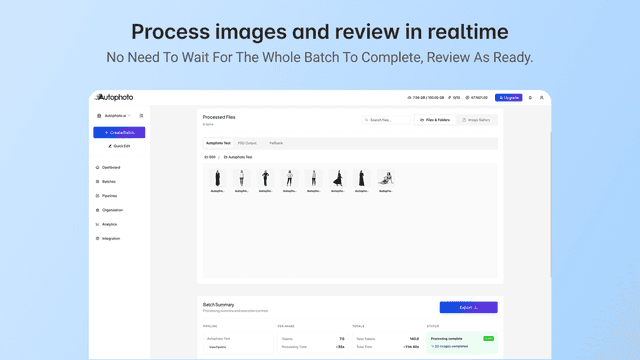
Product photo editing and image optimization within 24 hours
Momentum
New reviews each month
Review pace is the clearest public read on how fast an app is winning new merchants.
Autophoto Free
- · 1 GB storage / 3 days
- · 1 batches at once
- · 200 MB per batch (max 10 MB per file)
- · 200 tokens
- · 25 files per batch
Autophoto Starter
- · 2 batches at once
- · 2,500 tokens
- · 250 files per batch
- · 5 GB per batch (max 20 MB per file)
- · 5 GB storage
Autophoto Growth
- · 10,000 tokens
- · 25 GB storage
- · 3 batches at once
- · 300 files per batch
- · 7 GB per batch (max 24 MB per file)
Autophoto Scale
- · 100 GB storage
- · 25,000 tokens
- · 400 files per batch
- · 5 batches at once
- · 9 GB per batch (max 24 MB per file)
Pay-as-you-go
- · 1 user account
- · 2-day order review period
- · 20-day image storage and backup
- · No monthly fee
Pixc Member
- · 7-day review period
- · Only $79/month
- · Unlimited image storage and backup
- · Up to 5 user accounts
Coverage counts what each App Store listing names. Every feature, checked off app by app, is in Shoplist.
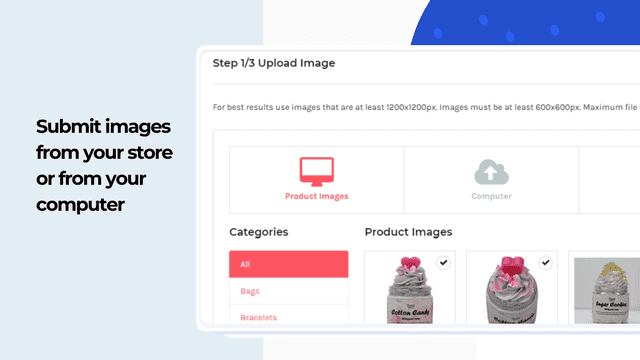
See every featureStop editing product photos one by one. Autophoto uses AI to remove backgrounds, generate realistic shadows, and crop your entire catalog automatically — in batches, not image by image. Set your rules once, apply them across hundreds of products with consistent results every time.
Give your store a consistent, professional look that builds trust and turns browsers into buyers. Pixc uses AI background removal to remove the background from every product photo, replacing it with clean white, a custom colour, or a transparent PNG. Every image matches the same uniform style — the kind of polished product grid that signals a premium brand. Higher trust, higher conversion, more sales.
- Batch image processing Process many product images at once.
- Reusable standards Apply the same image standards across products.
- Rules by product type Use different image rules for different products.
- Consistent results at scale Keep image output predictable with large catalogs.
- Increase online sales with professional product photos.
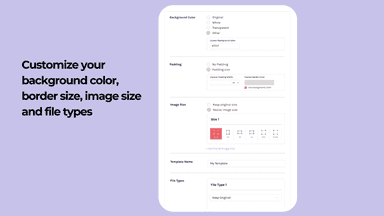
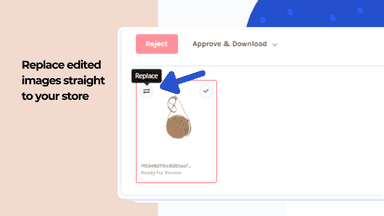
- Remove and replace image backgrounds to plain white (or any other custom color)
- Set up uniform image dimensions and borders for all product images.
- Get your images within a few hours (or less)


All the numbers
Every figure, side by side
A green dot marks the app ahead on a measured figure. Estimates, gaps and apps that leave no storefront trace never take the lead.
Adoption
| Measure |  Autophoto Bulk Image Editing |  Pixc |
|---|---|---|
| Detected stores | Not published | Not published |
| Net store change, 28 days | 0 | 0 |
| Stores added, 28 days | Not enough data | Not enough data |
| Big-brand share | Not enough data | Not enough data |
| Top store categories | Not published | Not published |
| Top store countries | Not published | Not published |
Reviews
| Measure | Autophoto Bulk Image Editing | Pixc |
|---|---|---|
| App Store rating | Not published | 4.7 ★ |
| App Store reviews | Not published | 41 |
| New reviews, 28 days | Not enough data | 0 |
| Reviewers a year or more in | Not enough data | Not enough data |
Pricing
| Measure | Autophoto Bulk Image Editing | Pixc |
|---|---|---|
| Free plan | Yes | Not listed |
| Lowest paid monthly plan | $35/month(ahead) | $79/month |
| Longest free trial | Not listed | Not listed |
| Plans listed | 4 | 2 |
Listing
| Measure | Autophoto Bulk Image Editing | Pixc |
|---|---|---|
| Shopify category rank | #158 | #101(ahead) |
| Shopify App Charts | Not on this week’s charts | Not on this week’s charts |
| Built for Shopify | No | No |
| Launched | May 13, 2026 | Aug 14, 2014 |
| Languages | 1 | 1 |
| Developer | Autophoto Labs Pvt Ltd | Pixc |
FAQ
Autophoto Bulk Image Editing and Pixc: common questions
- Is Autophoto Bulk Image Editing or Pixc cheaper?
- Only Autophoto Bulk Image Editing lists a free plan. Paid plans start at $35/month for Autophoto Bulk Image Editing and $79/month for Pixc. Shoplist compares base prices only between monthly plans in the same currency; usage charges and annual plans vary, so check each plan’s limits.
- What features does each app list that the other doesn’t?
- Autophoto Bulk Image Editing lists 12 the others don’t mention, such as AI generation, Auto-optimization, Background removal, Cropping. A feature missing from a listing may still be supported; this compares what each App Store listing says.
- Where does this comparison’s data come from?
- Shoplist crawls Shopify storefronts to detect which apps each store runs, and reads each app’s Shopify App Store listing for reviews, pricing, features and integrations. Store counts are as of Oct 13, 2026 for Autophoto Bulk Image Editing, Oct 23, 2026 for Pixc; estimated figures are labeled.
How Shoplist compares apps
Store counts come from Shoplist’s crawl of Shopify storefronts, which detects the apps each store runs; they are as of Oct 13, 2026 for Autophoto Bulk Image Editing, Oct 23, 2026 for Pixc. Reviews, ratings, plans, features and integrations come from each app’s Shopify App Store listing. 28-day figures are labeled when estimated, and a figure that is missing or estimated never decides who leads. Read the methodology.