
Adornu: Virtual Try‑On vs SwiftXR AI Virtual Try‑On
Two Shopify apps, side by side: detected stores, momentum, reviews, plans, listed features and who runs each. Store counts as of Nov 4, 2026 for Adornu, Oct 29, 2026 for SwiftXR AI Virtual Try‑On.
The short answer
- Only SwiftXR AI Virtual Try‑On lists a free plan. Paid plans start at $150/month for Adornu and $19/month for SwiftXR AI Virtual Try‑On.
- Adornu lists 2 features SwiftXR AI Virtual Try‑On’s listing doesn’t mention, including Color, File upload.
Head to head

Momentum
New reviews each month
Review pace is the clearest public read on how fast an app is winning new merchants.
Starter
- · 500 try-ons a month
- · Every feature included
Growth
- · 1,000 try-ons a month
- · Every feature included
Scale
- · 2,000 try-ons a month
- · Every feature included
Free
- · 5 try-ons per month included
- · No automatic overage charges
Basic
- · 100 try-ons per month included
- · Self-serve setup
Starter
- · 400 try-ons per month included
- · Self-serve setup
Growth
- · 1,800 try-ons per month included
- · Email support
Coverage counts what each App Store listing names. Every feature, checked off app by app, is in Shoplist.
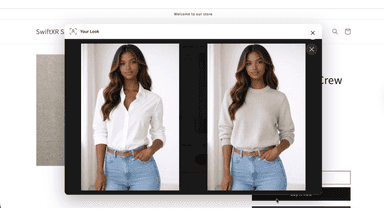
See every featureAdornu adds a See it on you button to your product pages. A shopper uploads a photo and gets a picture of themselves wearing the product, made from its featured image. It works for clothing, jewelry and accessories. You can match the button and try-on window to your store, set a daily limit per shopper, and ask for an email after a few try-ons, with an optional discount code as a reward.
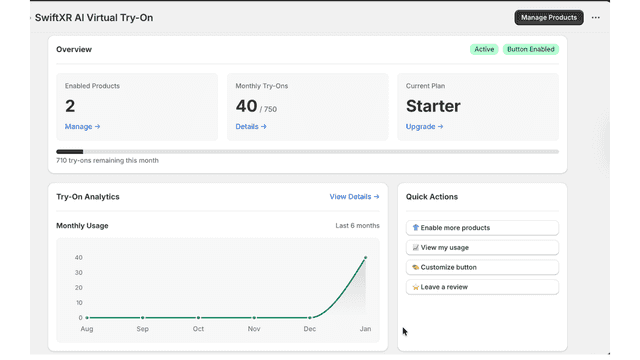
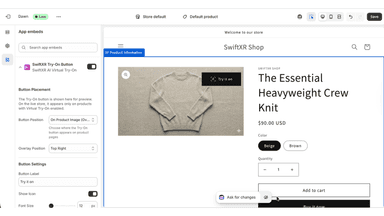
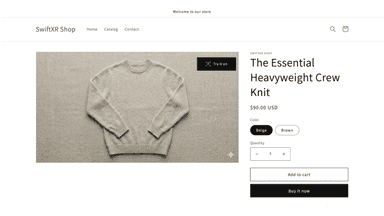
SwiftXR Virtual Try-On lets shoppers preview how products look on them using a photo, directly on product pages. Merchants can enable try-on per product, control where the button appears, and match it to their store’s design. This helps customers make more confident purchase decisions without changing existing product workflows.
- Try-on button under Add to cart that lines up with your theme, no code needed
- Works for clothing, jewelry and accessories, or detects the type per product
- Collect shopper emails after a few try-ons, with an optional discount reward
- Match the button, try-on window and wording to your brand with live preview
- Photo-based virtual try-on directly on product pages
- Enable or disable try-on per product from the app
- Customizable Try-On button placement and styling
All the numbers
Every figure, side by side
A green dot marks the app ahead on a measured figure. Estimates, gaps and apps that leave no storefront trace never take the lead.
Adoption
| Measure |  SwiftXR AI Virtual Try‑On | |
|---|---|---|
| Detected stores | Not published | Not published |
| Net store change, 28 days | 0 | 0 |
| Stores added, 28 days | Not enough data | Not enough data |
| Big-brand share | Not enough data | Not enough data |
| Top store categories | Not published | Not published |
| Top store countries | Not published | Not published |
Reviews
| Measure | SwiftXR AI Virtual Try‑On | |
|---|---|---|
| App Store rating | Not published | Not published |
| App Store reviews | Not published | Not published |
| New reviews, 28 days | Not enough data | Not enough data |
| Reviewers a year or more in | Not enough data | Not enough data |
Pricing
| Measure | SwiftXR AI Virtual Try‑On | |
|---|---|---|
| Free plan | Not listed | Yes |
| Lowest paid monthly plan | $150/month | $19/month(ahead) |
| Longest free trial | 14 days | Not listed |
| Plans listed | 3 | 4 |
Listing
| Measure | SwiftXR AI Virtual Try‑On | |
|---|---|---|
| Shopify category rank | Not enough data | #257 |
| Shopify App Charts | Not on this week’s charts | #14 on Pricing moves in 3D/AR/VR |
| Built for Shopify | No | No |
| Launched | Nov 4, 2026 | Feb 11, 2026 |
| Languages | 1 | 1 |
| Developer | Quikfox | SwiftXR |
FAQ
Adornu and SwiftXR AI Virtual Try‑On: common questions
- Is Adornu or SwiftXR AI Virtual Try‑On cheaper?
- Only SwiftXR AI Virtual Try‑On lists a free plan. Paid plans start at $150/month for Adornu and $19/month for SwiftXR AI Virtual Try‑On. Shoplist compares base prices only between monthly plans in the same currency; usage charges and annual plans vary, so check each plan’s limits.
- What features does each app list that the other doesn’t?
- Adornu lists 2 the others don’t mention, such as Color, File upload. SwiftXR AI Virtual Try‑On lists 2 the others don’t mention, such as Conditional logic, Mobile responsive. A feature missing from a listing may still be supported; this compares what each App Store listing says.
- Where does this comparison’s data come from?
- Shoplist crawls Shopify storefronts to detect which apps each store runs, and reads each app’s Shopify App Store listing for reviews, pricing, features and integrations. Store counts are as of Nov 4, 2026 for Adornu, Oct 29, 2026 for SwiftXR AI Virtual Try‑On; estimated figures are labeled.
How Shoplist compares apps
Store counts come from Shoplist’s crawl of Shopify storefronts, which detects the apps each store runs; they are as of Nov 4, 2026 for Adornu, Oct 29, 2026 for SwiftXR AI Virtual Try‑On. Reviews, ratings, plans, features and integrations come from each app’s Shopify App Store listing. 28-day figures are labeled when estimated, and a figure that is missing or estimated never decides who leads. Read the methodology.