DateView: Order Prep Calendar logo

DateView: Order Prep Calendar Shopify App: Pricing, Features & First-Adopter Watch

Orders - Other

Updated May 6, 2026

No signal

By Verdant Spark Ltd

Launched April 30, 2026. Shoplist is monitoring first merchant evidence, pricing, feature details, and listing changes for this Shopify app.

Shoplist public signals

What is visible for DateView: Order Prep Calendar right now

Signal date May 6, 2026

Monitoring status

First-adopter watch

Monitoring first merchant evidence

As of May 6, 2026

Momentum

0 No signal

Install trend held steady over the last 28 days

As of Jun 12, 2026

No signal0% confidence

0 momentum score

Install trend held steady over the latest 28-day window.

Updated Jun 12, 2026

0 installs

Momentum inputs

28d installs

0

Prev. 28d

0

New 28d

0

30d reviews

0

Installs
0
Growth
50
Adoption
0
Reviews
0
Fit
59

Quick answer

DateView: Order Prep Calendar launched on April 30, 2026. Shoplist is monitoring first public merchant evidence, pricing changes, and listing changes.

Pricing

Pricing and plan posture

Monthly plan

$9.99
  • All app features

Activity and changes

Recent signals for DateView: Order Prep Calendar

Recent detections and listing changes are public signals captured by crawl history.

App Store listing

Listing changes

4 updates

Detected May 31, 2026

App name changed +4 more

Positioning

App name changed

DateView: Plan Future OrdersDateView: Order Prep Calendar

Listing title changed

Organize and batch future orders by fulfillment date. Show orders in a date-based production plan.See your future orders by day, product and quantity. Customers choose date at checkout.

Description rewritten

DateView helps you manage orders that need to be prepared ahead of delivery. Customers choose is a fulfilment delivery date at checkout, picker and DateView turns those orders into order prep planner for make-to-order stores. Let customers choose a simple, chronological production view. See exactly delivery or collection date then view your future orders by fulfilment date, product and quantity. Your team can quickly see what needs to be made tomorrow, next week, made, packed or any date range. prepared each day. Set business days, cutoff times and blackout dates to control availability and avoid overbooking. Built for make-to-order businesses like florists, bakeries, delis, and food producers, DateView removes the guesswork gift shops and replaces it with a clear plan.other stores preparing orders in advance.

+2 more changes in this update

Detected May 15, 2026

Integrations updated

Integrations

Integrations updated

Shopify Admin

Detected May 6, 2026

Integrations updated +1 more

Integrations

Integrations updated

Shopify Admin

Trial terms updated

7-day free trial14-day free trial

Detected May 3, 2026

App name changed +4 more

Positioning

App name changed

DateView: Product PlanningDateView: Plan Future Orders

Listing title changed

Organize and batch future orders by fulfillment date.Organize and batch future orders by fulfillment date. Show orders in a date-based production plan.

Description rewritten

Master Your Prep with DateView. Stop guessing your workload - DateView lets customers select helps you manage orders that need to be prepared ahead of delivery. Customers choose a fulfilment date at checkout for you to fulfil in the future. For make-to-order businesses like bakeries or florists, preparation is everything. Our clean dashboard aggregates your data chronologically, so you can see checkout, and DateView turns those orders into a simple, chronological production view. See exactly what needs to be made for tomorrow or tomorrow, next month at a glance. Prep with precision week, or any date range. Built for make-to-order businesses like florists, bakeries, delis, and bridge food producers, DateView removes the gap between order date guesswork and fulfillment.replaces it with a clear plan.

+2 more changes in this update

App-store listing

About DateView: Order Prep Calendar

See your future orders by day, product and quantity. Customers choose date at checkout.

DateView is a delivery date picker and order prep planner for make-to-order stores. Let customers choose a delivery or collection date then view your future orders by fulfilment date, product and quantity. Your team can quickly see what needs to be made, packed or prepared each day. Set business days, cutoff times and blackout dates to control availability and avoid overbooking. Built for florists, bakeries, delis, food producers, gift shops and other stores preparing orders in advance.

Listing highlights

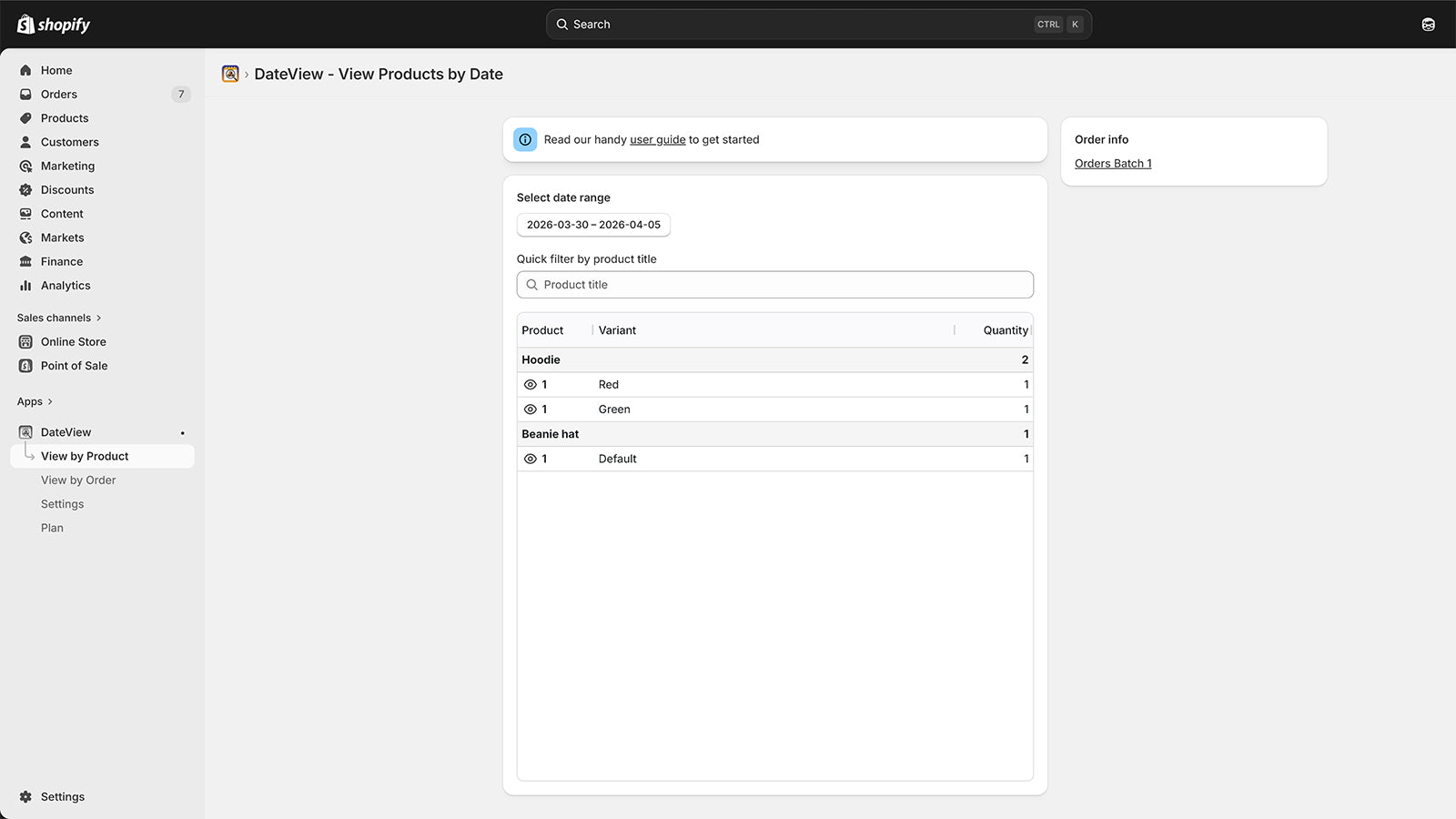
  • See exactly which products need to be prepared for any future date.
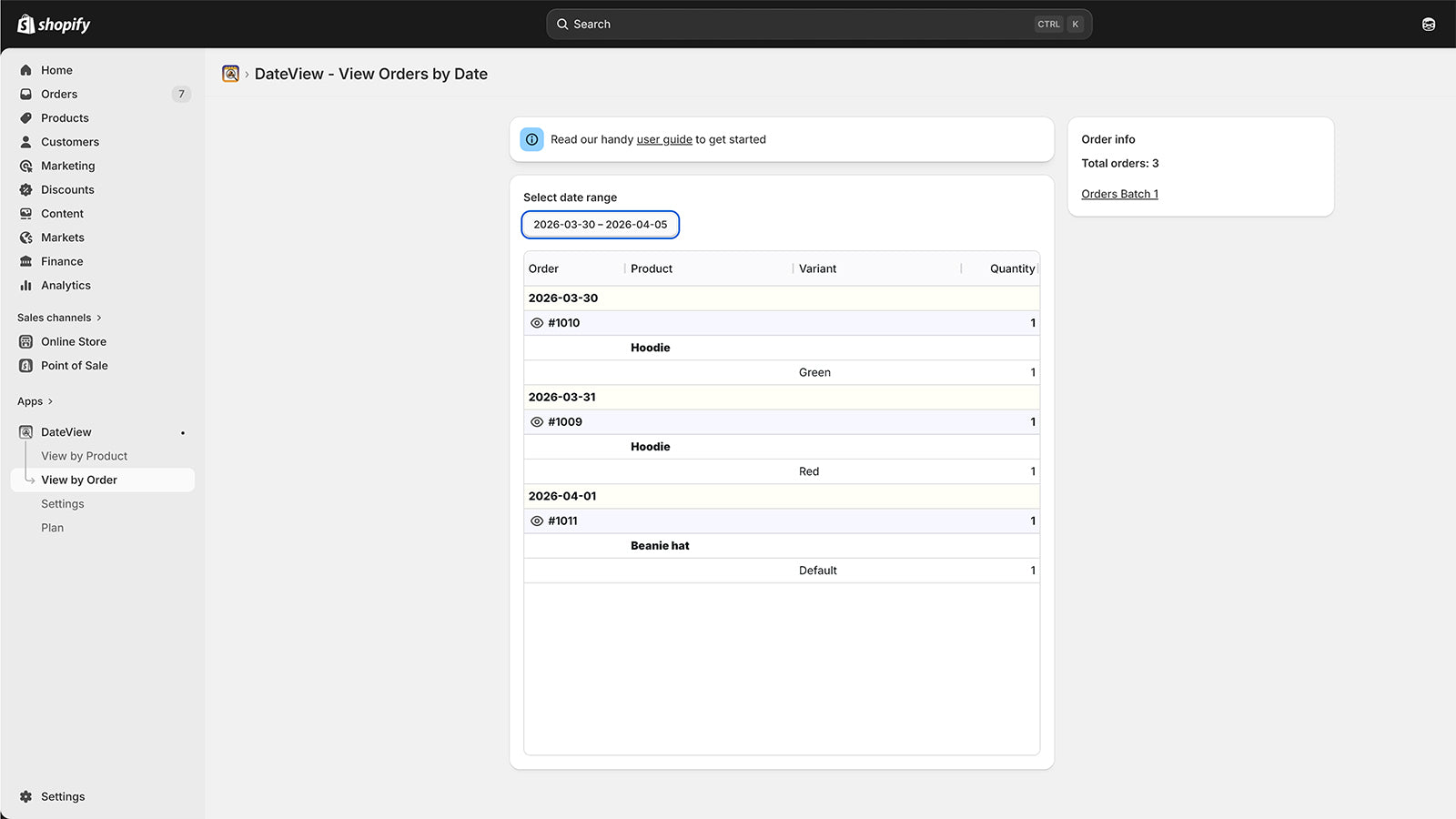
  • Get a list of all items and orders due on a future date or date range.
  • Perfect for any merchant who needs time to prep before they ship.
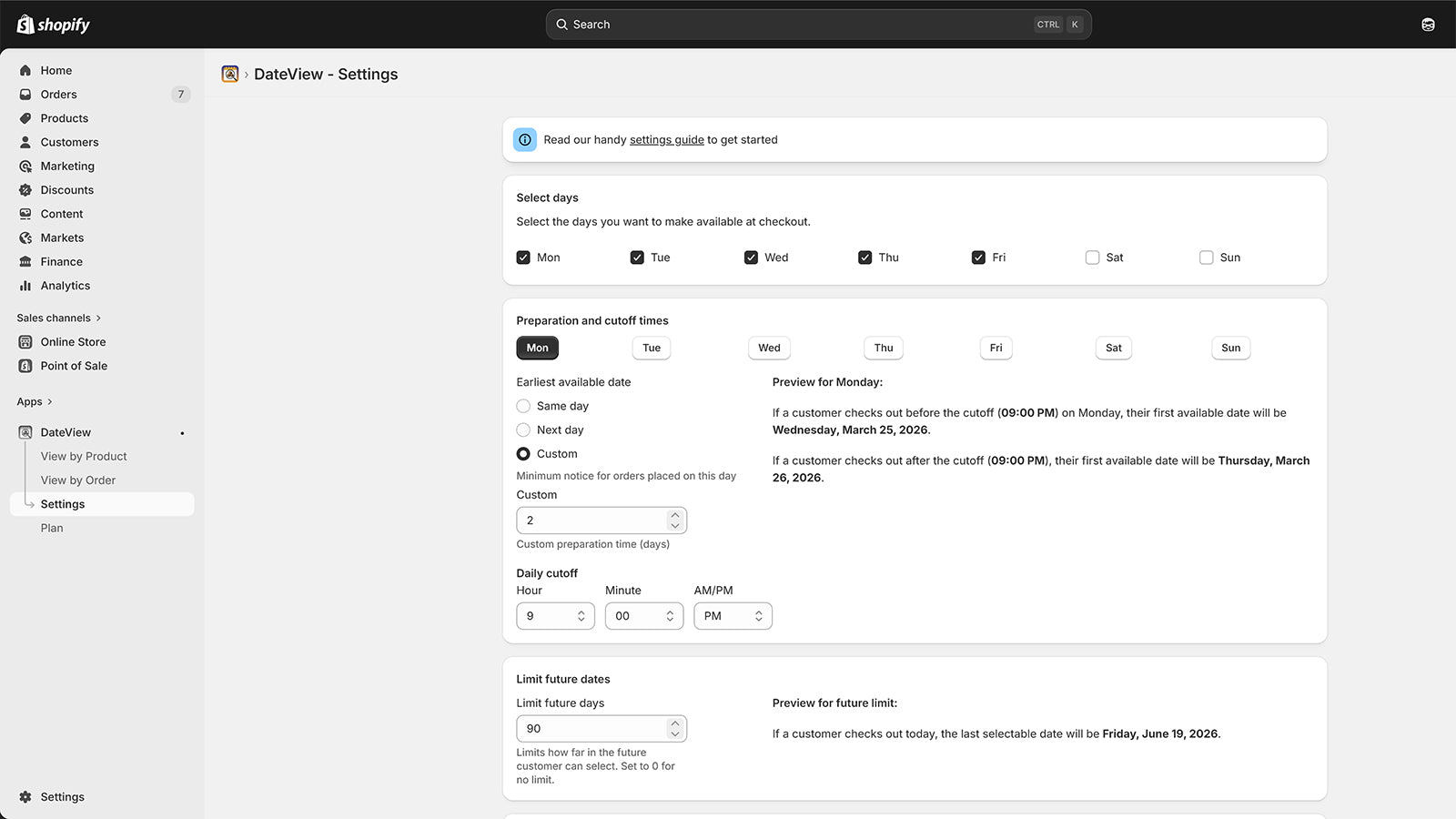
  • Fully configure your business days and cutoff times for orders.
  • Blackout days for holidays, business closures, etc, so you are in control.
View by product screen
View by order screen
Settings screen

Methodology

How to read these signals

Counts are based on Shoplist's latest available public crawl signal dated May 6, 2026.

Shoplist has not yet found reliable public storefront evidence connecting a Shopify store to this app. This does not mean the app has no users. Some apps are new, admin-only, server-side, theme-independent, or otherwise difficult to detect from public storefront signals.

Merchant rows are filtered to public brand profiles with enough public data to link safely. Full workflow, filtering, and monitoring stay behind signup.

Review, pricing, feature, screenshot, and listing-change data come from public Shopify App Store and Shoplist crawl records. Signals can change between crawls.

FAQ

Questions about DateView: Order Prep Calendar

Has Shoplist detected stores using DateView: Order Prep Calendar yet?

Shoplist has not yet found reliable public storefront evidence for DateView: Order Prep Calendar. The page tracks first merchant evidence as it appears.

What does first-adopter watch mean?

It means Shoplist is monitoring launch context, first storefront-detectable merchant evidence, pricing, and listing changes.

Can I get alerts when stores start using DateView: Order Prep Calendar?

Yes. Create a watchlist to get alerted when Shoplist finds public merchant evidence for DateView: Order Prep Calendar.

Keep watching DateView: Order Prep Calendar

Turn this public profile into a monitored app workflow for first detections, reviews, pricing, related apps, and listing-change history.

Get alerted when stores start using DateView: Order Prep Calendar