

Vibebun Image Optimizer vs Zen Image Optimizer
Two Shopify apps, side by side: detected stores, momentum, reviews, plans, listed features and who runs each. Store counts as of Oct 13, 2026 for Vibebun Image Optimizer, Oct 14, 2026 for Zen Image Optimizer.
The short answer
- Both list a free plan. Paid plans start at $9.99/month for Vibebun Image Optimizer and $9.99/month for Zen Image Optimizer.
- Vibebun Image Optimizer lists 3 features Zen Image Optimizer’s listing doesn’t mention, including AI generation, Alt text, Auto-optimization.
Head to head


Free
- · 3 concurrent optimizations
- · 50 optimizations / month
- · Rollback to original
- · Rules-based ALT text
Basic
- · 1,000 optimizations / month
- · 200 AI alt-text suggestions / month
- · 5 concurrent optimizations
- · Rollback to original
Advanced
- · 10 concurrent optimizations
- · 3,000 optimizations / month
- · 500 AI alt-text suggestions / month
- · Bulk optimize/rollback all on page
- · Rollback to original
Free
- · 30-day backups + one-click restore
- · 50 optimizations / month
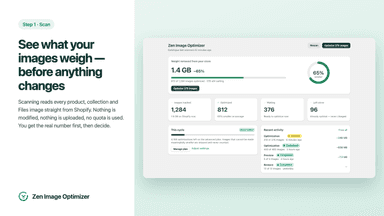
- · Catalogue scan + savings estimate
- · In-place rewrite — same image URL
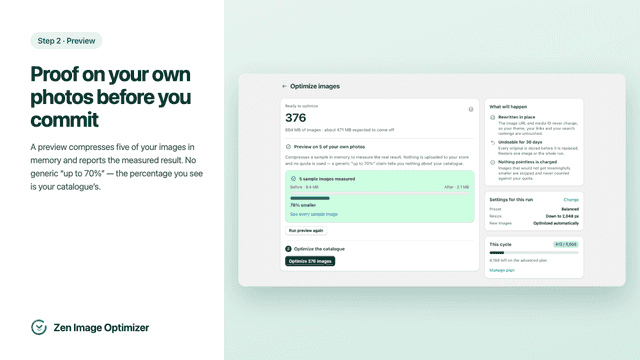
- · Preview on 5 of your own images
Starter
- · 1,500 optimizations / month
- · Bulk selection from the image list
- · Email support
- · Lossless, Balanced and Aggressive preset
- · Optional downscaling (longest-edge cap)
Advanced
- · 5,000 optimizations / month
- · Automatic mode — new and updated product
- · Everything in Starter
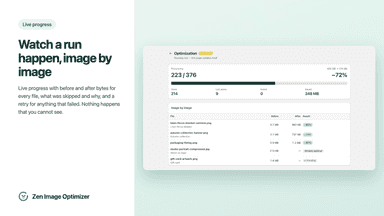
- · Run history with per-image before/after
Pro
- · 15,000 optimizations / month
- · Everything in Advanced
- · Priority support
- · Restore an entire run
Coverage counts what each App Store listing names. Every feature, checked off app by app, is in Shoplist.
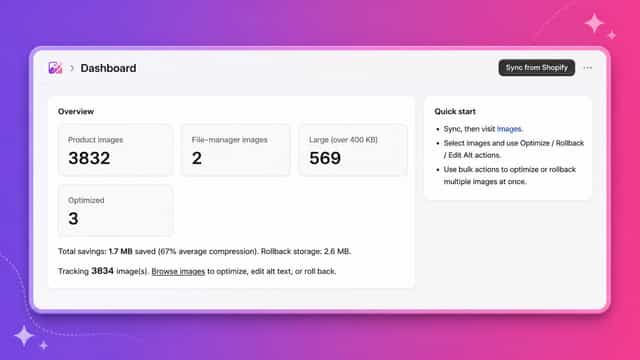
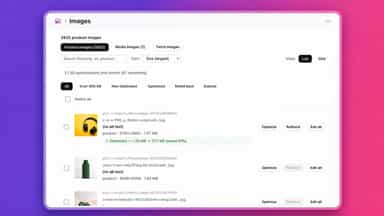
See every featureVibebun Image Optimizer reduces image file sizes directly on your Shopify store without breaking existing links or storefront layouts. The app downloads each image, compresses it using iterative quality reduction, and replaces it in place so your CDN URLs stay the same. Originals are preserved so you can roll back any optimization instantly. AI-powered alt text suggestions help improve SEO and accessibility.
Zen Image Optimizer compresses and resizes the images already in your store. Each image is rewritten in place: the media ID and the CDN URL stay the same, so themes, links and indexed pages keep working without redirects. Before a bulk run you can preview the result on a sample of your own photos — measured in memory, with nothing uploaded.
- Compress images in place so CDN URLs and storefront links stay intact
- One-click rollback to the original with configurable expiration or keep forever
- AI-powered alt text suggestions to improve SEO and store accessibility
- Bulk optimize or roll back multiple images at once with concurrent processing
- Catalogue scan — reads size of every product and Files library image, resumable,
- Savings estimate — shows what is optimizable and how much before anything runs
- Preview run — compresses 5 of your own images in memory to measure the real
- Bulk compression — JPEG, PNG and WebP with lossless, balanced or aggressive



All the numbers
Every figure, side by side
A green dot marks the app ahead on a measured figure. Estimates, gaps and apps that leave no storefront trace never take the lead.
Adoption
| Measure |  Vibebun Image Optimizer |  Zen Image Optimizer |
|---|---|---|
| Detected stores | Not published | Not published |
| Net store change, 28 days | 0 | 0 |
| Stores added, 28 days | Not enough data | Not enough data |
| Big-brand share | Not enough data | Not enough data |
| Top store categories | Not published | Not published |
| Top store countries | Not published | Not published |
Reviews
| Measure | Vibebun Image Optimizer | Zen Image Optimizer |
|---|---|---|
| App Store rating | Not published | Not published |
| App Store reviews | Not published | Not published |
| New reviews, 28 days | Not enough data | Not enough data |
| Reviewers a year or more in | Not enough data | Not enough data |
Pricing
| Measure | Vibebun Image Optimizer | Zen Image Optimizer |
|---|---|---|
| Free plan | Yes | Yes |
| Lowest paid monthly plan | $9.99/month | $9.99/month |
| Longest free trial | Not listed | 7 days |
| Plans listed | 3 | 4 |
Listing
| Measure | Vibebun Image Optimizer | Zen Image Optimizer |
|---|---|---|
| Shopify category rank | #320 | #221(ahead) |
| Shopify App Charts | Not on this week’s charts | Not on this week’s charts |
| Built for Shopify | No | No |
| Launched | May 8, 2026 | Aug 7, 2026 |
| Languages | 1 | 1 |
| Developer | Vibe Bun | ZenSoft Studio |
FAQ
Vibebun Image Optimizer and Zen Image Optimizer: common questions
- Is Vibebun Image Optimizer or Zen Image Optimizer cheaper?
- Both list a free plan. Paid plans start at $9.99/month for Vibebun Image Optimizer and $9.99/month for Zen Image Optimizer. Shoplist compares base prices only between monthly plans in the same currency; usage charges and annual plans vary, so check each plan’s limits.
- What features does each app list that the other doesn’t?
- Vibebun Image Optimizer lists 3 the others don’t mention, such as AI generation, Alt text, Auto-optimization. Zen Image Optimizer lists 1 the others don’t mention, such as Resizing. A feature missing from a listing may still be supported; this compares what each App Store listing says.
- Where does this comparison’s data come from?
- Shoplist crawls Shopify storefronts to detect which apps each store runs, and reads each app’s Shopify App Store listing for reviews, pricing, features and integrations. Store counts are as of Oct 13, 2026 for Vibebun Image Optimizer, Oct 14, 2026 for Zen Image Optimizer; estimated figures are labeled.
How Shoplist compares apps
Store counts come from Shoplist’s crawl of Shopify storefronts, which detects the apps each store runs; they are as of Oct 13, 2026 for Vibebun Image Optimizer, Oct 14, 2026 for Zen Image Optimizer. Reviews, ratings, plans, features and integrations come from each app’s Shopify App Store listing. 28-day figures are labeled when estimated, and a figure that is missing or estimated never decides who leads. Read the methodology.