Variant Table & Bulk Add vs Varviq Variant Table
Two Shopify apps, side by side: detected stores, momentum, reviews, plans, listed features and who runs each. Store counts as of Oct 23, 2026 for Variant Table & Bulk Add, Nov 13, 2026 for Varviq Variant Table.
The short answer
- Only Variant Table & Bulk Add lists a free plan. Paid plans start at $9.99/month for Variant Table & Bulk Add and $49/month for Varviq Variant Table.
- Variant Table & Bulk Add and Varviq Variant Table list the same 1 features.
Head to head

Free
- · 1 active table configuration
- · Add to Cart (bulk add up to 5 items)
- · Core 8 columns
- · Pagination & basic sorting
- · Replace variant selector position
- · Up to 5 products
Varient Table Pro
- · All table positions
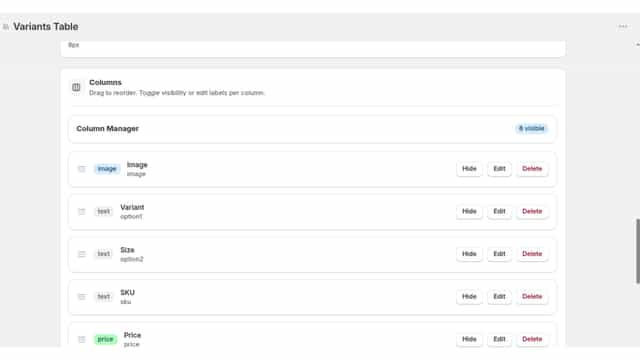
- · Full column customization
- · Full styling controls
- · Priority support
- · Product-specific configurations
- · Search, filters & grouping
Starter
- · Variant table and mobile cards
Growth
- · Starter + matrix, filters and CSV
Pro
- · Growth + compare, presets, branded print
Coverage counts what each App Store listing names. Every feature, checked off app by app, is in Shoplist.
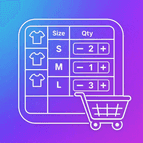
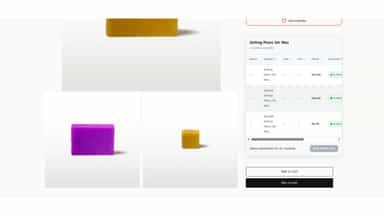
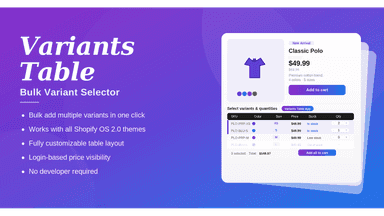
See every featureThe Variants Table app replaces your product page’s variant dropdown with a clear table. Shoppers can see sizes, colors, SKUs, prices, and stock status side by side. They enter a quantity for each variant they want and add them all to the cart with one click. You choose the columns, the styling, and which products get a table, and you don’t need to write any code.
Varviq turns product variants into a clear table or option matrix. Shoppers can review sizes, colors, materials, prices, SKU, and availability, then select a variant using your theme’s native product form. Search, filters, mobile cards, CSV export, printing, and specification views help shoppers compare options. Add the block in the theme editor. Your theme continues to handle add-to-cart and checkout.
- Bulk add multiple variants to cart in one click
- Fully customizable table layout, columns, and styling
- Displays SKU, price, stock status, and variant details
- Works with all Shopify Online Store 2.0 themes
- Show product variants in a table, matrix, or mobile cards.
- Filter options, search SKU, and identify available combinations.
- Sync selections with your theme’s native product form.
All the numbers
Every figure, side by side
A green dot marks the app ahead on a measured figure. Estimates, gaps and apps that leave no storefront trace never take the lead.
Adoption
| Measure |  Variant Table & Bulk Add | |
|---|---|---|
| Detected stores | Not published | Not published |
| Net store change, 28 days | 0 | Not enough data |
| Stores added, 28 days | Not enough data | Not enough data |
| Big-brand share | Not enough data | Not enough data |
| Top store categories | Not published | Not published |
| Top store countries | Not published | Not published |
Reviews
| Measure | Variant Table & Bulk Add | |
|---|---|---|
| App Store rating | Not published | Not published |
| App Store reviews | Not published | Not published |
| New reviews, 28 days | Not enough data | Not enough data |
| Reviewers a year or more in | Not enough data | Not enough data |
Pricing
| Measure | Variant Table & Bulk Add | |
|---|---|---|
| Free plan | Yes | Not listed |
| Lowest paid monthly plan | $9.99/month(ahead) | $49/month |
| Longest free trial | Not listed | 3 days |
| Plans listed | 2 | 3 |
Listing
| Measure | Variant Table & Bulk Add | |
|---|---|---|
| Shopify category rank | #412 | Not enough data |
| Shopify App Charts | Not on this week’s charts | Not on this week’s charts |
| Built for Shopify | No | No |
| Launched | May 5, 2026 | Nov 12, 2026 |
| Languages | 1 | 1 |
| Developer | Icreative Technologies | Varviq Variant Table |
FAQ
Variant Table & Bulk Add and Varviq Variant Table: common questions
- Is Variant Table & Bulk Add or Varviq Variant Table cheaper?
- Only Variant Table & Bulk Add lists a free plan. Paid plans start at $9.99/month for Variant Table & Bulk Add and $49/month for Varviq Variant Table. Shoplist compares base prices only between monthly plans in the same currency; usage charges and annual plans vary, so check each plan’s limits.
- Where does this comparison’s data come from?
- Shoplist crawls Shopify storefronts to detect which apps each store runs, and reads each app’s Shopify App Store listing for reviews, pricing, features and integrations. Store counts are as of Oct 23, 2026 for Variant Table & Bulk Add, Nov 13, 2026 for Varviq Variant Table; estimated figures are labeled.
How Shoplist compares apps
Store counts come from Shoplist’s crawl of Shopify storefronts, which detects the apps each store runs; they are as of Oct 23, 2026 for Variant Table & Bulk Add, Nov 13, 2026 for Varviq Variant Table. Reviews, ratings, plans, features and integrations come from each app’s Shopify App Store listing. 28-day figures are labeled when estimated, and a figure that is missing or estimated never decides who leads. Read the methodology.