

Try You : AI Virtual Try On vs Tryr ‑ Virtual TryOn Videos
Two Shopify apps, side by side: detected stores, momentum, reviews, plans, listed features and who runs each. Store counts as of Nov 5, 2026 for Try You, Oct 13, 2026 for Tryr.
The short answer
- Only Tryr lists a free plan.
- Try You lists 8 features Tryr’s listing doesn’t mention, including AI-powered, Conditional logic, Custom branding.
Head to head


Momentum
New reviews each month
Review pace is the clearest public read on how fast an app is winning new merchants.
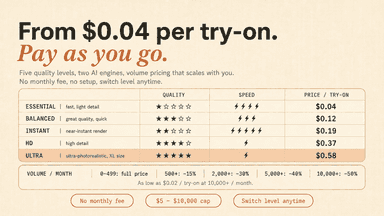
Pay as you go
- · 10 free credits on install
- · Adjustable monthly spend cap
- · Failed try-ons never billed
- · No monthly subscription fee
- · Pay per successful try-on
- · Volume discount down to $0.02
Forever Free
Starter
Growth
Pro
Coverage counts what each App Store listing names. Every feature, checked off app by app, is in Shoplist.
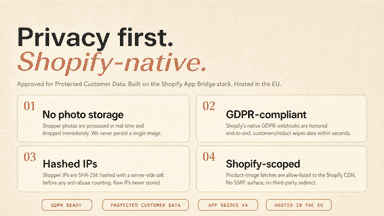
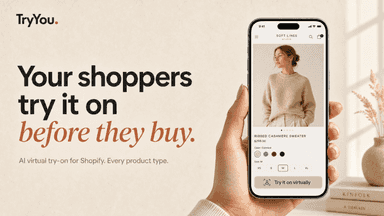
See every featureTry You adds an AI try-on button to your product pages. Shoppers upload a photo and see themselves wearing the item in seconds, powered by Google Gemini. Install the App Block from your theme editor in one click, no code required. An adjustable spend cap gives you full budget control, and failed try-ons are never counted. Photos are processed in real time and never stored, fully GDPR aligned.
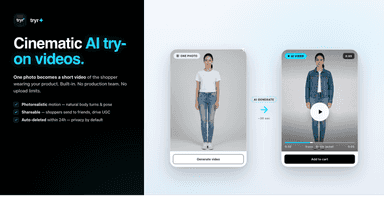
Tryr lets shoppers see how your products look on themselves, instantly. They upload one photo and our AI returns a photorealistic try-on in under 60 seconds inside the product page. Higher confidence, fewer returns, more conversions. Optional cinematic AI try-on videos help hesitant buyers commit.
- AI-generated try-on from a selfie, powered by Google Gemini
- App Block install: no code, live in 1 click from the theme editor
- Volume-based tier discounts apply automatically as traffic scales
- Hard spend cap stops billing the moment your limit is reached
- Realistic AI try-on in seconds for any garment, any body type
- AI try-on videos: cinematic 8-second clips
- Privacy-first by design, shopper photos are never stored or shared
- Real-time analytics: try-ons, ATC, attributed orders, revenue per product




All the numbers
Every figure, side by side
A green dot marks the app ahead on a measured figure. Estimates, gaps and apps that leave no storefront trace never take the lead.
Adoption
| Measure |  Try You |  Tryr |
|---|---|---|
| Detected stores | Not published | Not published |
| Net store change, 28 days | 0 | 0 |
| Stores added, 28 days | Not enough data | Not enough data |
| Big-brand share | Not enough data | Not enough data |
| Top store categories | Not published | Not published |
| Top store countries | Not published | Not published |
Reviews
| Measure | Try You | Tryr |
|---|---|---|
| App Store rating | 5.0 ★ | Not published |
| App Store reviews | 5 | Not published |
| New reviews, 28 days | Not enough data | Not enough data |
| Reviewers a year or more in | Not enough data | Not enough data |
FAQ
Try You and Tryr: common questions
- Is Try You or Tryr cheaper?
- Only Tryr lists a free plan. Shoplist compares base prices only between monthly plans in the same currency; usage charges and annual plans vary, so check each plan’s limits.
- What features does each app list that the other doesn’t?
- Try You lists 8 the others don’t mention, such as AI-powered, Conditional logic, Custom branding, File upload. Tryr lists 2 the others don’t mention, such as Mobile responsive, Product page. A feature missing from a listing may still be supported; this compares what each App Store listing says.
- Where does this comparison’s data come from?
- Shoplist crawls Shopify storefronts to detect which apps each store runs, and reads each app’s Shopify App Store listing for reviews, pricing, features and integrations. Store counts are as of Nov 5, 2026 for Try You, Oct 13, 2026 for Tryr; estimated figures are labeled.
How Shoplist compares apps
Store counts come from Shoplist’s crawl of Shopify storefronts, which detects the apps each store runs; they are as of Nov 5, 2026 for Try You, Oct 13, 2026 for Tryr. Reviews, ratings, plans, features and integrations come from each app’s Shopify App Store listing. 28-day figures are labeled when estimated, and a figure that is missing or estimated never decides who leads. Read the methodology.