
Try It On ‑ AI Outfit vs Tryly
Two Shopify apps, side by side: detected stores, momentum, reviews, plans, listed features and who runs each. Store counts as of Oct 14, 2026.
The short answer
- Paid plans start at $25/month for Try It On and $12.97/month for Tryly.
- Tryly lists 6 features Try It On’s listing doesn’t mention, including Color, Custom branding, File upload.
Head to head


Free
- · 5 free try-on credits
- · Full customization options
- · Quick Try-On feature
- · Smart rate limiting controls
- · Try-On history with gallery
Starter
- · 150 credits included monthly
- · Full customization options
- · Quick Try-On feature
- · Smart rate limiting controls
- · Try-On history with gallery
Max
- · 400 credits included monthly
- · Full customization options
- · Quick Try-On feature
- · Smart rate limiting controls
- · Try-On history with gallery
Lite
- · 1-minute setup
- · 120 try-ons per month
- · 6 designer templates
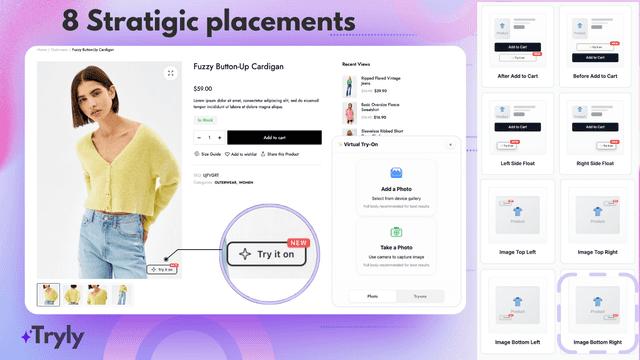
- · 8+ placement options
- · Auto-detects all products
- · Email support
Plus
- · 300 try-ons per month
- · Auto-detects all products
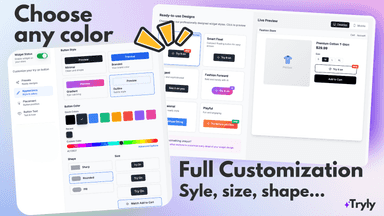
- · Button shapes & sizes
- · Display on UNLIMITED products
- · Email support
- · Full style customization
Pro (Most Popular)
- · 700 try-ons per month
- · Auto-detects all products
- · Badge system (NEW, AI, FREE...)
- · Choose any badge or button color
- · Custom badge text
- · Display on UNLIMITED products
Studio
- · 1,600 try-ons per month
- · All Pro features
- · Auto-detects all products
- · Beta feature access
- · Custom implementation
- · Dedicated account manager
Coverage counts what each App Store listing names. Every feature, checked off app by app, is in Shoplist.
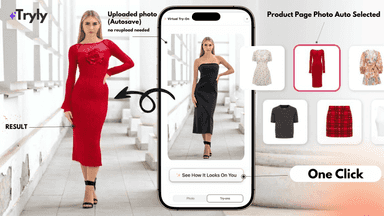
See every featureTry It On lets your customers upload a photo and instantly see how your products look on them using AI visualization, giving them a realistic preview in seconds. Customers can easily download their try-ons and view their try-on history. Photos are processed in real-time and locally stored avoiding storage on our severs.
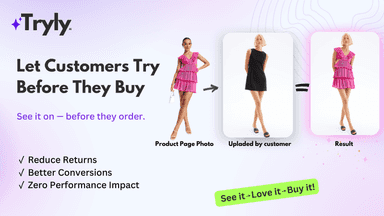
Tryly AI brings cutting-edge virtual try-on technology to your store through seamless integration. Our AI-powered solution helps fashion retailers reduce returns, improve customer satisfaction, helps with conversions by enabling shoppers to see how products look on them before purchasing.
- AI-powered virtual try-on that shows customers how clothes look on them
- Privacy-first design with no server storage and real-time image processing
- Easy theme integration and language translations built-in and try-on history
- Ai technology delivers realistic, quality clothing visualization in seconds
- Customer uploads image only once, modern familiar try-on preview, smart sharing
- Customizable widget that matches your brand perfectly or helps you stand out
- Mobile-optimized experience with responsive design for all devices


All the numbers
Every figure, side by side
A green dot marks the app ahead on a measured figure. Estimates, gaps and apps that leave no storefront trace never take the lead.
Adoption
| Measure |  Try It On |  Tryly |
|---|---|---|
| Detected stores | Not published | Not published |
| Net store change, 28 days | 0 | 0 |
| Stores added, 28 days | Not enough data | Not enough data |
| Big-brand share | Not enough data | Not enough data |
| Top store categories | Not published | Not published |
| Top store countries | Not published | Not published |
Reviews
| Measure | Try It On | Tryly |
|---|---|---|
| App Store rating | Not published | Not published |
| App Store reviews | Not published | Not published |
| New reviews, 28 days | Not enough data | Not enough data |
| Reviewers a year or more in | Not enough data | Not enough data |
FAQ
Try It On and Tryly: common questions
- Is Try It On or Tryly cheaper?
- Paid plans start at $25/month for Try It On and $12.97/month for Tryly. Shoplist compares base prices only between monthly plans in the same currency; usage charges and annual plans vary, so check each plan’s limits.
- What features does each app list that the other doesn’t?
- Tryly lists 6 the others don’t mention, such as Color, Custom branding, File upload, Images. A feature missing from a listing may still be supported; this compares what each App Store listing says.
- Where does this comparison’s data come from?
- Shoplist crawls Shopify storefronts to detect which apps each store runs, and reads each app’s Shopify App Store listing for reviews, pricing, features and integrations. Store counts are as of Oct 14, 2026; estimated figures are labeled.
How Shoplist compares apps
Store counts come from Shoplist’s crawl of Shopify storefronts, which detects the apps each store runs; they are as of Oct 14, 2026. Reviews, ratings, plans, features and integrations come from each app’s Shopify App Store listing. 28-day figures are labeled when estimated, and a figure that is missing or estimated never decides who leads. Read the methodology.