

Timey: Actions on Time vs Triggered: Power‑up workflows
Two Shopify apps, side by side: detected stores, momentum, reviews, plans, listed features and who runs each. Store counts as of Oct 13, 2026.
The short answer
- On the Shopify App Store: Timey 3.0 from 2 reviews and Triggered 5.0 from 1 reviews.
- Both list a free plan. Paid plans start at $2.99/month for Timey and $16/month for Triggered.
- Triggered lists 6 features Timey’s listing doesn’t mention, including Conditional logic, Custom triggers, Custom workflows.
Head to head


Automate your scheduled actions
Auto tag orders & customers, Auto edit orders & Boost loyalty
Momentum
New reviews each month
Review pace is the clearest public read on how fast an app is winning new merchants.
Free
- · Adjust product pricing of up to 10 product variants on time
- · One timer
- · Switch status of up to 10 products on time
Premium
- · Change theme on time
- · Email notifications
- · Support for collections and more than 10 products
- · Trigger Shopify Flow Workflow
- · Unlimited timers
Free
- · 2 active rules
- · 20 triggers per month
The Groove
- · 200 triggers per month
- · Up to 10 active rules
The Goods
- · 2,000 triggers per month
- · Up to 100 active rules
The Nuts
- · 100,000 triggers per month
- · Unlimited active rules
Coverage counts what each App Store listing names. Every feature, checked off app by app, is in Shoplist.
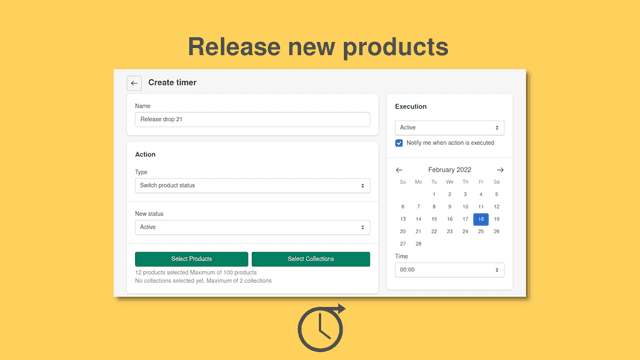
See every featureAs a merchant you can schedule timers that execute actions at predefined time. Currently following actions are supported: * Switch the status of products. This is useful, if you want to publish or archive products on time. * Change the Theme of the Online Store * Adjust Product prices, either to a fixed amount or by a certain absolute amount or percentage. * Trigger a Shopify Flow Workflow (requires Shopify Plus)
Triggered will take your customer engagement and retention to the next level with advanced marketing tools to increase your conversion rate to improve your customer life-time value, and drive brand loyalty. Triggered lets you create conditional rules to trigger a Shopify Flow, tag customers and orders, or modify an order’s line items.
- Timed Product prices and statuses
- Schedule a Shopify Flow Workflow
- Change the Theme of the Online Store on time
- Create opt-in URLs for customer emails, post checkout or customer account.
- Trigger Shopify Flow workflows to create opt-in or targeted processes.
- Trigger when specific customers or groups of targeted customers place an order.


All the numbers
Every figure, side by side
A green dot marks the app ahead on a measured figure. Estimates, gaps and apps that leave no storefront trace never take the lead.
Adoption
| Measure |  Timey |  Triggered |
|---|---|---|
| Detected stores | Not published | Not published |
| Net store change, 28 days | 0 | 0 |
| Stores added, 28 days | Not enough data | Not enough data |
| Big-brand share | Not enough data | Not enough data |
| Top store categories | Not published | Not published |
| Top store countries | Not published | Not published |
Reviews
| Measure | Timey | Triggered |
|---|---|---|
| App Store rating | 3.0 ★ | 5.0 ★(ahead) |
| App Store reviews | 2(ahead) | 1 |
| New reviews, 28 days | 0 | 0 |
| Reviewers a year or more in | Not enough data | Not enough data |
FAQ
Timey and Triggered: common questions
- Is Timey or Triggered cheaper?
- Both list a free plan. Paid plans start at $2.99/month for Timey and $16/month for Triggered. Shoplist compares base prices only between monthly plans in the same currency; usage charges and annual plans vary, so check each plan’s limits.
- Which has better reviews, Timey or Triggered?
- On the Shopify App Store: Timey 3.0 from 2 reviews and Triggered 5.0 from 1 reviews.
- What features does each app list that the other doesn’t?
- Timey lists 1 the others don’t mention, such as Time-based. Triggered lists 6 the others don’t mention, such as Conditional logic, Custom triggers, Custom workflows, Customer tags. A feature missing from a listing may still be supported; this compares what each App Store listing says.
- Where does this comparison’s data come from?
- Shoplist crawls Shopify storefronts to detect which apps each store runs, and reads each app’s Shopify App Store listing for reviews, pricing, features and integrations. Store counts are as of Oct 13, 2026; estimated figures are labeled.
How Shoplist compares apps
Store counts come from Shoplist’s crawl of Shopify storefronts, which detects the apps each store runs; they are as of Oct 13, 2026. Reviews, ratings, plans, features and integrations come from each app’s Shopify App Store listing. 28-day figures are labeled when estimated, and a figure that is missing or estimated never decides who leads. Read the methodology.