Tab‑Back Grabber vs TabBadge: Cart Favicon Counter
Two Shopify apps, side by side: detected stores, momentum, reviews, plans, listed features and who runs each. Store counts as of Oct 13, 2026 for Tab‑Back Grabber, Feb 25, 2026 for TabBadge.
The short answer
- Tab‑Back Grabber lists 1 features TabBadge’s listing doesn’t mention, including Exit pop-ups.
Head to head


Standard
Coverage counts what each App Store listing names. Every feature, checked off app by app, is in Shoplist.
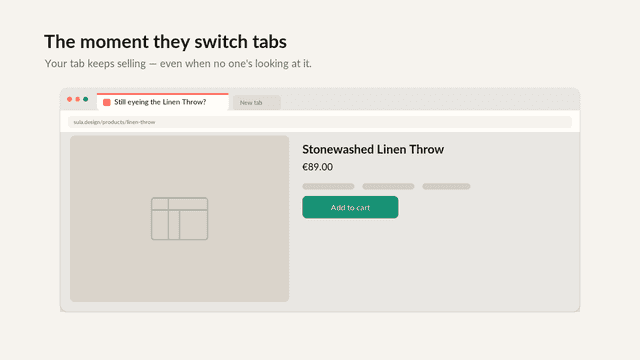
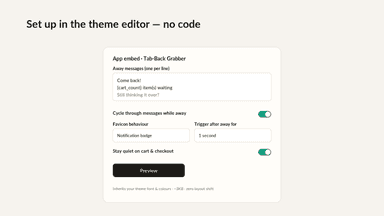
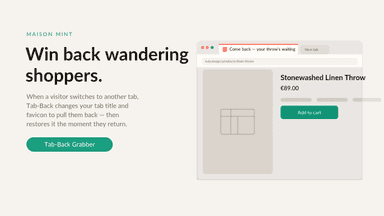
See every featureShoppers open your store, then drift to another tab and forget you're there. Tab-Back Grabber calls them back: when a visitor switches away, it changes your tab title to a message you choose and can turn the favicon into a notification badge. When they return, the title and favicon are restored. Personalise messages with cart-count, product and shop-name tokens, rotate them, add a delay, or show once per visit.
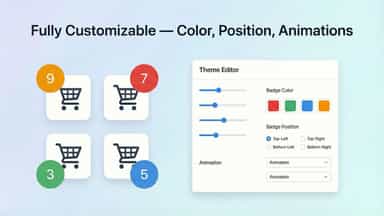
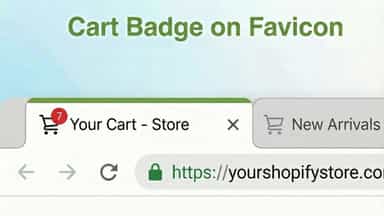
TabBadge adds a notification-style badge to your store's browser tab favicon showing the number of items in the cart. The badge appears instantly when items are added, with a smooth bump animation. It updates in real time as items are added or removed. When customers switch tabs, the badge blinks to remind them about items in their cart. Customize badge color, position (4 corners), blink and animation toggles. Free.
- Dynamic tab title switches to your message when a visitor leaves the tab
- Favicon notification badge, cart-count badge, custom icon, or gentle flash
- Cart count, product title and shop name tokens in your messages
- Cart item count badge displayed on the browser tab favicon
- Real-time updates when items are added or removed from cart
- Badge blinks on inactive tabs to remind about the cart
- Smooth bump animation when new items are added to cart



All the numbers
Every figure, side by side
A green dot marks the app ahead on a measured figure. Estimates, gaps and apps that leave no storefront trace never take the lead.
Adoption
| Measure |  Tab‑Back Grabber |  TabBadge |
|---|---|---|
| Detected stores | Not published | Not published |
| Net store change, 28 days | 0 | 0 |
| Stores added, 28 days | Not enough data | Not enough data |
| Big-brand share | Not enough data | Not enough data |
| Top store categories | Not published | Not published |
| Top store countries | Not published | Not published |
Reviews
| Measure | Tab‑Back Grabber | TabBadge |
|---|---|---|
| App Store rating | Not published | Not published |
| App Store reviews | Not published | Not published |
| New reviews, 28 days | Not enough data | Not enough data |
| Reviewers a year or more in | Not enough data | Not enough data |
Pricing
| Measure | Tab‑Back Grabber | TabBadge |
|---|---|---|
| Free plan | Not listed | Not listed |
| Lowest paid monthly plan | $0.50/month | No monthly plan listed |
| Longest free trial | Not listed | Not listed |
| Plans listed | 1 | Not published |
Listing
| Measure | Tab‑Back Grabber | TabBadge |
|---|---|---|
| Shopify category rank | #346 | #236(ahead) |
| Shopify App Charts | Not on this week’s charts | Not on this week’s charts |
| Built for Shopify | No | No |
| Launched | Jun 30, 2026 | Feb 24, 2026 |
| Languages | 1 | 1 |
| Developer | MINTAGENCY OÜ | ElectricBlaze |
FAQ
Tab‑Back Grabber and TabBadge: common questions
- What features does each app list that the other doesn’t?
- Tab‑Back Grabber lists 1 the others don’t mention, such as Exit pop-ups. A feature missing from a listing may still be supported; this compares what each App Store listing says.
- Where does this comparison’s data come from?
- Shoplist crawls Shopify storefronts to detect which apps each store runs, and reads each app’s Shopify App Store listing for reviews, pricing, features and integrations. Store counts are as of Oct 13, 2026 for Tab‑Back Grabber, Feb 25, 2026 for TabBadge; estimated figures are labeled.
How Shoplist compares apps
Store counts come from Shoplist’s crawl of Shopify storefronts, which detects the apps each store runs; they are as of Oct 13, 2026 for Tab‑Back Grabber, Feb 25, 2026 for TabBadge. Reviews, ratings, plans, features and integrations come from each app’s Shopify App Store listing. 28-day figures are labeled when estimated, and a figure that is missing or estimated never decides who leads. Read the methodology.