

Subscriber Reports vs SubsExport: Unified Exports
Two Shopify apps, side by side: detected stores, momentum, reviews, plans, listed features and who runs each. Store counts as of Oct 19, 2026 for Subscriber Reports, Oct 13, 2026 for SubsExport.
The short answer
- Only SubsExport lists a free plan. Paid plans start at $39/month for Subscriber Reports and $19/month for SubsExport.
- SubsExport lists 10 features Subscriber Reports’s listing doesn’t mention, including Cohort analysis, Custom reports, Data export.
Head to head


Starter
- · CSV export of subscribers and logs
- · Consent history with source and date
- · Email and SMS consent reporting
- · Up to 5,000 customer records
Growth
- · 5,000 to 50,000 customer records
- · CSV export of subscribers and logs
- · Consent history with source and date
- · Email and SMS consent reporting
Professional
- · 50,000 to 200,000 customer records
- · CSV export of subscribers and logs
- · Consent history with source and date
- · Email and SMS consent reporting
Free
- · 5 exports per month
- · Basic dashboard
- · CSV export
- · Connect any subscription app
- · Export history
- · Search, sort & filter
Growth
- · 50 exports per month
- · At-risk subscriber alerts
- · CSV, Excel & Google Sheets
- · Cohort retention analytics
- · Full subscriber dashboard
- · Save up to 10 templates
Pro
- · At-risk subscriber alerts
- · CSV, Excel & Google Sheets
- · Cohort retention analytics
- · Email + Slack scheduled exports
- · Priority email support
- · Unlimited exports
Coverage counts what each App Store listing names. Every feature, checked off app by app, is in Shoplist.
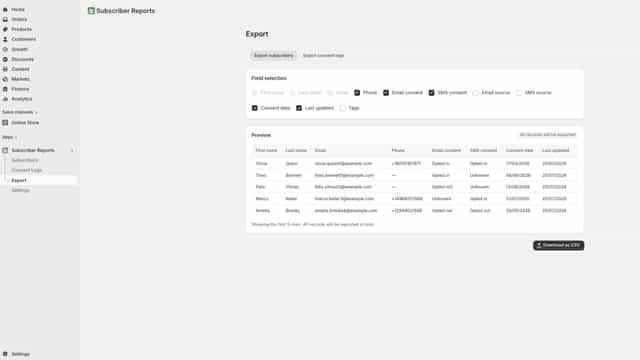
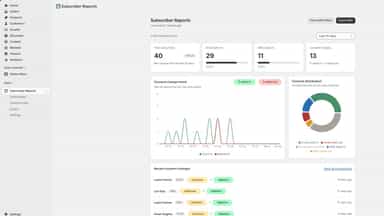
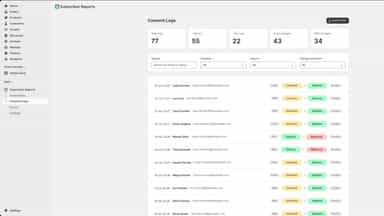
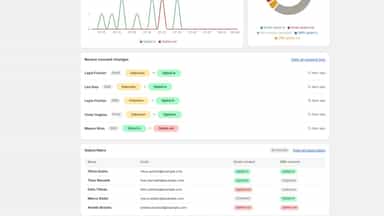
See every featureSubscriber Reports gives you one dashboard for your customers' email and SMS marketing consent. Subscribers sync from Shopify automatically as customers are created, updated, or deleted. See opt-in and opt-out rates, 90-day approval-vs-rejection trends, and a full audit log of every consent change.
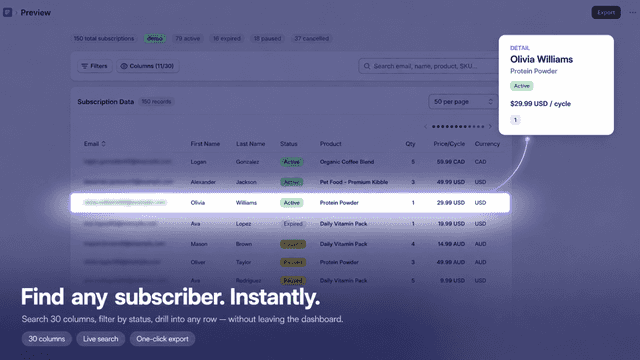
Subscription stores often use multiple apps like ReCharge, Skio, Seal, Loop, or PayWhirl. Each has its own admin and export format, so getting a full subscriber list means logging in to several places. SubsExport connects to your subscription platforms and produces a single CSV, Excel, or Google Sheets file. Run exports on demand, save reusable templates, or schedule recurring deliveries by email or Slack.
- Dashboard of email and SMS marketing opt-in rates and consent trends
- Search subscribers and view each customer's full consent history
- Audit log of every consent change by channel, source, and direction
- Unified exports from ReCharge, Skio, Seal, Loop, and PayWhirl
- Export to CSV, Excel, or Google Sheets in one click
- Schedule recurring exports delivered by email or Slack
- Save reusable export templates for one-click re-runs


All the numbers
Every figure, side by side
A green dot marks the app ahead on a measured figure. Estimates, gaps and apps that leave no storefront trace never take the lead.
Adoption
| Measure |  Subscriber Reports |  SubsExport |
|---|---|---|
| Detected stores | Not published | Not published |
| Net store change, 28 days | 0 | 0 |
| Stores added, 28 days | Not enough data | Not enough data |
| Big-brand share | Not enough data | Not enough data |
| Top store categories | Not published | Not published |
| Top store countries | Not published | Not published |
Reviews
| Measure | Subscriber Reports | SubsExport |
|---|---|---|
| App Store rating | Not published | Not published |
| App Store reviews | Not published | Not published |
| New reviews, 28 days | Not enough data | Not enough data |
| Reviewers a year or more in | Not enough data | Not enough data |
Pricing
| Measure | Subscriber Reports | SubsExport |
|---|---|---|
| Free plan | Not listed | Yes |
| Lowest paid monthly plan | $39/month | $19/month(ahead) |
| Longest free trial | Not listed | Not listed |
| Plans listed | 3 | 3 |
Listing
| Measure | Subscriber Reports | SubsExport |
|---|---|---|
| Shopify category rank | #999(ahead) | #1126 |
| Shopify App Charts | Not on this week’s charts | Not on this week’s charts |
| Built for Shopify | No | No |
| Launched | Jul 29, 2026 | Jun 1, 2026 |
| Languages | 1 | 1 |
| Developer | matevise | Add One Plugins |
FAQ
Subscriber Reports and SubsExport: common questions
- Is Subscriber Reports or SubsExport cheaper?
- Only SubsExport lists a free plan. Paid plans start at $39/month for Subscriber Reports and $19/month for SubsExport. Shoplist compares base prices only between monthly plans in the same currency; usage charges and annual plans vary, so check each plan’s limits.
- What features does each app list that the other doesn’t?
- Subscriber Reports lists 1 the others don’t mention, such as Activity tracking. SubsExport lists 10 the others don’t mention, such as Cohort analysis, Custom reports, Data export, GDPR compliance. A feature missing from a listing may still be supported; this compares what each App Store listing says.
- Where does this comparison’s data come from?
- Shoplist crawls Shopify storefronts to detect which apps each store runs, and reads each app’s Shopify App Store listing for reviews, pricing, features and integrations. Store counts are as of Oct 19, 2026 for Subscriber Reports, Oct 13, 2026 for SubsExport; estimated figures are labeled.
How Shoplist compares apps
Store counts come from Shoplist’s crawl of Shopify storefronts, which detects the apps each store runs; they are as of Oct 19, 2026 for Subscriber Reports, Oct 13, 2026 for SubsExport. Reviews, ratings, plans, features and integrations come from each app’s Shopify App Store listing. 28-day figures are labeled when estimated, and a figure that is missing or estimated never decides who leads. Read the methodology.