

StockSavvy Barcode Scanning vs StockSnap
Two Shopify apps, side by side: detected stores, momentum, reviews, plans, listed features and who runs each. Store counts as of Oct 13, 2026 for StockSavvy Barcode Scanning, Oct 28, 2026 for StockSnap.
The short answer
- On the Shopify App Store: StockSavvy Barcode Scanning 5.0 from 12 reviews and StockSnap 5.0 from 1 reviews.
- Paid plans start at $9/month for StockSavvy Barcode Scanning and $9/month for StockSnap.
- StockSnap lists 3 features StockSavvy Barcode Scanning’s listing doesn’t mention, including Bulk edit, CSV import and export, Inventory.
Head to head


Barcode scanning and purchase orders to manage inventory
Momentum
New reviews each month
Review pace is the clearest public read on how fast an app is winning new merchants.
Lite Plan
- · 20 purchase orders per month
- · Limited to inventory < 8k items
- · Only allows 1 location
- · Scan and update 500 SKUs per count
- · Unlimited barcode label printing
- · Unlimited inventory counts
Medium Plan
- · 3 locations
- · 50 purchase orders per month
- · Full and partial receiving
- · Scan and update 1000 SKUs per count
- · Unlimited barcode label printing
- · Unlimited inventory counts
Plus Plan
- · 100 purchase orders per month
- · 5 locations (Premium Plan for > 5)
- · Full and partial receiving
- · Scan and update 1000 SKUs per count
- · Unlimited barcode label printing
- · Unlimited inventory counts
One Month Pass
- · Great for annual physical inventory
- · Scan unlimited items per count
- · See total inventory value
- · Works for 30 days, not recurring charge
Early Founder
- · Store reports for 90 Days
- · Unlimited counts and transfers
- · Unlimited locations
- · Unlimited users / staff members
- · Up to 2000 SKU's per count
Coverage counts what each App Store listing names. Every feature, checked off app by app, is in Shoplist.
See every featureStockSavvy is a full-featured inventory management app. Run sales history reports/forecasts and create purchase orders directly from forecasts, receive shipments and print/generate barcodes during receiving, perform stock takes and transfers to keep multi-location inventory accurate. Get low stock alerts before you run out. Gain valuable insights with inventory valuation history and various reports.
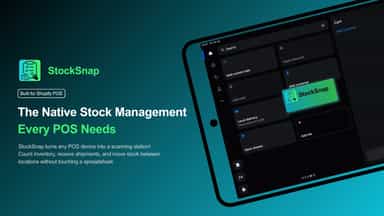
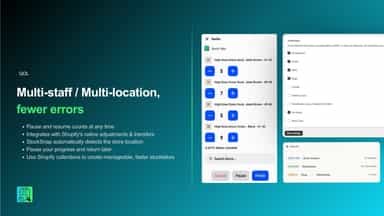
Retail staff often leave Shopify POS to count inventory or log incoming stock, using spreadsheets or separate tools that can fall out of sync with actual inventory records. This app keeps that work inside POS. Staff pick a collection and count items using a barcode scanner, the POS built-in camera, or manual entry, then apply the results directly to Shopify inventory.
- Scan & update quantities in 1 shot, works with all scanners and beeps on errors
- See inventory worth, what inventory is low and needs reordering, see top sellers
- Compare the scanned items with your full inventory. See what barcodes are wrong.
- Efficient purchase order and receiving flow, generate barcodes and print labels.
- Allow POS staff to complete stock takes directly in the POS system.
- Easily scan new/incoming inventory at each store location.
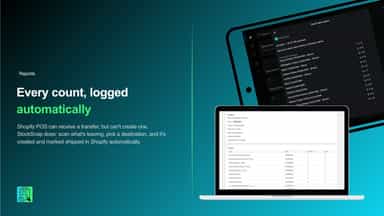
- Automatically keeps a recorded history of all stock adjustments
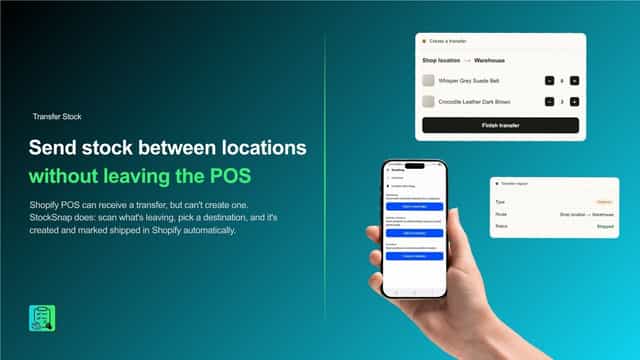
- Create an inventory transfer directly in the POS system


All the numbers
Every figure, side by side
A green dot marks the app ahead on a measured figure. Estimates, gaps and apps that leave no storefront trace never take the lead.
Adoption
| Measure |  StockSavvy Barcode Scanning |  StockSnap |
|---|---|---|
| Detected stores | Not published | Not published |
| Net store change, 28 days | 0 | 0 |
| Stores added, 28 days | Not enough data | Not enough data |
| Big-brand share | Not enough data | Not enough data |
| Top store categories | Not published | Not published |
| Top store countries | Not published | Not published |
Reviews
| Measure | StockSavvy Barcode Scanning | StockSnap |
|---|---|---|
| App Store rating | 5.0 ★ | 5.0 ★ |
| App Store reviews | 12(ahead) | 1 |
| New reviews, 28 days | 0 | Not enough data |
| Reviewers a year or more in | Not enough data | Not enough data |
Pricing
| Measure | StockSavvy Barcode Scanning | StockSnap |
|---|---|---|
| Free plan | Not listed | Not listed |
| Lowest paid monthly plan | $9/month | $9/month |
| Longest free trial | 14 days | 14 days |
| Plans listed | 4 | 1 |
Listing
| Measure | StockSavvy Barcode Scanning | StockSnap |
|---|---|---|
| Shopify category rank | #94 | #266 |
| Shopify App Charts | Not on this week’s charts | Not on this week’s charts |
| Built for Shopify | No | No |
| Launched | Jul 25, 2016 | Aug 18, 2026 |
| Languages | 1 | 1 |
| Developer | Savvison, LLC | Visionaryart-Tech |
FAQ
StockSavvy Barcode Scanning and StockSnap: common questions
- Is StockSavvy Barcode Scanning or StockSnap cheaper?
- Paid plans start at $9/month for StockSavvy Barcode Scanning and $9/month for StockSnap. Shoplist compares base prices only between monthly plans in the same currency; usage charges and annual plans vary, so check each plan’s limits.
- Which has better reviews, StockSavvy Barcode Scanning or StockSnap?
- On the Shopify App Store: StockSavvy Barcode Scanning 5.0 from 12 reviews and StockSnap 5.0 from 1 reviews.
- What features does each app list that the other doesn’t?
- StockSnap lists 3 the others don’t mention, such as Bulk edit, CSV import and export, Inventory. A feature missing from a listing may still be supported; this compares what each App Store listing says.
- Where does this comparison’s data come from?
- Shoplist crawls Shopify storefronts to detect which apps each store runs, and reads each app’s Shopify App Store listing for reviews, pricing, features and integrations. Store counts are as of Oct 13, 2026 for StockSavvy Barcode Scanning, Oct 28, 2026 for StockSnap; estimated figures are labeled.
How Shoplist compares apps
Store counts come from Shoplist’s crawl of Shopify storefronts, which detects the apps each store runs; they are as of Oct 13, 2026 for StockSavvy Barcode Scanning, Oct 28, 2026 for StockSnap. Reviews, ratings, plans, features and integrations come from each app’s Shopify App Store listing. 28-day figures are labeled when estimated, and a figure that is missing or estimated never decides who leads. Read the methodology.