StockNest ‑ Inventory Alerts vs Stockwatch Low Stock Alerts
Two Shopify apps, side by side: detected stores, momentum, reviews, plans, listed features and who runs each. Store counts as of Nov 6, 2026 for StockNest, Sep 16, 2026 for Stockwatch Low Stock Alerts.
The short answer
- Only StockNest lists a free plan.
- StockNest lists 11 features Stockwatch Low Stock Alerts’s listing doesn’t mention, including Email notifications, Forecasting, Import and export.
Head to head

Free
- · 500 stock adjustments per month
- · Back-in-stock notices on recovery
- · Bulk stock adjustments, 50 records/run
- · Instant alerts or a daily/weekly digest
- · Low-stock and out-of-stock email alerts
- · Preview, live progress, one-click undo
Starter
- · 10,000 stock adjustments per month
- · CSV export of stock status
- · CSV import of reorder points
- · Drift alerts clear when stock is fixed
- · Everything in Free
- · Negative-stock (drift) detection
Pro
- · Cover-days + lead-time rules per scope
- · Days of cover for every product
- · Everything in Starter
- · Priority email support
- · Running-out-soon alerts (cover days)
- · Sales-velocity forecasting per item
Coverage counts what each App Store listing names. Every feature, checked off app by app, is in Shoplist.
See every featureStockNest keeps a live copy of your inventory levels for every location and watches it for two things: items about to run out, and stock that has gone negative. Set a default reorder point, then override it per SKU or per location. Alerts arrive as one deduplicated email or Slack digest, and clear themselves when stock recovers. Need to fix quantities?
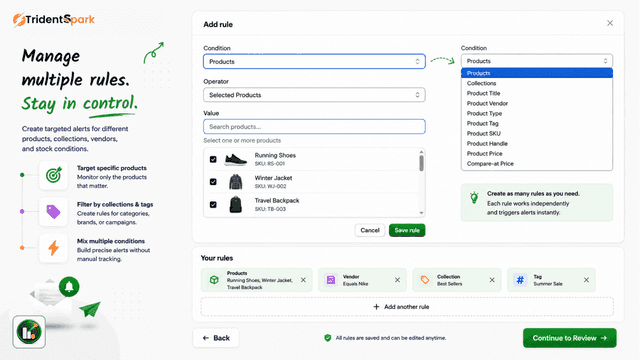
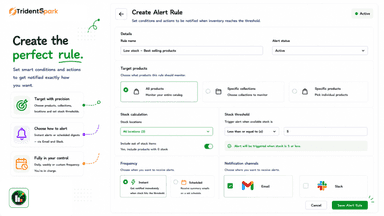
Notify your team when product variants fall to or below a minimum stock threshold you set. Create alerts for all products, selected products, or collections, and filter by location, vendor, type, tag, SKU, or title. Run alerts instantly when stock changes, or on a daily, weekly, or quarterly schedule in your time zone.
- Reorder points per SKU, product, collection, vendor, tag, location or default.
- Negative-stock detection so silent inventory drift surfaces as an alert
- Instant or daily/weekly digests by email or Slack; back-in-stock notices too
- Bulk stock adjustments: preview the exact records, apply in background, undo
- Get alerts when product variants fall to or below a stock threshold you set.
- Create rules for all products, selected products, collections, and locations.
- Get instant alerts when stock changes, or run them daily, weekly, or quarterly.
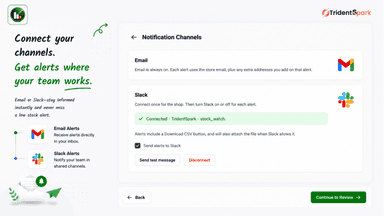
- Send notifications to extra emails and Slack, with a CSV of matching variants.

All the numbers
Every figure, side by side
A green dot marks the app ahead on a measured figure. Estimates, gaps and apps that leave no storefront trace never take the lead.
Adoption
| Measure |  Stockwatch Low Stock Alerts | |
|---|---|---|
| Detected stores | Not published | Not published |
| Net store change, 28 days | 0 | 0 |
| Stores added, 28 days | Not enough data | Not enough data |
| Big-brand share | Not enough data | Not enough data |
| Top store categories | Not published | Not published |
| Top store countries | Not published | Not published |
Reviews
| Measure | Stockwatch Low Stock Alerts | |
|---|---|---|
| App Store rating | Not published | Not published |
| App Store reviews | Not published | Not published |
| New reviews, 28 days | Not enough data | Not enough data |
| Reviewers a year or more in | Not enough data | Not enough data |
Pricing
| Measure | Stockwatch Low Stock Alerts | |
|---|---|---|
| Free plan | Yes | Not listed |
| Lowest paid monthly plan | $7/month | No monthly plan listed |
| Longest free trial | Not listed | Not listed |
| Plans listed | 3 | Not published |
Listing
| Measure | Stockwatch Low Stock Alerts | |
|---|---|---|
| Shopify category rank | Not enough data | #124 |
| Shopify App Charts | Not on this week’s charts | Not on this week’s charts |
| Built for Shopify | No | No |
| Launched | Oct 1, 2026 | Sep 15, 2026 |
| Languages | 1 | 1 |
| Developer | AppNest Studio | Trident Spark Technologies |
FAQ
StockNest and Stockwatch Low Stock Alerts: common questions
- Is StockNest or Stockwatch Low Stock Alerts cheaper?
- Only StockNest lists a free plan. Shoplist compares base prices only between monthly plans in the same currency; usage charges and annual plans vary, so check each plan’s limits.
- What features does each app list that the other doesn’t?
- StockNest lists 11 the others don’t mention, such as Email notifications, Forecasting, Import and export, Inventory planning. Stockwatch Low Stock Alerts lists 1 the others don’t mention, such as Restock notifications. A feature missing from a listing may still be supported; this compares what each App Store listing says.
- Where does this comparison’s data come from?
- Shoplist crawls Shopify storefronts to detect which apps each store runs, and reads each app’s Shopify App Store listing for reviews, pricing, features and integrations. Store counts are as of Nov 6, 2026 for StockNest, Sep 16, 2026 for Stockwatch Low Stock Alerts; estimated figures are labeled.
How Shoplist compares apps
Store counts come from Shoplist’s crawl of Shopify storefronts, which detects the apps each store runs; they are as of Nov 6, 2026 for StockNest, Sep 16, 2026 for Stockwatch Low Stock Alerts. Reviews, ratings, plans, features and integrations come from each app’s Shopify App Store listing. 28-day figures are labeled when estimated, and a figure that is missing or estimated never decides who leads. Read the methodology.