

Stockify | Stock Counter vs StockPulse – Urgency Bar
Two Shopify apps, side by side: detected stores, momentum, reviews, plans, listed features and who runs each. Store counts as of Oct 13, 2026 for Stockify, Nov 3, 2026 for StockPulse.
The short answer
- Paid plans start at $9.99/month for Stockify and $1.99/month for StockPulse.
- Stockify lists 1 features StockPulse’s listing doesn’t mention, including Inventory reports.
Head to head


Monthly Plan
- · Cancel anytime.
- · Easy to use/setup.
- · Enjoy a 3-day free trial to explore.
- · Full access to all blocks.
- · Full access to all future updates.
- · Fully customizable blocks.
Yearly Plan
- · Cancel anytime.
- · Easy to use/setup.
- · Enjoy a 3-day free trial to explore.
- · Full access to all blocks.
- · Full access to all future updates.
- · Fully customizable blocks.
Monthly Package
Coverage counts what each App Store listing names. Every feature, checked off app by app, is in Shoplist.
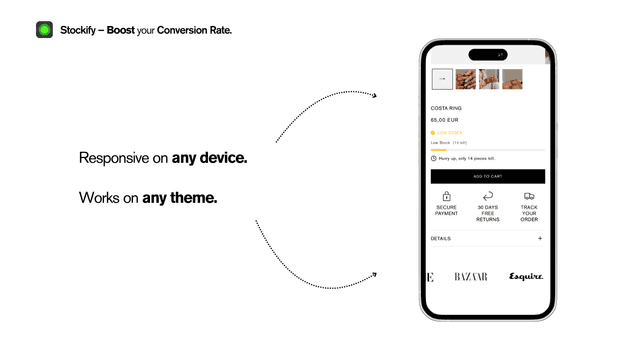
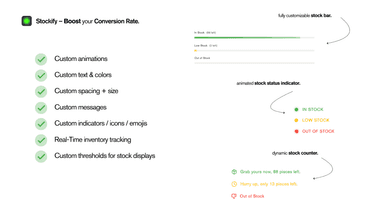
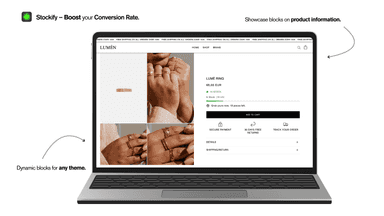
See every featureStockify enhances your product pages with dynamic inventory displays that create urgency and build customer trust. Our customizable stock counters show real-time inventory levels in three engaging formats: animated counters with pulsing indicators, visual progress bars, and icon-based status displays. Each element integrates seamlessly with your theme and updates automatically as inventory changes.
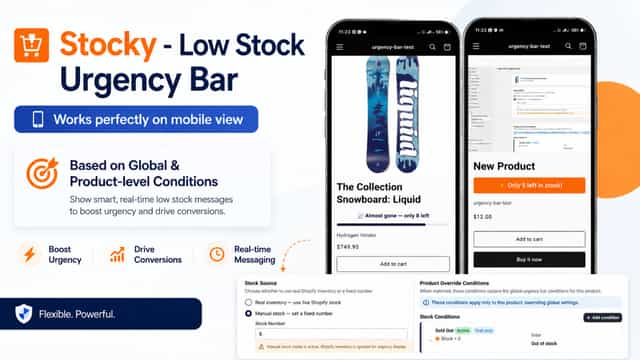
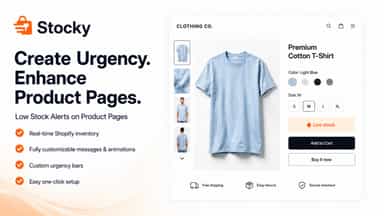
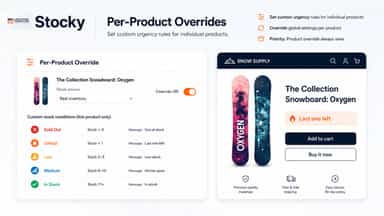
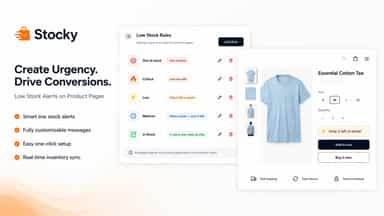
Stocky helps merchants create purchase urgency by showing a dynamic low-stock bar on product pages. The app reads inventory in real time, matches stock ranges to merchant-defined rules, and displays tailored messages, colors, icons, and animations. Merchants can set global conditions, add product-level overrides, and control behavior for untracked inventory, all from an embedded Shopify admin interface.
- Real-time inventory updates that sync automatically with your store.
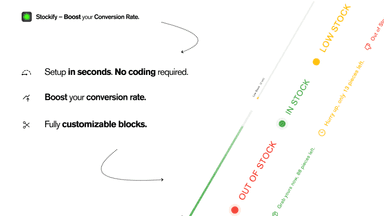
- Easy theme integration with no coding required.
- Stock counters with animated indicators for eye-catching displays.
- Visual progress bars showing remaining inventory percentage
- Show real-time low-stock urgency bars on product pages.
- Set stock-range rules and show the first matching urgency message.
- Apply global defaults and override urgency rules for specific products.
- Customize text, icons, colors, fonts, alignment, and animations.
All the numbers
Every figure, side by side
A green dot marks the app ahead on a measured figure. Estimates, gaps and apps that leave no storefront trace never take the lead.
Adoption
| Measure |  Stockify |  StockPulse |
|---|---|---|
| Detected stores | Not published | Not published |
| Net store change, 28 days | 0 | 0 |
| Stores added, 28 days | Not enough data | Not enough data |
| Big-brand share | Not enough data | Not enough data |
| Top store categories | Not published | Not published |
| Top store countries | Not published | Not published |
Reviews
| Measure | Stockify | StockPulse |
|---|---|---|
| App Store rating | 5.0 ★ | Not published |
| App Store reviews | 1 | Not published |
| New reviews, 28 days | Not enough data | Not enough data |
| Reviewers a year or more in | Not enough data | Not enough data |
Pricing
| Measure | Stockify | StockPulse |
|---|---|---|
| Free plan | Not listed | Not listed |
| Lowest paid monthly plan | $9.99/month | $1.99/month(ahead) |
| Longest free trial | 3 days | 14 days |
| Plans listed | 2 | 1 |
Listing
| Measure | Stockify | StockPulse |
|---|---|---|
| Shopify category rank | #162 | Not enough data |
| Shopify App Charts | Not on this week’s charts | Not on this week’s charts |
| Built for Shopify | No | No |
| Launched | Apr 21, 2025 | May 21, 2026 |
| Languages | 1 | 1 |
| Developer | Pulse Developments | Md Mahiuddin |
FAQ
Stockify and StockPulse: common questions
- Is Stockify or StockPulse cheaper?
- Paid plans start at $9.99/month for Stockify and $1.99/month for StockPulse. Shoplist compares base prices only between monthly plans in the same currency; usage charges and annual plans vary, so check each plan’s limits.
- What features does each app list that the other doesn’t?
- Stockify lists 1 the others don’t mention, such as Inventory reports. A feature missing from a listing may still be supported; this compares what each App Store listing says.
- Where does this comparison’s data come from?
- Shoplist crawls Shopify storefronts to detect which apps each store runs, and reads each app’s Shopify App Store listing for reviews, pricing, features and integrations. Store counts are as of Oct 13, 2026 for Stockify, Nov 3, 2026 for StockPulse; estimated figures are labeled.
How Shoplist compares apps
Store counts come from Shoplist’s crawl of Shopify storefronts, which detects the apps each store runs; they are as of Oct 13, 2026 for Stockify, Nov 3, 2026 for StockPulse. Reviews, ratings, plans, features and integrations come from each app’s Shopify App Store listing. 28-day figures are labeled when estimated, and a figure that is missing or estimated never decides who leads. Read the methodology.