

StockHQ Inventory Management vs StockOps
Two Shopify apps, side by side: detected stores, momentum, reviews, plans, listed features and who runs each. Store counts as of Oct 13, 2026.
The short answer
- Only StockHQ Inventory Management lists a free plan. Paid plans start at $20/month for StockHQ Inventory Management and $10/month for StockOps.
- StockHQ Inventory Management lists 3 features StockOps’s listing doesn’t mention, including Custom reports, Inventory sync, Restock notifications.
Head to head


Free
- · 10 Purchase orders a month
- · 10 Transfers a month
- · Unlimited Stock takes
Growth
- · 15-day free trial
- · Multi-location inventory management
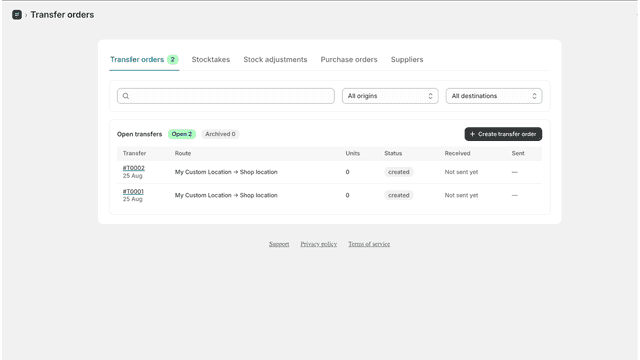
- · Purchase orders, transfers and stocktake
- · Standard usage limits
- · Standard user access and workflows
Enterprise
- · 15-day free trial
- · Advanced user roles and permissions
- · Priority support and assisted onboarding
- · Purchase order and transfer approvals
- · Unlimited locations and higher limits
StockOps PRO
Coverage counts what each App Store listing names. Every feature, checked off app by app, is in Shoplist.
See every featureManage your inventory operations in one place with tools for purchase orders, stock transfers, and stocktakes. Create and manage purchase orders to keep incoming inventory organized, transfer stock between locations, and perform stocktakes to keep inventory quantities accurate.
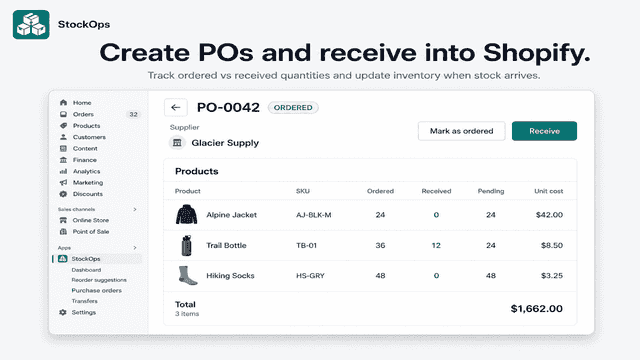
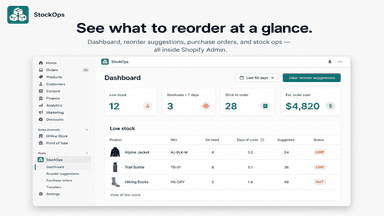
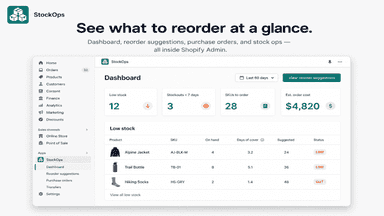
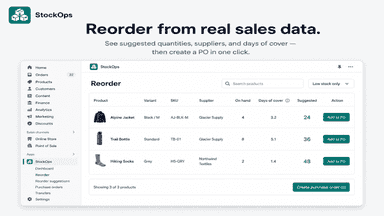
StockOps helps merchants manage inventory inside Shopify Admin. It calculates reorder suggestions from recent sales, then lets you create purchase orders, receive stock into Shopify inventory, and move stock between locations. Merchants can keep supplier costs and lead times on each product, run stock takes and adjustments, and use a dashboard to spot low stock before it becomes a stockout.
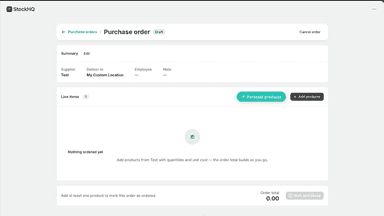
- Create and manage purchase orders to track incoming inventory
- Transfer stock between locations and keep quantities organized
- Perform stocktakes to reconcile physical and Shopify inventory
- Reorder suggestions based on recent sales velocity and warehouse stock
- Purchase orders with receiving that updates Shopify inventory
- Supplier records with cost and lead time on each product
- Transfers, stock takes, and adjustments across locations

All the numbers
Every figure, side by side
A green dot marks the app ahead on a measured figure. Estimates, gaps and apps that leave no storefront trace never take the lead.
Adoption
| Measure |  StockHQ Inventory Management |  StockOps |
|---|---|---|
| Detected stores | Not published | Not published |
| Net store change, 28 days | 0 | 0 |
| Stores added, 28 days | Not enough data | Not enough data |
| Big-brand share | Not enough data | Not enough data |
| Top store categories | Not published | Not published |
| Top store countries | Not published | Not published |
Reviews
| Measure | StockHQ Inventory Management | StockOps |
|---|---|---|
| App Store rating | Not published | Not published |
| App Store reviews | Not published | Not published |
| New reviews, 28 days | Not enough data | Not enough data |
| Reviewers a year or more in | Not enough data | Not enough data |
Pricing
| Measure | StockHQ Inventory Management | StockOps |
|---|---|---|
| Free plan | Yes | Not listed |
| Lowest paid monthly plan | $20/month | $10/month(ahead) |
| Longest free trial | 15 days | 14 days |
| Plans listed | 3 | 1 |
Listing
| Measure | StockHQ Inventory Management | StockOps |
|---|---|---|
| Shopify category rank | #503(ahead) | #655 |
| Shopify App Charts | Not on this week’s charts | Not on this week’s charts |
| Built for Shopify | No | No |
| Launched | Sep 17, 2026 | Aug 28, 2026 |
| Languages | 1 | 1 |
| Developer | Panspot Innovations LLP | Avanti |
FAQ
StockHQ Inventory Management and StockOps: common questions
- Is StockHQ Inventory Management or StockOps cheaper?
- Only StockHQ Inventory Management lists a free plan. Paid plans start at $20/month for StockHQ Inventory Management and $10/month for StockOps. Shoplist compares base prices only between monthly plans in the same currency; usage charges and annual plans vary, so check each plan’s limits.
- What features does each app list that the other doesn’t?
- StockHQ Inventory Management lists 3 the others don’t mention, such as Custom reports, Inventory sync, Restock notifications. StockOps lists 2 the others don’t mention, such as Auto-restock, Multi-location. A feature missing from a listing may still be supported; this compares what each App Store listing says.
- Where does this comparison’s data come from?
- Shoplist crawls Shopify storefronts to detect which apps each store runs, and reads each app’s Shopify App Store listing for reviews, pricing, features and integrations. Store counts are as of Oct 13, 2026; estimated figures are labeled.
How Shoplist compares apps
Store counts come from Shoplist’s crawl of Shopify storefronts, which detects the apps each store runs; they are as of Oct 13, 2026. Reviews, ratings, plans, features and integrations come from each app’s Shopify App Store listing. 28-day figures are labeled when estimated, and a figure that is missing or estimated never decides who leads. Read the methodology.