

StockFlow: Purchase Orders vs TransferWatch
Two Shopify apps, side by side: detected stores, momentum, reviews, plans, listed features and who runs each. Store counts as of Nov 9, 2026 for StockFlow, Oct 13, 2026 for TransferWatch.
The short answer
Head to head


Core
Coverage counts what each App Store listing names. Every feature, checked off app by app, is in Shoplist.
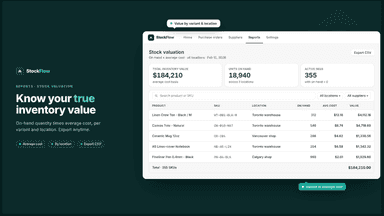
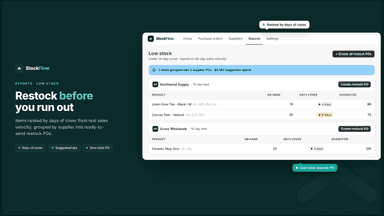
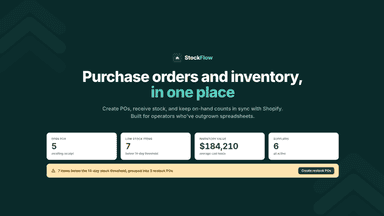
See every featureStockFlow helps retailers manage purchasing and inventory inside Shopify admin. Create purchase orders and generate branded PDFs for suppliers. Receive full or partial shipments, log rejections, and sync received quantities to the correct Shopify location so on-hand counts stay accurate. StockFlow updates landed cost per unit as you receive stock and suggests reorder quantities from your sales history.
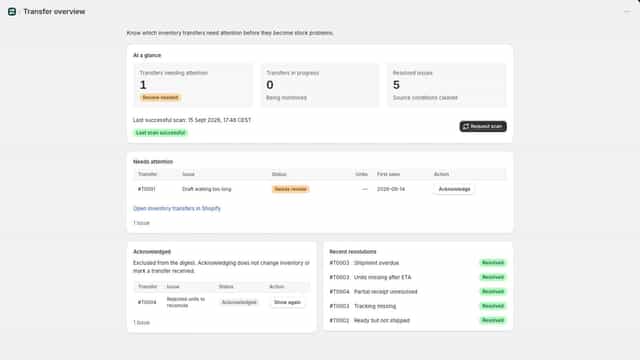
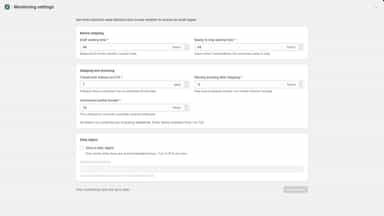
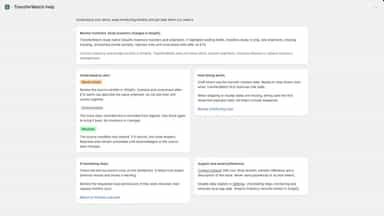
Track exceptions in native Shopify inventory transfers across your locations. TransferWatch highlights delayed shipments, unresolved partial receipts, rejected quantities and missing tracking. Review a focused list, acknowledge issues your team is handling, and choose a daily email digest. Configurable timing rules help match your operation.
- Create purchase orders and generate branded PDFs for your suppliers
- Receive full or partial shipments and log rejections with reasons
- Sync received quantities to the correct Shopify location automatically
- Track landed cost per unit and COGS as you receive stock
- Find stale drafts and transfers waiting to ship.
- Highlight overdue shipments and unresolved partial receipts.
- Review rejected quantities and units unreceived after ETA.
- Acknowledge exceptions without changing Shopify inventory.


All the numbers
Every figure, side by side
A green dot marks the app ahead on a measured figure. Estimates, gaps and apps that leave no storefront trace never take the lead.
Adoption
| Measure |  StockFlow |  TransferWatch |
|---|---|---|
| Detected stores | Not published | Not published |
| Net store change, 28 days | 0 | 0 |
| Stores added, 28 days | Not enough data | Not enough data |
| Big-brand share | Not enough data | Not enough data |
| Top store categories | Not published | Not published |
| Top store countries | Not published | Not published |
Reviews
| Measure | StockFlow | TransferWatch |
|---|---|---|
| App Store rating | Not published | Not published |
| App Store reviews | Not published | Not published |
| New reviews, 28 days | Not enough data | Not enough data |
| Reviewers a year or more in | Not enough data | Not enough data |
Pricing
| Measure | StockFlow | TransferWatch |
|---|---|---|
| Free plan | Not listed | Not listed |
| Lowest paid monthly plan | No monthly plan listed | $19/month |
| Longest free trial | Not listed | 14 days |
| Plans listed | Not published | 1 |
Listing
| Measure | StockFlow | TransferWatch |
|---|---|---|
| Shopify category rank | #220(ahead) | #242 |
| Shopify App Charts | Not on this week’s charts | Not on this week’s charts |
| Built for Shopify | No | No |
| Launched | Aug 17, 2026 | Oct 1, 2026 |
| Languages | 1 | 1 |
| Developer | Plinth | Calm Utility |
FAQ
StockFlow and TransferWatch: common questions
- Where does this comparison’s data come from?
- Shoplist crawls Shopify storefronts to detect which apps each store runs, and reads each app’s Shopify App Store listing for reviews, pricing, features and integrations. Store counts are as of Nov 9, 2026 for StockFlow, Oct 13, 2026 for TransferWatch; estimated figures are labeled.
How Shoplist compares apps
Store counts come from Shoplist’s crawl of Shopify storefronts, which detects the apps each store runs; they are as of Nov 9, 2026 for StockFlow, Oct 13, 2026 for TransferWatch. Reviews, ratings, plans, features and integrations come from each app’s Shopify App Store listing. 28-day figures are labeled when estimated, and a figure that is missing or estimated never decides who leads. Read the methodology.