
StockClock vs Stockler
Two Shopify apps, side by side: detected stores, momentum, reviews, plans, listed features and who runs each. Store counts as of Oct 13, 2026 for StockClock, Oct 14, 2026 for Stockler.
The short answer
- Only StockClock lists a free plan. Paid plans start at $7.99/month for StockClock and $2.99/month for Stockler.
- Stockler lists 5 features StockClock’s listing doesn’t mention, including Analytics, Email notifications, Inventory sync.
Head to head


Free
- · Card, list, and table views
- · Color-coded inventory dashboard
- · Days-until-stockout forecast
Pro
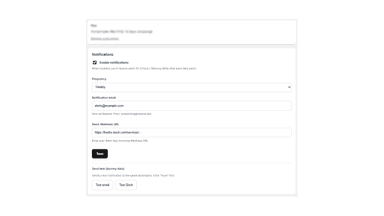
- · Email & Slack notifications
- · Recommended order quantities
- · Reorder date recommendations
Monthly Plan
Coverage counts what each App Store listing names. Every feature, checked off app by app, is in Shoplist.
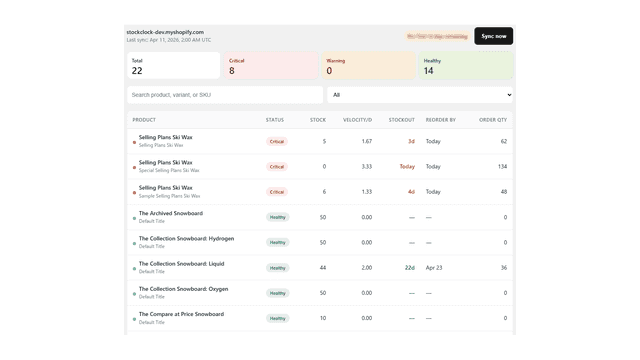
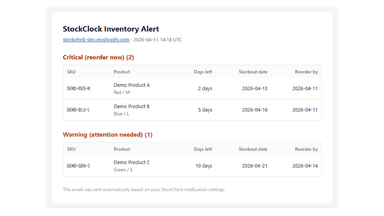
See every featureMost apps alert when stock drops below a number. But 10 units means different things for a product selling 50/day vs 1/week. StockClock shows how many days of stock remain based on actual sales velocity. Your dashboard ranks all SKUs by urgency with color-coded status. See stock, velocity, and stockout dates at a glance. Get email or Slack alerts when inventory needs attention.
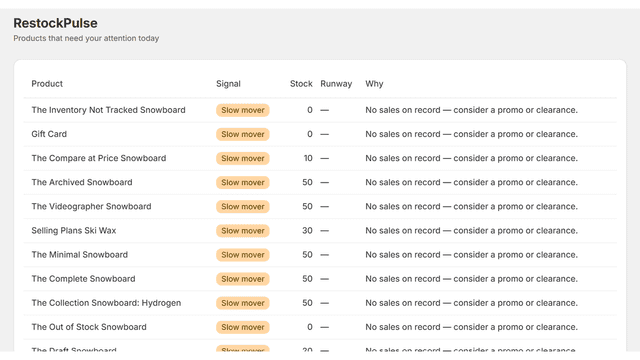
Most restock tools just watch a fixed number and alert when you cross it — a slow week gets treated the same as a real emergency, or a genuine stockout slips through because the number never technically hit zero.
- Days-until-stockout forecast for every SKU based on real sales velocity
- Color-coded dashboard: critical, warning, and healthy status at a glance
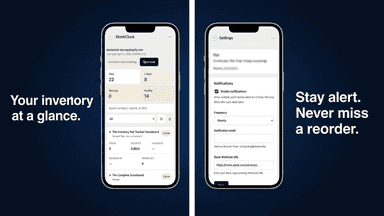
- Mobile-first card view designed for quick daily inventory checks on your phone
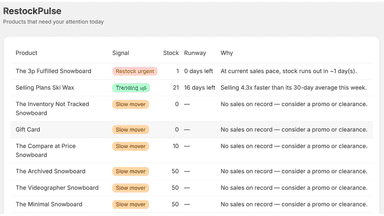
- Restock urgency alerts — Know what sells out this week, before it happens
- Trending product detection — Spot products suddenly selling faster than usual
- Daily email digest — A morning summary, sent only when something needs attention
- Zero-setup dashboard — One screen, refreshed daily — no configuration needed
All the numbers
Every figure, side by side
A green dot marks the app ahead on a measured figure. Estimates, gaps and apps that leave no storefront trace never take the lead.
Adoption
| Measure |  StockClock |  Stockler |
|---|---|---|
| Detected stores | Not published | Not published |
| Net store change, 28 days | 0 | 0 |
| Stores added, 28 days | Not enough data | Not enough data |
| Big-brand share | Not enough data | Not enough data |
| Top store categories | Not published | Not published |
| Top store countries | Not published | Not published |
Reviews
| Measure | StockClock | Stockler |
|---|---|---|
| App Store rating | Not published | Not published |
| App Store reviews | Not published | Not published |
| New reviews, 28 days | Not enough data | Not enough data |
| Reviewers a year or more in | Not enough data | Not enough data |
Pricing
| Measure | StockClock | Stockler |
|---|---|---|
| Free plan | Yes | Not listed |
| Lowest paid monthly plan | $7.99/month | $2.99/month(ahead) |
| Longest free trial | 14 days | 7 days |
| Plans listed | 2 | 1 |
Listing
| Measure | StockClock | Stockler |
|---|---|---|
| Shopify category rank | #592 | #292(ahead) |
| Shopify App Charts | Not on this week’s charts | Not on this week’s charts |
| Built for Shopify | No | No |
| Launched | May 19, 2026 | Aug 7, 2026 |
| Languages | 1 | 1 |
| Developer | Foxry | StocklerSuite |
FAQ
StockClock and Stockler: common questions
- Is StockClock or Stockler cheaper?
- Only StockClock lists a free plan. Paid plans start at $7.99/month for StockClock and $2.99/month for Stockler. Shoplist compares base prices only between monthly plans in the same currency; usage charges and annual plans vary, so check each plan’s limits.
- What features does each app list that the other doesn’t?
- StockClock lists 2 the others don’t mention, such as Insights, Out of stock notifications. Stockler lists 5 the others don’t mention, such as Analytics, Email notifications, Inventory sync, Real-time updates. A feature missing from a listing may still be supported; this compares what each App Store listing says.
- Where does this comparison’s data come from?
- Shoplist crawls Shopify storefronts to detect which apps each store runs, and reads each app’s Shopify App Store listing for reviews, pricing, features and integrations. Store counts are as of Oct 13, 2026 for StockClock, Oct 14, 2026 for Stockler; estimated figures are labeled.
How Shoplist compares apps
Store counts come from Shoplist’s crawl of Shopify storefronts, which detects the apps each store runs; they are as of Oct 13, 2026 for StockClock, Oct 14, 2026 for Stockler. Reviews, ratings, plans, features and integrations come from each app’s Shopify App Store listing. 28-day figures are labeled when estimated, and a figure that is missing or estimated never decides who leads. Read the methodology.