

StockBridge ‑ Inventory Sync vs Virtual Shop Manager
Two Shopify apps, side by side: detected stores, momentum, reviews, plans, listed features and who runs each. Store counts as of Oct 13, 2026 for StockBridge, Nov 5, 2026 for Virtual Shop Manager.
The short answer
- On the Shopify App Store: StockBridge 5.0 from 2 reviews and Virtual Shop Manager 5.0 from 1 reviews.
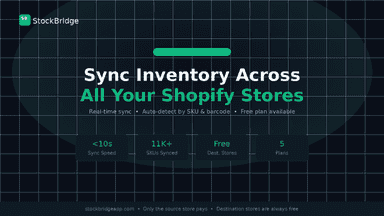
- Only StockBridge lists a free plan. Paid plans start at $9.99/month for StockBridge and $19.99/month for Virtual Shop Manager.
- StockBridge lists 10 features Virtual Shop Manager’s listing doesn’t mention, including Automatic, Barcodes, Detailed logs.
Head to head


Momentum
New reviews each month
Review pace is the clearest public read on how fast an app is winning new merchants.
Free
- · 1 sync rule
- · 2 stores
- · 50 SKUs per connection
- · One-way sync
Starter
- · 2 stores
- · 5 sync rules
- · 500 SKUs per connection
- · Bidirectional sync
- · Real-time webhooks
Growth
- · % sync
- · 5 stores
- · 5,000 SKUs per connection
- · All conflict modes
- · Drift analytics
- · Priority support
Business
- · 10 stores
- · 20,000 SKUs per connection
- · API access
- · Dedicated support
- · Multi-location
- · Shopify Flow (coming soon)
Store Tools
- · Appearance & minimum order controls
- · Build promotions: Sales Manager (Beta)
- · Bulk stock, price, cost & weight edits
- · Inventory value (Beta) & activity
- · Order Picker with photos (Beta)
- · Saved product-line listing templates
Trading Cards
- · All Store Tools at no extra cost
- · Automatic card pricing with your rules
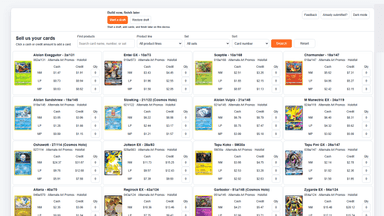
- · Cash & credit Buylist; Shopify receiving
- · Market movers (Beta); coverage varies
- · Review matches and prices in Alerts
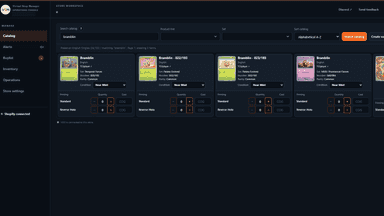
- · Supported card & sealed Catalog
Coverage counts what each App Store listing names. Every feature, checked off app by app, is in Shoplist.
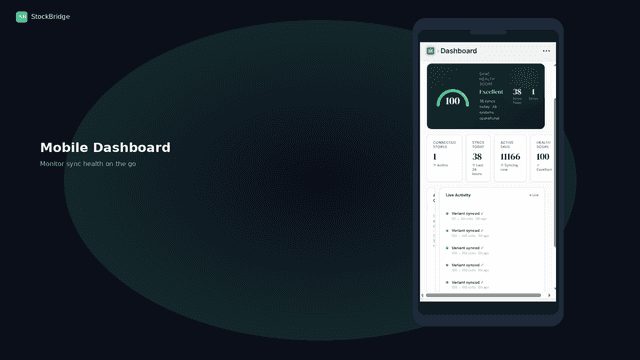
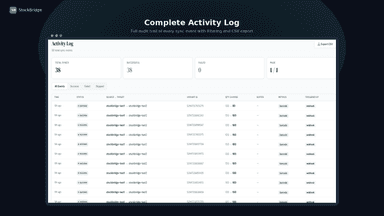
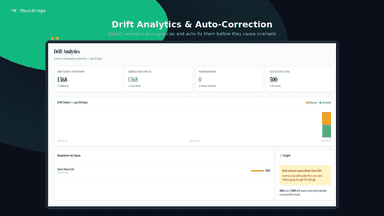
See every featureStockBridge keeps inventory in sync across all your stores automatically. When stock changes in one store after an order, refund, or restock, quantities update in real time on every connected store. Match products by SKU or barcode, set buffer stock, and choose one-way or two-way sync per store or product group. See drift reports and a full activity log so you always know what changed and why.
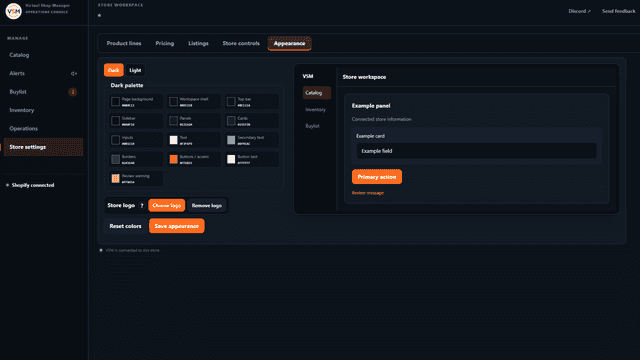
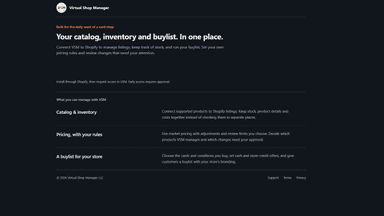
Store Tools brings bulk editing and order picking into one workspace. Update stock, prices, costs and weights, then prepare orders with photos and quantities. Reuse listing templates, build sales and review inventory value. For card shops, Trading Cards adds a customer Buylist with cash and store-credit offers, Shopify receiving and automatic pricing for supported cards. All Store Tools are included.
- Real-time inventory sync between stores via webhooks — updates in seconds
- Auto-detect product matches across stores by SKU or barcode — no manual work
- Bidirectional sync, buffer stock, and custom rules per product or collection
- Drift analytics and full activity log for complete inventory audit trail
- Review catalog and listing changes before publishing updates.
- Keep product listings and inventory matched to your store.
- Find duplicate or mismatched listings that need attention.
- Publish store-specific buylist offers with optional intake limits.
All the numbers
Every figure, side by side
A green dot marks the app ahead on a measured figure. Estimates, gaps and apps that leave no storefront trace never take the lead.
Adoption
| Measure |  StockBridge |  Virtual Shop Manager |
|---|---|---|
| Detected stores | Not published | Not published |
| Net store change, 28 days | 0 | 0 |
| Stores added, 28 days | Not enough data | Not enough data |
| Big-brand share | Not enough data | Not enough data |
| Top store categories | Not published | Not published |
| Top store countries | Not published | Not published |
Reviews
| Measure | StockBridge | Virtual Shop Manager |
|---|---|---|
| App Store rating | 5.0 ★ | 5.0 ★ |
| App Store reviews | 2(ahead) | 1 |
| New reviews, 28 days | Not enough data | Not enough data |
| Reviewers a year or more in | Not enough data | Not enough data |
Pricing
| Measure | StockBridge | Virtual Shop Manager |
|---|---|---|
| Free plan | Yes | Not listed |
| Lowest paid monthly plan | $9.99/month(ahead) | $19.99/month |
| Longest free trial | 14 days | 7 days |
| Plans listed | 4 | 2 |
Listing
| Measure | StockBridge | Virtual Shop Manager |
|---|---|---|
| Shopify category rank | #232 | #245 |
| Shopify App Charts | Not on this week’s charts | #14 on Pricing moves in Bulk editor |
| Built for Shopify | No | No |
| Launched | May 5, 2026 | Aug 27, 2026 |
| Languages | 1 | 1 |
| Developer | Meridian Apps | Virtual Shop Manager |
FAQ
StockBridge and Virtual Shop Manager: common questions
- Is StockBridge or Virtual Shop Manager cheaper?
- Only StockBridge lists a free plan. Paid plans start at $9.99/month for StockBridge and $19.99/month for Virtual Shop Manager. Shoplist compares base prices only between monthly plans in the same currency; usage charges and annual plans vary, so check each plan’s limits.
- Which has better reviews, StockBridge or Virtual Shop Manager?
- On the Shopify App Store: StockBridge 5.0 from 2 reviews and Virtual Shop Manager 5.0 from 1 reviews.
- What features does each app list that the other doesn’t?
- StockBridge lists 10 the others don’t mention, such as Automatic, Barcodes, Detailed logs, Inventory alerts. Virtual Shop Manager lists 6 the others don’t mention, such as Automated alerts, Bulk edit, Inventory, Product details. A feature missing from a listing may still be supported; this compares what each App Store listing says.
- Where does this comparison’s data come from?
- Shoplist crawls Shopify storefronts to detect which apps each store runs, and reads each app’s Shopify App Store listing for reviews, pricing, features and integrations. Store counts are as of Oct 13, 2026 for StockBridge, Nov 5, 2026 for Virtual Shop Manager; estimated figures are labeled.
How Shoplist compares apps
Store counts come from Shoplist’s crawl of Shopify storefronts, which detects the apps each store runs; they are as of Oct 13, 2026 for StockBridge, Nov 5, 2026 for Virtual Shop Manager. Reviews, ratings, plans, features and integrations come from each app’s Shopify App Store listing. 28-day figures are labeled when estimated, and a figure that is missing or estimated never decides who leads. Read the methodology.