
Stock Sentry: Low Stock Alerts vs Zelari
Two Shopify apps, side by side: detected stores, momentum, reviews, plans, listed features and who runs each. Store counts as of Oct 13, 2026 for Stock Sentry, Nov 16, 2026 for Zelari.
The short answer
- Only Stock Sentry lists a free plan. Paid plans start at $4.99/month for Stock Sentry and $19/month for Zelari.
- Zelari lists 9 features Stock Sentry’s listing doesn’t mention, including AI optimization, Analytics, Email notifications.
Head to head

Free
- · Access to alert history
- · Low-stock email alerts
- · Monitor up to 3 products
Pro
- · Analytics dashboard
- · Analytics dashboard
- · Faster checks (15 min)
- · Monitor unlimited products
- · Priority support
- · Slack
Starter
- · Anomaly detection + AI
- · Email alerts + digest
- · Insights & inventory
Coverage counts what each App Store listing names. Every feature, checked off app by app, is in Shoplist.
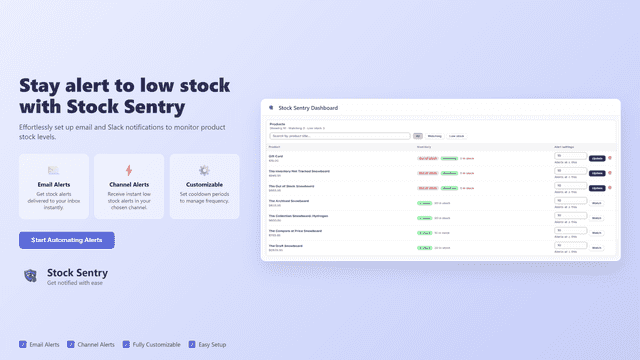
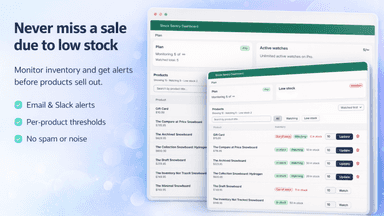
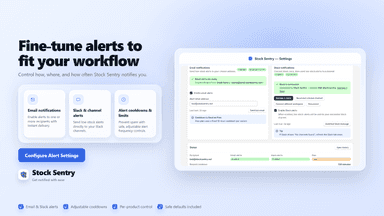
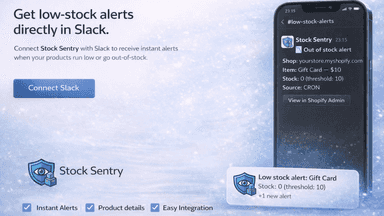
See every featureStock Sentry helps you monitor product inventory and get notified when stock reaches your chosen threshold. Create watches for the products you care about and receive email and Slack alerts when inventory changes. Manage alert settings in-app, including thresholds and notification preferences. View alert history and use analytics to understand which products trigger the most alerts and keep tracking organized.
Zelari watches your Shopify inventory and recent sales, spots unusual stock changes, and uses AI to explain each one clearly. See Overview, Inventory, Insights, Anomalies, and History in your admin, with email alerts for urgent issues and a weekly digest. Built for small and growing merchants who want clear answers about their stock.
- Instant email alerts when products hit your custom low-stock threshold.
- Smart "Spam Prevention" blocks duplicate alerts to keep your inbox clean.
- Visual Analytics Dashboard: Track inventory health & most-alerted items.
- Slack Integration that allows alerts to show directly on your channel
- Always-on anomaly detection with clear AI explanations
- Sales velocity, at-risk stock, sell-through and reorder hints from your orders
- Instant email alerts for urgent issues plus a weekly inventory digest
- Live Inventory table aligned with Shopify stock levels
All the numbers
Every figure, side by side
A green dot marks the app ahead on a measured figure. Estimates, gaps and apps that leave no storefront trace never take the lead.
Adoption
| Measure |  Stock Sentry | |
|---|---|---|
| Detected stores | Not published | Not published |
| Net store change, 28 days | 0 | 0 |
| Stores added, 28 days | Not enough data | Not enough data |
| Big-brand share | Not enough data | Not enough data |
| Top store categories | Not published | Not published |
| Top store countries | Not published | Not published |
Reviews
| Measure | Stock Sentry | |
|---|---|---|
| App Store rating | Not published | Not published |
| App Store reviews | Not published | Not published |
| New reviews, 28 days | Not enough data | Not enough data |
| Reviewers a year or more in | Not enough data | Not enough data |
Pricing
| Measure | Stock Sentry | |
|---|---|---|
| Free plan | Yes | Not listed |
| Lowest paid monthly plan | $4.99/month(ahead) | $19/month |
| Longest free trial | Not listed | 30 days |
| Plans listed | 2 | 1 |
Listing
| Measure | Stock Sentry | |
|---|---|---|
| Shopify category rank | #402 | Not enough data |
| Shopify App Charts | Not on this week’s charts | Not on this week’s charts |
| Built for Shopify | No | No |
| Launched | Mar 2, 2026 | Nov 16, 2026 |
| Languages | 1 | 1 |
| Developer | Stock Sentry | Zelari |
FAQ
Stock Sentry and Zelari: common questions
- Is Stock Sentry or Zelari cheaper?
- Only Stock Sentry lists a free plan. Paid plans start at $4.99/month for Stock Sentry and $19/month for Zelari. Shoplist compares base prices only between monthly plans in the same currency; usage charges and annual plans vary, so check each plan’s limits.
- What features does each app list that the other doesn’t?
- Stock Sentry lists 1 the others don’t mention, such as Replenishment reminders. Zelari lists 9 the others don’t mention, such as AI optimization, Analytics, Email notifications, Insights. A feature missing from a listing may still be supported; this compares what each App Store listing says.
- Where does this comparison’s data come from?
- Shoplist crawls Shopify storefronts to detect which apps each store runs, and reads each app’s Shopify App Store listing for reviews, pricing, features and integrations. Store counts are as of Oct 13, 2026 for Stock Sentry, Nov 16, 2026 for Zelari; estimated figures are labeled.
How Shoplist compares apps
Store counts come from Shoplist’s crawl of Shopify storefronts, which detects the apps each store runs; they are as of Oct 13, 2026 for Stock Sentry, Nov 16, 2026 for Zelari. Reviews, ratings, plans, features and integrations come from each app’s Shopify App Store listing. 28-day figures are labeled when estimated, and a figure that is missing or estimated never decides who leads. Read the methodology.