

Dead Stock Savers vs StockAge Alerts
Two Shopify apps, side by side: detected stores, momentum, reviews, plans, listed features and who runs each. Store counts as of Nov 7, 2026 for Dead Stock Savers, Aug 11, 2026 for StockAge Alerts.
The short answer
- Only Dead Stock Savers lists a free plan.
- Dead Stock Savers lists 6 features StockAge Alerts’s listing doesn’t mention, including AI optimization, Analytics, Custom reports.
Head to head


Momentum
New reviews each month
Review pace is the clearest public read on how fast an app is winning new merchants.
Free
- · ABC inventory classification
- · Auto-detect dead stock from Shopify
- · Automatic Shopify sync
- · Top 10 dead SKUs by value
- · Total capital at risk dashboard
Recovery
- · AI Recovery Coach included
- · At-Risk SKUs early warning feed
- · Everything in Free
- · Full dead stock report — all SKUs
- · QuickBooks, Xero & CSV Integration
- · Recovery Value Estimator per SKU
Intelligence
- · Demand Forecasting for future risk
- · Everything in Recovery
- · Prioritised recovery plan by value
- · Recovery performance tracking
- · Unlimited AI recovery coaching
- · Walk-through coaching on top SKUs
Coverage counts what each App Store listing names. Every feature, checked off app by app, is in Shoplist.
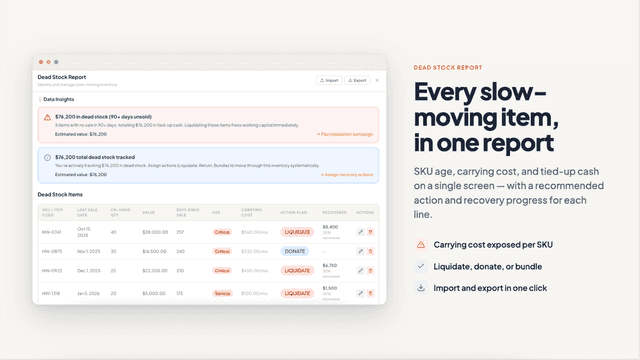
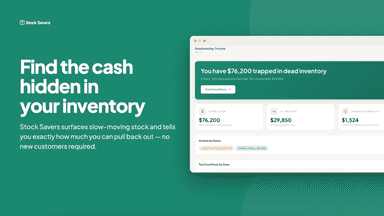
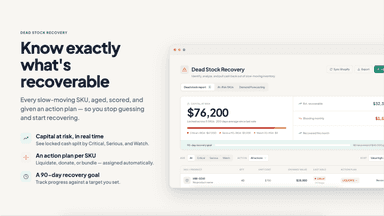
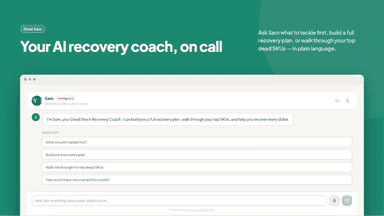
See every featureStock Savers connects to your Shopify store and automatically identifies inventory that hasn't sold in 90+ days — showing you exactly how much cash is trapped and what it's costing you to hold it every month. Set recovery actions per SKU (liquidate, bundle, return, donate), see estimated recovery values at different scenarios, and get AI-powered coaching from Sam — your Dead Stock Recovery Coach — on where to start…
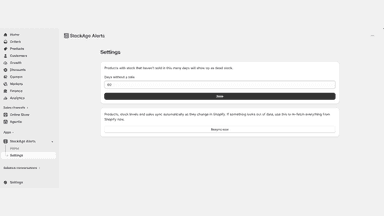
StockAge Alerts watches your sales history and flags any product that still has stock but hasn't sold in more days than the threshold you choose. Instead of digging through reports to spot products tying up money on your shelves, you get a single table inside your Shopify admin showing exactly what's not moving, sorted by how long it's been sitting.
- Automatic dead stock detection — flags SKUs with no sales in 90+ days
- Recovery Value Estimator — see liquidation, markdown, and return values per SKU
- AI Recovery Coach — get specific advice on which dead SKUs to tackle first
- At-Risk SKUs feed — catch slow-moving inventory before it becomes dead stock
- Configurable "days without a sale" threshold, applied across your catalog
- One table showing every slow-moving product across all your locations
- Sort and filter by location to see what's tying up money fastest
- Jump straight to any product's edit page from the alerts table



All the numbers
Every figure, side by side
A green dot marks the app ahead on a measured figure. Estimates, gaps and apps that leave no storefront trace never take the lead.
Adoption
| Measure |  Dead Stock Savers |  StockAge Alerts |
|---|---|---|
| Detected stores | Not published | Not published |
| Net store change, 28 days | 0 | 0 |
| Stores added, 28 days | Not enough data | Not enough data |
| Big-brand share | Not enough data | Not enough data |
| Top store categories | Not published | Not published |
| Top store countries | Not published | Not published |
Reviews
| Measure | Dead Stock Savers | StockAge Alerts |
|---|---|---|
| App Store rating | 5.0 ★ | Not published |
| App Store reviews | 7 | Not published |
| New reviews, 28 days | 0 | Not enough data |
| Reviewers a year or more in | Not enough data | Not enough data |
Pricing
| Measure | Dead Stock Savers | StockAge Alerts |
|---|---|---|
| Free plan | Yes | Not listed |
| Lowest paid monthly plan | $49/month | No monthly plan listed |
| Longest free trial | Not listed | Not listed |
| Plans listed | 3 | Not published |
Listing
| Measure | Dead Stock Savers | StockAge Alerts |
|---|---|---|
| Shopify category rank | #73(ahead) | #333 |
| Shopify App Charts | Not on this week’s charts | Not on this week’s charts |
| Built for Shopify | No | No |
| Launched | Jul 14, 2026 | Aug 11, 2026 |
| Languages | 1 | 1 |
| Developer | Stock Savers | Minimal Apps |
FAQ
Dead Stock Savers and StockAge Alerts: common questions
- Is Dead Stock Savers or StockAge Alerts cheaper?
- Only Dead Stock Savers lists a free plan. Shoplist compares base prices only between monthly plans in the same currency; usage charges and annual plans vary, so check each plan’s limits.
- What features does each app list that the other doesn’t?
- Dead Stock Savers lists 6 the others don’t mention, such as AI optimization, Analytics, Custom reports, Forecasting. StockAge Alerts lists 1 the others don’t mention, such as Threshold alerts. A feature missing from a listing may still be supported; this compares what each App Store listing says.
- Where does this comparison’s data come from?
- Shoplist crawls Shopify storefronts to detect which apps each store runs, and reads each app’s Shopify App Store listing for reviews, pricing, features and integrations. Store counts are as of Nov 7, 2026 for Dead Stock Savers, Aug 11, 2026 for StockAge Alerts; estimated figures are labeled.
How Shoplist compares apps
Store counts come from Shoplist’s crawl of Shopify storefronts, which detects the apps each store runs; they are as of Nov 7, 2026 for Dead Stock Savers, Aug 11, 2026 for StockAge Alerts. Reviews, ratings, plans, features and integrations come from each app’s Shopify App Store listing. 28-day figures are labeled when estimated, and a figure that is missing or estimated never decides who leads. Read the methodology.