

Snap Compare vs SliderPro: Banner & Carousel
Two Shopify apps, side by side: detected stores, momentum, reviews, plans, listed features and who runs each. Store counts as of Oct 13, 2026.
The short answer
- Both list a free plan. Paid plans start at $30/month for Snap Compare and $4.99/month for SliderPro.
Head to head


Momentum
New reviews each month
Review pace is the clearest public read on how fast an app is winning new merchants.
FREE
- · Basic Image Slider
- · Branding Present
- · Heading/Subheading Option
Premium
- · Add Detailed Descriptions
- · Advanced Customization
- · CTA Button Feature
- · Zero-code setup
- · add the slider to any Shopify theme
Free Plan
- · 1 Slider Per Store
- · 1 Slider Preset (Hero-slider)
- · 1 Slider Preset (Product-slider)
- · All Slider Types
- · Email Support
- · Lightbox Preview
Starter Plan
- · 5 Sliders Per Store
- · 6 Premium Hero Slider Design Presets
- · 6 Premium Slider Preset (Product-slider)
- · All Slider Types
- · Lightbox Preview
- · Marquee Slider
Pro Plan
- · 10 Sliders Per Store
- · 6 Premium Hero Slider Design Presets
- · 6 Premium Slider Preset (Product-slider)
- · All Slider Types
- · Lightbox Preview
- · Marquee Slider
Business Plan
- · 6 Premium Hero Slider Design Presets
- · 6 Premium Slider Preset (Product-slider)
- · All Slider Types
- · Dedicated Priority Support
- · Lightbox Preview
- · Marquee Slider
Coverage counts what each App Store listing names. Every feature, checked off app by app, is in Shoplist.
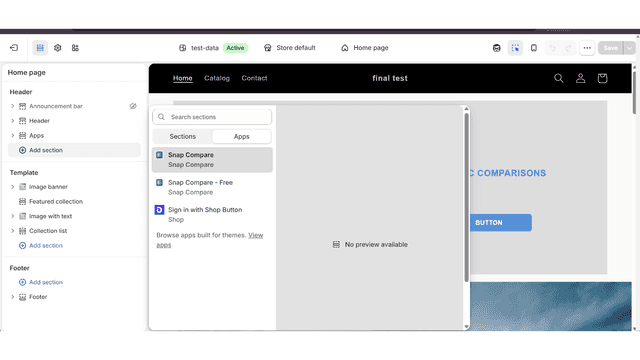
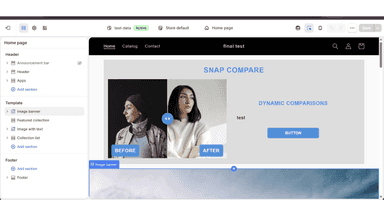
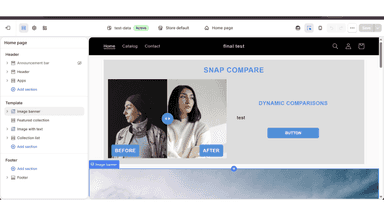
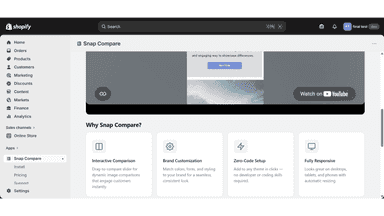
See every featureSnap Compare lets you showcase product transformations with a drag-to-reveal image slider. Add it to any theme in minutes, no coding required. Customize colors, labels, and layout to match your brand. Works on desktop and mobile automatically. Perfect for beauty, fashion, home decor, fitness, and any store where showing results drives sales.
Create stunning responsive sliders, carousels & homepage banners with zero coding. Our drag-and-drop builder lets you add image sliders, hero banners, product carousels, video sliders & testimonial slideshows to your Shopify store in minutes. Fully mobile-friendly across all devices. Supports auto-play, lightbox preview, custom transitions & animation effects. Seamlessly integrates with all Shopify themes.
- Drag-to-compare slider that lets customers reveal before-and-after product image
- Zero-code setup — add the slider to any Shopify theme in just a few clicks
- Fully responsive design that looks great on desktop, tablet, and mobile.
- Customize heading, labels, colors, and layout to match your store's brand
- Responsive Design and Customization
- Product Integration and Slider Automation
- Drag-and-Drop Interface with No Coding Required
- Lightbox Preview Functionality




All the numbers
Every figure, side by side
A green dot marks the app ahead on a measured figure. Estimates, gaps and apps that leave no storefront trace never take the lead.
Adoption
| Measure |  Snap Compare |  SliderPro |
|---|---|---|
| Detected stores | Not published | Not published |
| Net store change, 28 days | 0 | 0 |
| Stores added, 28 days | Not enough data | Not enough data |
| Big-brand share | Not enough data | Not enough data |
| Top store categories | Not published | Not published |
| Top store countries | Not published | Not published |
Reviews
| Measure | Snap Compare | SliderPro |
|---|---|---|
| App Store rating | Not published | Not published |
| App Store reviews | Not published | Not published |
| New reviews, 28 days | Not enough data | Not enough data |
| Reviewers a year or more in | Not enough data | Not enough data |
Pricing
| Measure | Snap Compare | SliderPro |
|---|---|---|
| Free plan | Yes | Yes |
| Lowest paid monthly plan | $30/month | $4.99/month(ahead) |
| Longest free trial | Not listed | 7 days |
| Plans listed | 2 | 4 |
Listing
| Measure | Snap Compare | SliderPro |
|---|---|---|
| Shopify category rank | #44(ahead) | #86 |
| Shopify App Charts | Not on this week’s charts | Not on this week’s charts |
| Built for Shopify | No | No |
| Launched | May 13, 2026 | Dec 31, 2025 |
| Languages | 1 | 1 |
| Developer | Snap Compare | WP Frank Softwares |
FAQ
Snap Compare and SliderPro: common questions
- Is Snap Compare or SliderPro cheaper?
- Both list a free plan. Paid plans start at $30/month for Snap Compare and $4.99/month for SliderPro. Shoplist compares base prices only between monthly plans in the same currency; usage charges and annual plans vary, so check each plan’s limits.
- Where does this comparison’s data come from?
- Shoplist crawls Shopify storefronts to detect which apps each store runs, and reads each app’s Shopify App Store listing for reviews, pricing, features and integrations. Store counts are as of Oct 13, 2026; estimated figures are labeled.
How Shoplist compares apps
Store counts come from Shoplist’s crawl of Shopify storefronts, which detects the apps each store runs; they are as of Oct 13, 2026. Reviews, ratings, plans, features and integrations come from each app’s Shopify App Store listing. 28-day figures are labeled when estimated, and a figure that is missing or estimated never decides who leads. Read the methodology.