

Slingshot vs StockAlert
Two Shopify apps, side by side: detected stores, momentum, reviews, plans, listed features and who runs each. Store counts as of Oct 13, 2026.
The short answer
- Only StockAlert lists a free plan. Paid plans start at $19/month for Slingshot and $9/month for StockAlert.
- Slingshot lists 8 features StockAlert’s listing doesn’t mention, including Alert settings, Auto-alerts, Back in stock.
Head to head


Growth
Scale
Gratuit
- · 10 alertes par mois
- · Emails avec branding StockAlert
- · Support par email
- · Widget sur 3 produits maximum
Pro
- · Alertes illimitées
- · Emails sans branding
- · Export CSV des abonnés
- · Support prioritaire
- · Widget sur tous vos produits
Coverage counts what each App Store listing names. Every feature, checked off app by app, is in Shoplist.
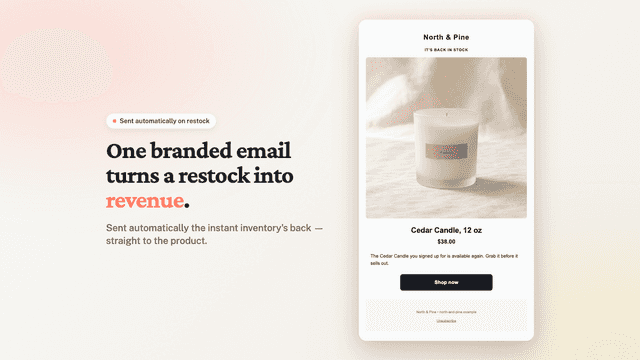
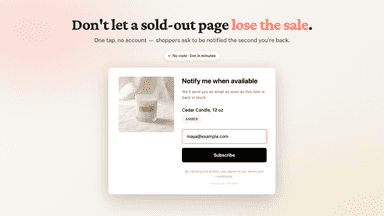
See every featureWhen a product sells out, interested shoppers leave and most never return. Slingshot captures them before they go and brings them back when you restock. Shoppers sign up in one step, no account needed, through an on-site widget you add in the theme editor. The moment you restock, every waiting shopper gets a branded email linking back to the product.
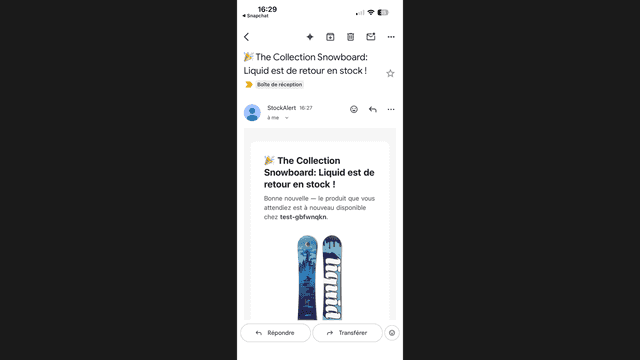
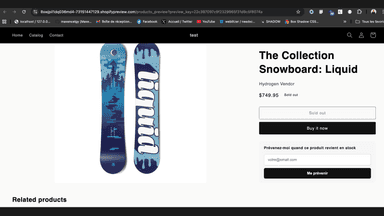
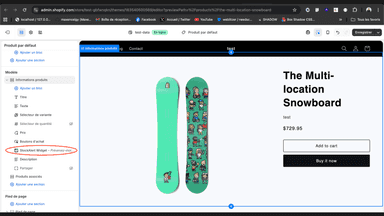
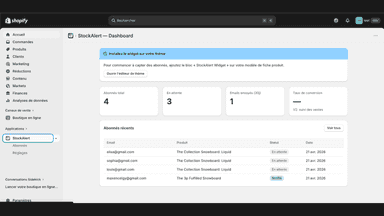
StockAlert capture les visiteurs qui quittent vos fiches produit en rupture, et les rappelle par email automatiquement dès que vous réapprovisionnez. Le widget natif remplace le bouton Épuisé par un champ email en quelques secondes. Côté admin, un dashboard clair suit vos abonnés et vos envois. Conforme RGPD avec base hébergée en Europe, support en français sous 24h, et un plan gratuit pour démarrer sans engagement.
- No-code on-site signup widget for out-of-stock products
- Automatic branded email the moment a product is back in stock
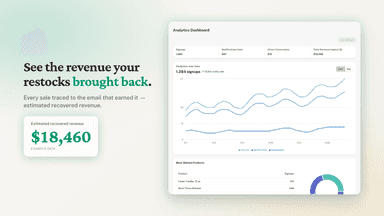
- Revenue attribution that ties each alert to the sale it earned
- Widget natif « Prévenez-moi » : remplace Épuisé par un champ email en 1 clic
- Email de retour en stock automatique dès que vous réapprovisionnez un produit
- Dashboard admin clair : abonnés, envois, export CSV des leads (plan Pro)
All the numbers
Every figure, side by side
A green dot marks the app ahead on a measured figure. Estimates, gaps and apps that leave no storefront trace never take the lead.
Adoption
| Measure |  Slingshot |  StockAlert |
|---|---|---|
| Detected stores | Not published | Not published |
| Net store change, 28 days | 0 | 0 |
| Stores added, 28 days | Not enough data | Not enough data |
| Big-brand share | Not enough data | Not enough data |
| Top store categories | Not published | Not published |
| Top store countries | Not published | Not published |
Reviews
| Measure | Slingshot | StockAlert |
|---|---|---|
| App Store rating | Not published | Not published |
| App Store reviews | Not published | Not published |
| New reviews, 28 days | Not enough data | Not enough data |
| Reviewers a year or more in | Not enough data | Not enough data |
Pricing
| Measure | Slingshot | StockAlert |
|---|---|---|
| Free plan | Not listed | Yes |
| Lowest paid monthly plan | $19/month | $9/month(ahead) |
| Longest free trial | 14 days | 7 days |
| Plans listed | 2 | 2 |
Listing
| Measure | Slingshot | StockAlert |
|---|---|---|
| Shopify category rank | #247 | #403 |
| Shopify App Charts | Not on this week’s charts | Not on this week’s charts |
| Built for Shopify | No | No |
| Launched | Jul 8, 2026 | Jun 1, 2026 |
| Languages | 2 | 2 |
| Developer | nerd with attitude | StockAlert |
FAQ
Slingshot and StockAlert: common questions
- Is Slingshot or StockAlert cheaper?
- Only StockAlert lists a free plan. Paid plans start at $19/month for Slingshot and $9/month for StockAlert. Shoplist compares base prices only between monthly plans in the same currency; usage charges and annual plans vary, so check each plan’s limits.
- What features does each app list that the other doesn’t?
- Slingshot lists 8 the others don’t mention, such as Alert settings, Auto-alerts, Back in stock, Customer demand. StockAlert lists 3 the others don’t mention, such as Automations, Email capture list, Templates. A feature missing from a listing may still be supported; this compares what each App Store listing says.
- Where does this comparison’s data come from?
- Shoplist crawls Shopify storefronts to detect which apps each store runs, and reads each app’s Shopify App Store listing for reviews, pricing, features and integrations. Store counts are as of Oct 13, 2026; estimated figures are labeled.
How Shoplist compares apps
Store counts come from Shoplist’s crawl of Shopify storefronts, which detects the apps each store runs; they are as of Oct 13, 2026. Reviews, ratings, plans, features and integrations come from each app’s Shopify App Store listing. 28-day figures are labeled when estimated, and a figure that is missing or estimated never decides who leads. Read the methodology.