

Singleton | Advanced Discounts vs Vindi Advanced
Two Shopify apps, side by side: detected stores, momentum, reviews, plans, listed features and who runs each. Store counts as of Nov 9, 2026 for Singleton, May 14, 2026 for Vindi Advanced.
The short answer
- Only Singleton lists a free plan.
- Singleton lists 23 features Vindi Advanced’s listing doesn’t mention, including Automations, Bulk discounts, Bulk editing.
Head to head


- United States
- Australia
- United Kingdom
Momentum
New reviews each month
Review pace is the clearest public read on how fast an app is winning new merchants.
Free
- · 0 - 30 online store orders per month
- · Advanced discount conditions
- · Automatic or code-based discounts
- · Live chat & email support
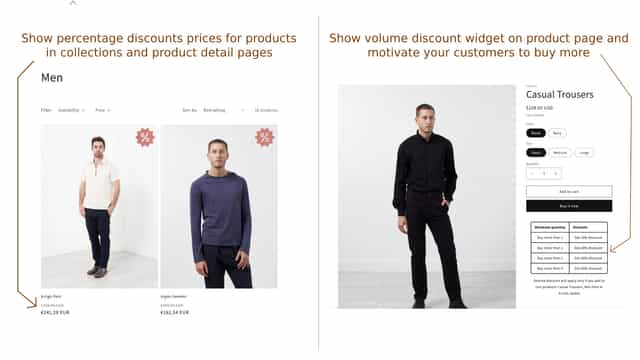
- · Show discount price on product listings
- · Target products/customers/markets
Starter
- · 31 - 100 online store orders per month
- · Advanced discount conditions
- · Automatic or code-based discounts
- · Live chat & email support
- · Show discount price on product listings
- · Target products/customers/markets
Advanced
- · 101 - 500 online store orders per month
- · Advanced discount conditions
- · Automatic or code-based discounts
- · Live chat & email support
- · Show discount price on product listings
- · Target products/customers/markets
Enterprise
- · Advanced discount conditions
- · Automatic or code-based discounts
- · Live chat & email support
- · Show discount price on product listings
- · Target products/customers/markets
- · Unlimited online store orders per month
Coverage counts what each App Store listing names. Every feature, checked off app by app, is in Shoplist.
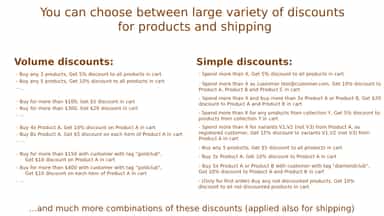
See every featureAutomatically apply discounts for selected customers, products, or cart values. Boost AOV with volume discounts, B2B wholesale pricing, shipping discounts, and countdown timers. Discounts apply automatically or via code, visible in cart drawer, page, and checkout. Target everyone or specific wholesale and B2B customer groups. Set advanced conditions, and highlight deals with discount widgets and timers.
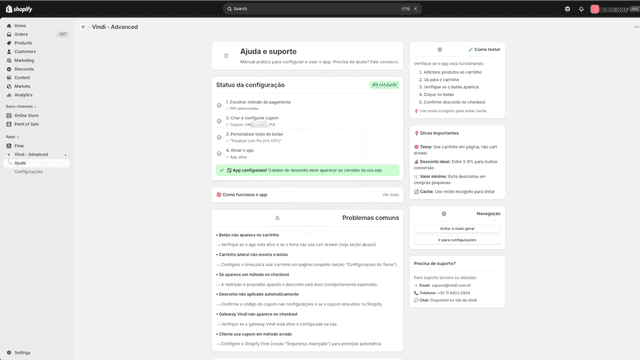
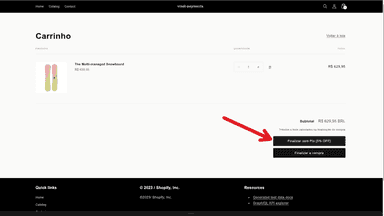
O Vindi Advanced permite oferecer descontos automáticos para clientes que pagam com Pix no checkout. O plugin cria e aplica códigos de cupom em nome da sua loja, para que você não precise gerenciá-los manualmente. Depois de instalado, você escolhe a porcentagem de desconto, define um limite de uso e a data de expiração de cada cupom, além de personalizar o texto do botão exibido durante o checkout.
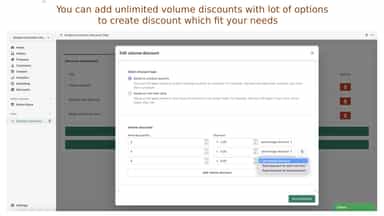
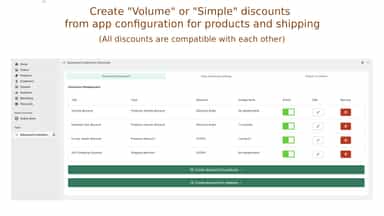
- Create discounts for selected customers, selected products, with selected rules
- Create discounts also for everyone who visit your store with lot of options
- Create volume discounts based on products quantity, or based on cart total value
- Customers will see discounts in all types of cart drawers, cart and checkout
- Desconto para Pix
- Cupom de Desconto Automático
- Pré seleciona método de pagamento no carrinho


All the numbers
Every figure, side by side
A green dot marks the app ahead on a measured figure. Estimates, gaps and apps that leave no storefront trace never take the lead.
Adoption
| Measure |  Singleton |  Vindi Advanced |
|---|---|---|
| Detected stores | 104 | Not published |
| Net store change, 28 days | −1 | 0 |
| Stores added, 28 days | 1 | Not enough data |
| Big-brand share | Not enough data | Not enough data |
| Top store categories | Apparel & Accessories, Home & Garden, Health & Beauty | Not published |
| Top store countries | United States, Australia, United Kingdom | Not published |
Reviews
| Measure | Singleton | Vindi Advanced |
|---|---|---|
| App Store rating | 5.0 ★ | Not published |
| App Store reviews | 35 | Not published |
| New reviews, 28 days | 0 | Not enough data |
| Reviewers a year or more in | Not enough data | Not enough data |
Pricing
| Measure | Singleton | Vindi Advanced |
|---|---|---|
| Free plan | Yes | Not listed |
| Lowest paid monthly plan | $9.99/month | No monthly plan listed |
| Longest free trial | 14 days | Not listed |
| Plans listed | 4 | Not published |
Listing
| Measure | Singleton | Vindi Advanced |
|---|---|---|
| Shopify category rank | #205 | #53 |
| Shopify App Charts | Not on this week’s charts | Not on this week’s charts |
| Built for Shopify | Yes | No |
| Launched | Feb 2, 2023 | May 14, 2026 |
| Languages | 1 | 1 |
| Developer | Singleton software | Vindi |
FAQ
Singleton and Vindi Advanced: common questions
- Is Singleton or Vindi Advanced cheaper?
- Only Singleton lists a free plan. Shoplist compares base prices only between monthly plans in the same currency; usage charges and annual plans vary, so check each plan’s limits.
- What features does each app list that the other doesn’t?
- Singleton lists 23 the others don’t mention, such as Automations, Bulk discounts, Bulk editing, Cart discounts. Vindi Advanced lists 2 the others don’t mention, such as Fixed discounts, Percentage discounts. A feature missing from a listing may still be supported; this compares what each App Store listing says.
- Where does this comparison’s data come from?
- Shoplist crawls Shopify storefronts to detect which apps each store runs, and reads each app’s Shopify App Store listing for reviews, pricing, features and integrations. Store counts are as of Nov 9, 2026 for Singleton, May 14, 2026 for Vindi Advanced; estimated figures are labeled.
How Shoplist compares apps
Store counts come from Shoplist’s crawl of Shopify storefronts, which detects the apps each store runs; they are as of Nov 9, 2026 for Singleton, May 14, 2026 for Vindi Advanced. Reviews, ratings, plans, features and integrations come from each app’s Shopify App Store listing. 28-day figures are labeled when estimated, and a figure that is missing or estimated never decides who leads. Read the methodology.