
Shipping calculator: ShipMagic vs ShippingIQ Freight Calculator
Two Shopify apps, side by side: detected stores, momentum, reviews, plans, listed features and who runs each. Store counts as of Nov 3, 2026 for Shipping calculator, Oct 13, 2026 for ShippingIQ Freight Calculator.
The short answer
- Both list a free plan. Paid plans start at $14/month for Shipping calculator and $29/month for ShippingIQ Freight Calculator.
- Shipping calculator lists 13 features ShippingIQ Freight Calculator’s listing doesn’t mention, including Carrier-based, Customer-based, Delivery time.
Head to head

Momentum
New reviews each month
Review pace is the clearest public read on how fast an app is winning new merchants.
Sandbox / Test
- · Customizable shipping discounts
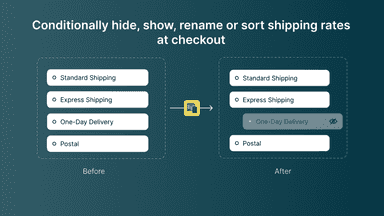
- · Hide, rename, sort shipping rates
- · Live Carrier Rates
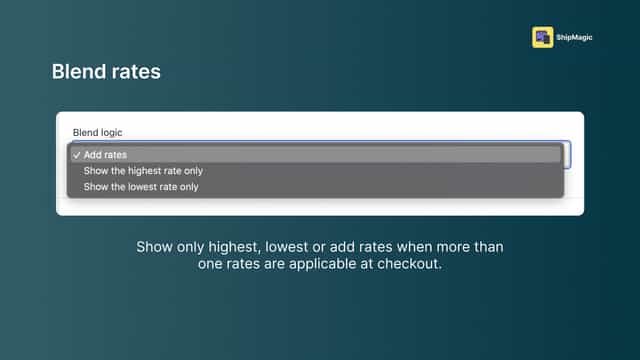
- · Rate blending
- · Rates by zipcode, products, customer
- · Use full app in test mode only
Starter
- · Customizable shipping discounts
- · Hide shipping rates conditionally
- · Live chat + Email support
- · Rename & reorder rates conditionally
- · Use customizations in live mode
- · Use shipping discounts in live mode
Pro
- · Advanced rate blending
- · All features in "Starter" plan
- · Developer API
- · Live Carrier Rates
- · Live chat + Email support
- · Rates by zipcode, products, customer
Pro+
- · All features in "Starter" plan
- · Custom coded shipping rate logic
- · Developer API
- · Live chat + Email support
- · Skilled human developer for coding
- · Use shipping rates in live mode
Free
- · 1 carrier
- · 100 quotes per month
- · Cubic weight calculation
Pro
- · Free shipping rules
- · Freight margin & display modes
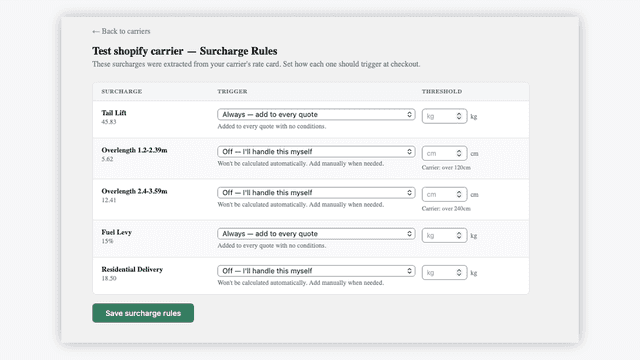
- · Surcharge rules
- · Unlimited carriers
- · Unlimited quotes
Coverage counts what each App Store listing names. Every feature, checked off app by app, is in Shoplist.
See every featureSet up custom shipping rates, rules and discounts in minutes - no coding required. Create shipping rates using product, cart, customer, zipcode, distance, metafields, dimensions and 25+ params to control exactly what shipping rates customers see at checkout. Show live carrier rates, tiered rates, per item rates, percentage rates, etc. Blend shipping rates from multiple profiles or rules.
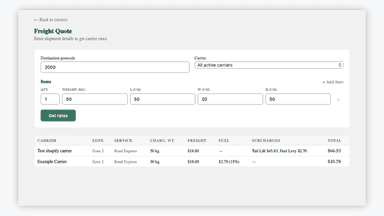
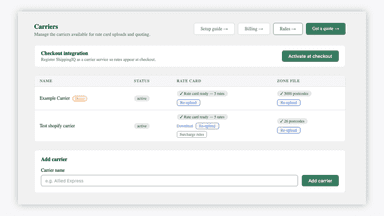
ShippingIQ lets merchants use their own negotiated carrier rate cards to calculate accurate freight costs at checkout. Upload your carrier rate cards and zone files, and ShippingIQ calculates real shipping prices based on destination, weight, and cubic (dimensional) weight. Set shipping thresholds, add surcharges like tail lift or fuel levies, and apply a freight margin.
- Set shipping rates by 25+ parameters like product tag, cart total, pincode, etc
- Assign different package sizes for different product & show live carrier rates
- Charge shipping rates per product in cart
- Avoid doubling of shipping rates because of multiple locations (flat rates only)
- Upload your own carrier rate cards and zone files to quote real freight prices
- Calculates cubic (dimensional) weight, not just actual weight
- Set shipping thresholds, surcharges, and freight margins
- Live freight rates shown to customers at checkout


All the numbers
Every figure, side by side
A green dot marks the app ahead on a measured figure. Estimates, gaps and apps that leave no storefront trace never take the lead.
Adoption
| Measure | Shipping calculator |  ShippingIQ Freight Calculator |
|---|---|---|
| Detected stores | Not published | Not published |
| Net store change, 28 days | 0 | 0 |
| Stores added, 28 days | Not enough data | Not enough data |
| Big-brand share | Not enough data | Not enough data |
| Top store categories | Not published | Not published |
| Top store countries | Not published | Not published |
Reviews
| Measure | Shipping calculator | ShippingIQ Freight Calculator |
|---|---|---|
| App Store rating | 4.9 ★ | Not published |
| App Store reviews | 123 | Not published |
| New reviews, 28 days | 1 | Not enough data |
| Reviewers a year or more in | 35% | Not enough data |
Pricing
| Measure | Shipping calculator | ShippingIQ Freight Calculator |
|---|---|---|
| Free plan | Yes | Yes |
| Lowest paid monthly plan | $14/month(ahead) | $29/month |
| Longest free trial | 14 days | Not listed |
| Plans listed | 4 | 2 |
Listing
| Measure | Shipping calculator | ShippingIQ Freight Calculator |
|---|---|---|
| Shopify category rank | #41 | Not enough data |
| Shopify App Charts | Not on this week’s charts | Not on this week’s charts |
| Built for Shopify | No | No |
| Launched | Jul 7, 2023 | Jul 13, 2026 |
| Languages | 1 | 1 |
| Developer | Speedy Squirrel | ShippingIQ - Freight Calculator |
FAQ
Shipping calculator and ShippingIQ Freight Calculator: common questions
- Is Shipping calculator or ShippingIQ Freight Calculator cheaper?
- Both list a free plan. Paid plans start at $14/month for Shipping calculator and $29/month for ShippingIQ Freight Calculator. Shoplist compares base prices only between monthly plans in the same currency; usage charges and annual plans vary, so check each plan’s limits.
- What features does each app list that the other doesn’t?
- Shipping calculator lists 13 the others don’t mention, such as Carrier-based, Customer-based, Delivery time, Distance-based. ShippingIQ Freight Calculator lists 1 the others don’t mention, such as Dimension-based. A feature missing from a listing may still be supported; this compares what each App Store listing says.
- Where does this comparison’s data come from?
- Shoplist crawls Shopify storefronts to detect which apps each store runs, and reads each app’s Shopify App Store listing for reviews, pricing, features and integrations. Store counts are as of Nov 3, 2026 for Shipping calculator, Oct 13, 2026 for ShippingIQ Freight Calculator; estimated figures are labeled.
How Shoplist compares apps
Store counts come from Shoplist’s crawl of Shopify storefronts, which detects the apps each store runs; they are as of Nov 3, 2026 for Shipping calculator, Oct 13, 2026 for ShippingIQ Freight Calculator. Reviews, ratings, plans, features and integrations come from each app’s Shopify App Store listing. 28-day figures are labeled when estimated, and a figure that is missing or estimated never decides who leads. Read the methodology.