
ShipCelero vs Worklea Weight Split
Two Shopify apps, side by side: detected stores, momentum, reviews, plans, listed features and who runs each. Store counts as of Jun 7, 2026 for ShipCelero, Nov 6, 2026 for Worklea Weight Split.
The short answer
- Only Worklea Weight Split lists a free plan.
- ShipCelero lists 10 features Worklea Weight Split’s listing doesn’t mention, including Bulk printing, Carrier selection, Customs documents.
Head to head

Standard
Free
- · Email support
- · See orders over your weight limit
- · Split any order with one click
Pro
- · Automatic splitting of new orders
- · Everything in Free
Coverage counts what each App Store listing names. Every feature, checked off app by app, is in Shoplist.
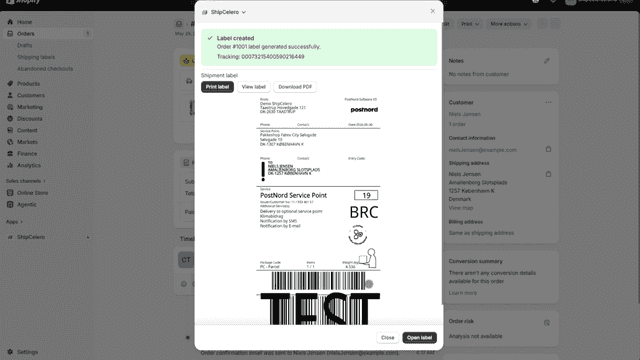
See every featureShipCelero helps merchants prepare shipments from Shopify orders with less repeated typing. Connect your Shopify store to a ShipCelero account to keep sender details, recipient details, product information, and draft shipments available when preparing future shipments. Merchants can reuse saved shipment details, continue draft shipments later, and keep shipping information organized in one place.
Couriers add fees or refuse parcels that are over their weight limit, so heavy orders often have to be divided by hand. Weight Split does it for you. Set your courier's limit once. When an order is heavier, Weight Split packs its items into parcels that each fit and adds them to the order as separate fulfillments, ready for their own labels. The order, payment, sales reports and inventory are not changed.
- Generate shipping labels without leaving Shopify Admin
- Create labels for multiple orders in one batch
- Split one order into multiple packages with separate labels
- Sync tracking numbers and fulfill orders automatically
- Splits new orders over your weight limit automatically as they come in
- Packs the heaviest items first to keep the number of parcels low
- See every order over the limit and split any of them with one click
- Leaves the order, payment, revenue and inventory exactly as they were

All the numbers
Every figure, side by side
A green dot marks the app ahead on a measured figure. Estimates, gaps and apps that leave no storefront trace never take the lead.
Adoption
| Measure |  ShipCelero | |
|---|---|---|
| Detected stores | Not published | Not published |
| Net store change, 28 days | 0 | 0 |
| Stores added, 28 days | Not enough data | Not enough data |
| Big-brand share | Not enough data | Not enough data |
| Top store categories | Not published | Not published |
| Top store countries | Not published | Not published |
Reviews
| Measure | ShipCelero | |
|---|---|---|
| App Store rating | Not published | Not published |
| App Store reviews | Not published | Not published |
| New reviews, 28 days | Not enough data | Not enough data |
| Reviewers a year or more in | Not enough data | Not enough data |
Pricing
| Measure | ShipCelero | |
|---|---|---|
| Free plan | Not listed | Yes |
| Lowest paid monthly plan | No monthly plan listed | $9.99/month |
| Longest free trial | Not listed | 7 days |
| Plans listed | 1 | 2 |
Listing
| Measure | ShipCelero | |
|---|---|---|
| Shopify category rank | #1028 | Not enough data |
| Shopify App Charts | Not on this week’s charts | Not on this week’s charts |
| Built for Shopify | No | No |
| Launched | Jun 4, 2026 | Nov 6, 2026 |
| Languages | 1 | 1 |
| Developer | ShipCelero | Worklea Services |
FAQ
ShipCelero and Worklea Weight Split: common questions
- Is ShipCelero or Worklea Weight Split cheaper?
- Only Worklea Weight Split lists a free plan. Shoplist compares base prices only between monthly plans in the same currency; usage charges and annual plans vary, so check each plan’s limits.
- What features does each app list that the other doesn’t?
- ShipCelero lists 10 the others don’t mention, such as Bulk printing, Carrier selection, Customs documents, Label creation. Worklea Weight Split lists 1 the others don’t mention, such as Order updates. A feature missing from a listing may still be supported; this compares what each App Store listing says.
- Where does this comparison’s data come from?
- Shoplist crawls Shopify storefronts to detect which apps each store runs, and reads each app’s Shopify App Store listing for reviews, pricing, features and integrations. Store counts are as of Jun 7, 2026 for ShipCelero, Nov 6, 2026 for Worklea Weight Split; estimated figures are labeled.
How Shoplist compares apps
Store counts come from Shoplist’s crawl of Shopify storefronts, which detects the apps each store runs; they are as of Jun 7, 2026 for ShipCelero, Nov 6, 2026 for Worklea Weight Split. Reviews, ratings, plans, features and integrations come from each app’s Shopify App Store listing. 28-day figures are labeled when estimated, and a figure that is missing or estimated never decides who leads. Read the methodology.