

ShipCalc: Shipping Calculator vs ShipSplit
Two Shopify apps, side by side: detected stores, momentum, reviews, plans, listed features and who runs each. Store counts as of Oct 14, 2026.
The short answer
- Paid plans start at $9.99/month for ShipCalc and $9/month for ShipSplit.
- ShipCalc lists 14 features ShipSplit’s listing doesn’t mention, including Carrier-based, Customer-based, Delivery date.
Head to head


Standard
- · 24/7 support
- · Analytics by destination
- · Custom styling and CSS editor
- · GA4, GTM and Meta Pixel events
- · Quotes by postcode or country
- · Rates on product, cart and cart drawer
Starter
Growth
Pro
Coverage counts what each App Store listing names. Every feature, checked off app by app, is in Shoplist.
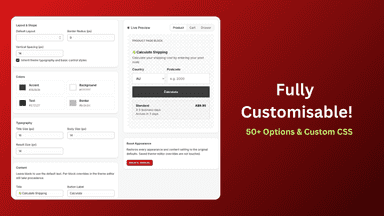
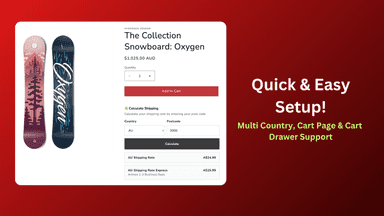
See every featureShipCalc shows the shipping rates you already set up in Shopify on product pages, the cart page and cart drawers. Shoppers enter a postcode, or simply pick a country, to see delivery options and prices before they reach checkout. There are no separate rate tables to maintain, because every quote comes from your live Shopify shipping settings.
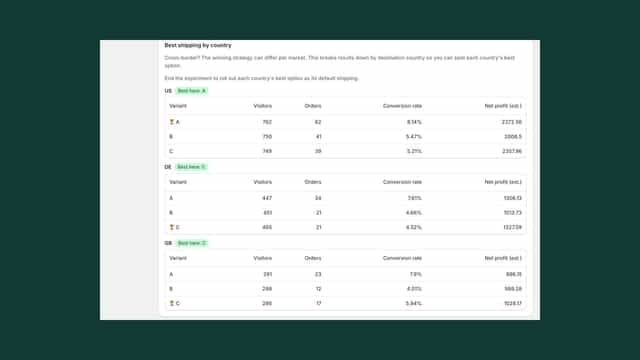
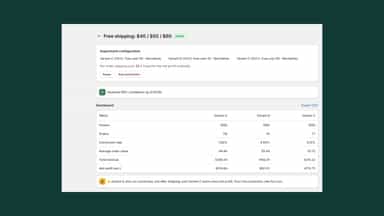
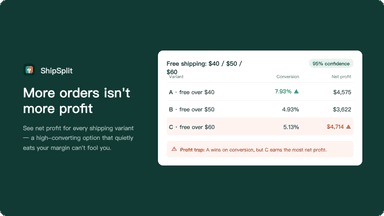
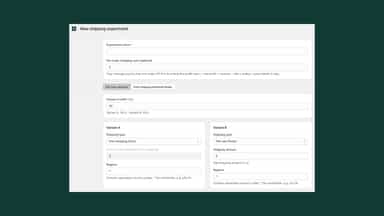
ShipSplit lets you A/B test shipping options on real shoppers. Split checkout traffic between strategies — free shipping, a flat rate, or free over a set amount — and compare conversion rate, order value, and net profit for each, with a confidence score. Test several free-shipping thresholds at once and compare them. See results by destination country and apply a different winning option per country.
- Show shipping rates on product pages.
- Show rates on cart pages and compatible cart drawers.
- Use your existing Shopify shipping rates.
- Customize text, colors, and layout.
- A/B test shipping options — free shipping, flat rates, and thresholds
- See net profit per variant, not just conversion rate
- Free-shipping threshold finder — test several at once
- See results by destination country and apply a different option per country


All the numbers
Every figure, side by side
A green dot marks the app ahead on a measured figure. Estimates, gaps and apps that leave no storefront trace never take the lead.
Adoption
| Measure |  ShipCalc |  ShipSplit |
|---|---|---|
| Detected stores | Not published | Not published |
| Net store change, 28 days | 0 | 0 |
| Stores added, 28 days | Not enough data | Not enough data |
| Big-brand share | Not enough data | Not enough data |
| Top store categories | Not published | Not published |
| Top store countries | Not published | Not published |
Reviews
| Measure | ShipCalc | ShipSplit |
|---|---|---|
| App Store rating | 5.0 ★ | Not published |
| App Store reviews | 1 | Not published |
| New reviews, 28 days | Not enough data | Not enough data |
| Reviewers a year or more in | Not enough data | Not enough data |
FAQ
ShipCalc and ShipSplit: common questions
- Is ShipCalc or ShipSplit cheaper?
- Paid plans start at $9.99/month for ShipCalc and $9/month for ShipSplit. Shoplist compares base prices only between monthly plans in the same currency; usage charges and annual plans vary, so check each plan’s limits.
- What features does each app list that the other doesn’t?
- ShipCalc lists 14 the others don’t mention, such as Carrier-based, Customer-based, Delivery date, Delivery time. ShipSplit lists 3 the others don’t mention, such as Custom rules, Hide rates, Rename options. A feature missing from a listing may still be supported; this compares what each App Store listing says.
- Where does this comparison’s data come from?
- Shoplist crawls Shopify storefronts to detect which apps each store runs, and reads each app’s Shopify App Store listing for reviews, pricing, features and integrations. Store counts are as of Oct 14, 2026; estimated figures are labeled.
How Shoplist compares apps
Store counts come from Shoplist’s crawl of Shopify storefronts, which detects the apps each store runs; they are as of Oct 14, 2026. Reviews, ratings, plans, features and integrations come from each app’s Shopify App Store listing. 28-day figures are labeled when estimated, and a figure that is missing or estimated never decides who leads. Read the methodology.