
Revlo: WhatsApp Chat Widget vs Shopinou WhatsApp & Social
Two Shopify apps, side by side: detected stores, momentum, reviews, plans, listed features and who runs each. Store counts as of Nov 9, 2026 for Revlo, Oct 25, 2026 for Shopinou WhatsApp & Social.
The short answer
- Only Shopinou WhatsApp & Social lists a free plan.
- Shopinou WhatsApp & Social lists 3 features Revlo’s listing doesn’t mention, including Agent avatar, Business hours, Chat assignment.
Head to head

Free
- · Greeting bubble with photo
- · Looks, corner and devices
- · One number
Pro
- · Everything in Free
- · Opening hours
- · Out-of-hours message
- · Several people, rotated
Coverage counts what each App Store listing names. Every feature, checked off app by app, is in Shoplist.
See every featureRevlo adds a WhatsApp chat button to every page of your store. Shoppers tap “Chat with us” and a WhatsApp chat with your business number opens, with a message you choose already typed: in the WhatsApp app on phones, or WhatsApp Web on computers. Write your own button text or show the WhatsApp icon alone, pick any color and corner, and add a greeting card that invites questions.
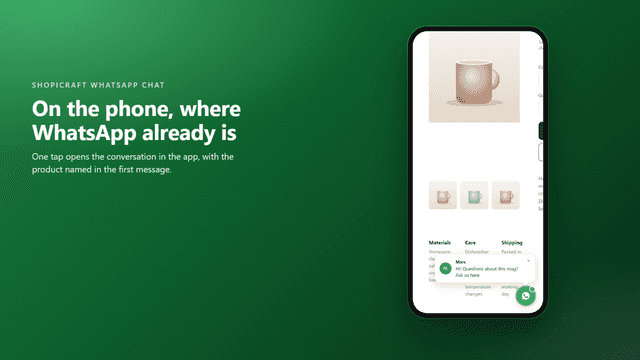
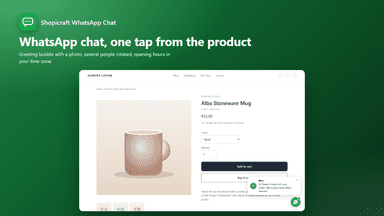
A floating WhatsApp button that opens a conversation with you, with the page the shopper is on already named in the message. Set your number, write the greeting, and choose the look, corner and devices. A greeting bubble with your photo appears after a delay and can be dismissed. Several people can take turns answering, and opening hours can show a message when you are closed, or hide the button until you are back.
- WhatsApp chat button on every page, for mobile and desktop shoppers
- Your own button text, like “Chat with us”, or the WhatsApp icon alone
- Pre-filled message and greeting card so every chat starts with context
- Any button color, either bottom corner, and an adjustable height
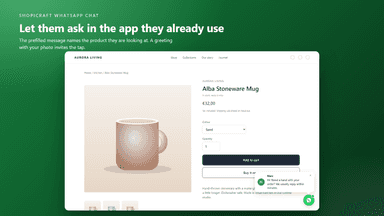
- Prefilled message names the product the shopper is looking at
- Greeting bubble with your photo, shown after a delay
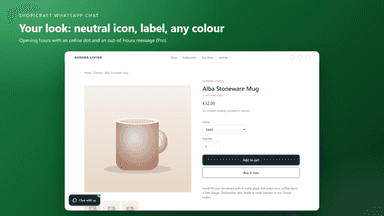
- WhatsApp or neutral icon, two shapes, three sizes, any colour
- Several people, rotated automatically
All the numbers
Every figure, side by side
A green dot marks the app ahead on a measured figure. Estimates, gaps and apps that leave no storefront trace never take the lead.
Adoption
| Measure |  Shopinou WhatsApp & Social | |
|---|---|---|
| Detected stores | Not published | Not published |
| Net store change, 28 days | 0 | 0 |
| Stores added, 28 days | Not enough data | Not enough data |
| Big-brand share | Not enough data | Not enough data |
| Top store categories | Not published | Not published |
| Top store countries | Not published | Not published |
Reviews
| Measure | Shopinou WhatsApp & Social | |
|---|---|---|
| App Store rating | Not published | Not published |
| App Store reviews | Not published | Not published |
| New reviews, 28 days | Not enough data | Not enough data |
| Reviewers a year or more in | Not enough data | Not enough data |
Pricing
| Measure | Shopinou WhatsApp & Social | |
|---|---|---|
| Free plan | Not listed | Yes |
| Lowest paid monthly plan | No monthly plan listed | $2.99/month |
| Longest free trial | Not listed | 7 days |
| Plans listed | Not published | 2 |
Listing
| Measure | Shopinou WhatsApp & Social | |
|---|---|---|
| Shopify category rank | Not enough data | #716 |
| Shopify App Charts | Not on this week’s charts | Not on this week’s charts |
| Built for Shopify | No | No |
| Launched | Nov 4, 2026 | Aug 31, 2026 |
| Languages | 1 | 1 |
| Developer | The Meno Lab | Shopinou Solutions |
FAQ
Revlo and Shopinou WhatsApp & Social: common questions
- Is Revlo or Shopinou WhatsApp & Social cheaper?
- Only Shopinou WhatsApp & Social lists a free plan. Shoplist compares base prices only between monthly plans in the same currency; usage charges and annual plans vary, so check each plan’s limits.
- What features does each app list that the other doesn’t?
- Revlo lists 1 the others don’t mention, such as Live chat. Shopinou WhatsApp & Social lists 3 the others don’t mention, such as Agent avatar, Business hours, Chat assignment. A feature missing from a listing may still be supported; this compares what each App Store listing says.
- Where does this comparison’s data come from?
- Shoplist crawls Shopify storefronts to detect which apps each store runs, and reads each app’s Shopify App Store listing for reviews, pricing, features and integrations. Store counts are as of Nov 9, 2026 for Revlo, Oct 25, 2026 for Shopinou WhatsApp & Social; estimated figures are labeled.
How Shoplist compares apps
Store counts come from Shoplist’s crawl of Shopify storefronts, which detects the apps each store runs; they are as of Nov 9, 2026 for Revlo, Oct 25, 2026 for Shopinou WhatsApp & Social. Reviews, ratings, plans, features and integrations come from each app’s Shopify App Store listing. 28-day figures are labeled when estimated, and a figure that is missing or estimated never decides who leads. Read the methodology.