

QuickEdit: Bulk Product Edit vs TCG Automate
Two Shopify apps, side by side: detected stores, momentum, reviews, plans, listed features and who runs each. Store counts as of Nov 1, 2026 for QuickEdit, Oct 13, 2026 for TCG Automate.
The short answer
- Only QuickEdit lists a free plan. Paid plans start at $9/month for QuickEdit and $10/month for TCG Automate.
- QuickEdit lists 9 features TCG Automate’s listing doesn’t mention, including Collections, Descriptions, Images.
Head to head


Bulk edit product descriptions, tags, prices, SEO, and more
Momentum
New reviews each month
Review pace is the clearest public read on how fast an app is winning new merchants.
Demo
- · 10 bulk edits per month
- · 10 collections per task
- · 30 orders / customers per task
- · 30-day task history and backup
- · 50 products / 500 variants per task
Basic
- · 100 collections per task
- · 300 orders / customers per task
- · 500 products / 5,000 variants per task
- · 60-day task history and backup
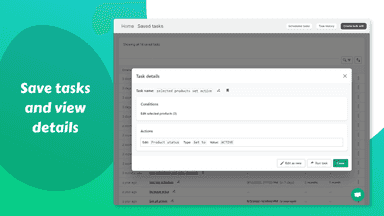
- · Save tasks
- · Unlimited bulk edits
Advanced
- · 1000 collections per task
- · 3000 orders / customers per task
- · 5000 products / 50,000 variants per task
- · 90-day task history and backup
- · Save tasks
- · Schedule bulk edits
Professional
- · 180-day task history and backup
- · Recurring tasks
- · Save tasks
- · Schedule bulk edits
- · Unlimited bulk edits
- · Unlimited collections per task
Beginner
- · 500 AI scans per month
- · Unused scans rollover (limit 500)
Standard
- · 1,000 AI scans per month
- · Everything in Beginner
- · PSA/CGC listing creation w/ cert lookup
- · Unused scans rollover (limit 1,000)
Pro
- · 3,000 AI scans per month
- · Cross list to other marketplaces
- · Everything in Standard
- · Unused scans rollover (limit 3,000)
Elite
- · 10,000 AI scans per month
- · Everything in Pro
- · Unlimited ROCA sorter listings
- · Unused scans rollover (limit 10,000)
Ultimate
- · 20,000 AI scans per month
- · Custome feature requests
- · Everything in Elite
- · Priority customer support
- · Unused scans rollover (limit 20,000)
Legendary
- · 30,000 AI scans per month
- · Everything in Ultimate
- · Unused scans rollover (limit 30,000)
Coverage counts what each App Store listing names. Every feature, checked off app by app, is in Shoplist.
See every featureQuickly bulk edit thousands of products, collections, orders, and more. Use advanced rules to modify titles, descriptions, tags, prices, inventory, metafields, and more in bulk. Easily find and replace text, edit Google Shopping fields, or adjust pricing. Add, remove, and sort product options & variants. Preview changes as CSV and safely revert any task to undo mistakes.
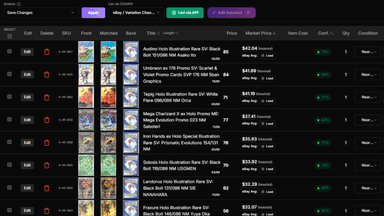
TCG Automate helps trading card and collectibles sellers turn card images and catalog data into Shopify products. Merchants can upload or build a batch, review matched card details, edit titles, prices, SKUs, conditions, quantities, and images, then publish products to Shopify with inventory tracking enabled.
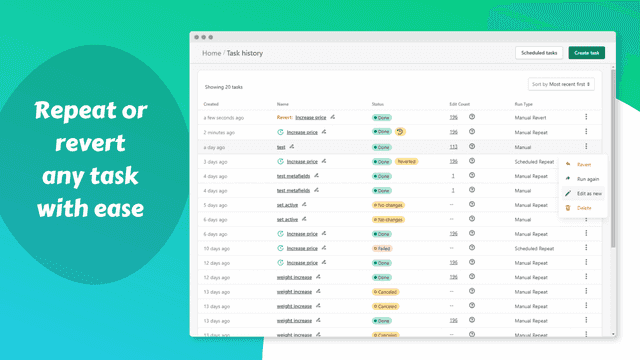
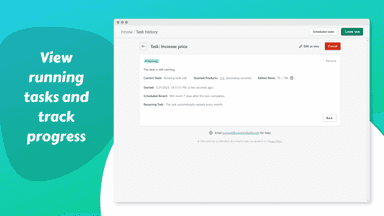
- Quickly bulk edit thousands of products or variants and revert edits with ease.
- Edit many different product and variant fields with different action types.
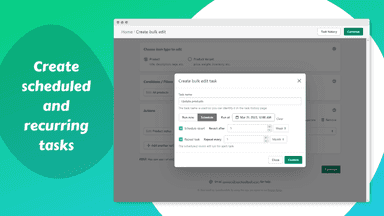
- Schedule bulk edits and reverts to run once or repeat automatically.
- Filter products or variants to edit with intuitive conditions.
- Create Shopify products from prepared card batches
- Use front and back card images on product listings
- Set prices, quantities, SKUs, tags, and product details before publishing
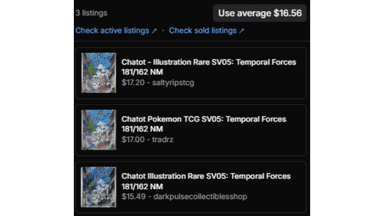
- Review card matches and market data before listing

All the numbers
Every figure, side by side
A green dot marks the app ahead on a measured figure. Estimates, gaps and apps that leave no storefront trace never take the lead.
Adoption
| Measure |  QuickEdit |  TCG Automate |
|---|---|---|
| Detected stores | Not published | Not published |
| Net store change, 28 days | 0 | 0 |
| Stores added, 28 days | Not enough data | Not enough data |
| Big-brand share | Not enough data | Not enough data |
| Top store categories | Not published | Not published |
| Top store countries | Not published | Not published |
Reviews
| Measure | QuickEdit | TCG Automate |
|---|---|---|
| App Store rating | 4.9 ★ | Not published |
| App Store reviews | 106 | Not published |
| New reviews, 28 days | 1 | Not enough data |
| Reviewers a year or more in | 42% | Not enough data |
Pricing
| Measure | QuickEdit | TCG Automate |
|---|---|---|
| Free plan | Yes | Not listed |
| Lowest paid monthly plan | $9/month(ahead) | $10/month |
| Longest free trial | Not listed | Not listed |
| Plans listed | 4 | 6 |
Listing
| Measure | QuickEdit | TCG Automate |
|---|---|---|
| Shopify category rank | #15(ahead) | #75 |
| Shopify App Charts | Not on this week’s charts | Not on this week’s charts |
| Built for Shopify | Yes | No |
| Launched | Feb 7, 2022 | Aug 3, 2026 |
| Languages | 1 | 1 |
| Developer | QuickBulkEdit | TCG Automate |
FAQ
QuickEdit and TCG Automate: common questions
- Is QuickEdit or TCG Automate cheaper?
- Only QuickEdit lists a free plan. Paid plans start at $9/month for QuickEdit and $10/month for TCG Automate. Shoplist compares base prices only between monthly plans in the same currency; usage charges and annual plans vary, so check each plan’s limits.
- What features does each app list that the other doesn’t?
- QuickEdit lists 9 the others don’t mention, such as Collections, Descriptions, Images, Metafields. A feature missing from a listing may still be supported; this compares what each App Store listing says.
- Where does this comparison’s data come from?
- Shoplist crawls Shopify storefronts to detect which apps each store runs, and reads each app’s Shopify App Store listing for reviews, pricing, features and integrations. Store counts are as of Nov 1, 2026 for QuickEdit, Oct 13, 2026 for TCG Automate; estimated figures are labeled.
How Shoplist compares apps
Store counts come from Shoplist’s crawl of Shopify storefronts, which detects the apps each store runs; they are as of Nov 1, 2026 for QuickEdit, Oct 13, 2026 for TCG Automate. Reviews, ratings, plans, features and integrations come from each app’s Shopify App Store listing. 28-day figures are labeled when estimated, and a figure that is missing or estimated never decides who leads. Read the methodology.