

Webgility x QuickBooks Desktop vs MyWorks Sync for QuickBooks
Two Shopify apps, side by side: detected stores, momentum, reviews, plans, listed features and who runs each. Store counts as of Nov 15, 2026 for Webgility x QuickBooks Desktop, Nov 18, 2026 for MyWorks Sync for QuickBooks.
The short answer
- On the Shopify App Store: Webgility x QuickBooks Desktop 4.9 from 524 reviews and MyWorks Sync for QuickBooks 4.6 from 59 reviews.
- Only MyWorks Sync for QuickBooks lists a free plan. Paid plans start at $139/month for Webgility x QuickBooks Desktop and $24/month for MyWorks Sync for QuickBooks.
- Webgility x QuickBooks Desktop lists 9 features MyWorks Sync for QuickBooks’s listing doesn’t mention, including COGS tracking, Custom reports, Expense tracking.
Head to head


- Canada
- United States
Momentum
New reviews each month
Review pace is the clearest public read on how fast an app is winning new merchants.
Plus
- · 1 sales channel
- · 3 months historical data
- · 500 orders per month
- · Multi-state & International tax support
- · Payout & settlement reconciliation
- · Real-time order-level sync
Advanced
- · 1000 orders per month
- · 2 sales channels
- · 3 months historical data
Premium
- · 3 Sales Channels
- · 3000 orders per month
- · Ecommerce reconciliation audit
- · Everything in Advanced plan, plus:
- · Findings report with recommendation
- · Quarterly review by accounting partner
Complete
- · 3 months historical data
- · 5 sales channels
- · 5,000 orders per month
- · Guaranteed Monthly Reconciliation
- · Monthly Accountant Review
- · Monthly Ecommerce Report
Launch
- · Email Support
- · Sync Historical Data
- · Sync Orders as Invoices or Sales Receipt
- · Sync Products, Inventory, Price, Cost
- · Sync every hour
- · Sync up to 20 orders / month
Rise
- · Advanced Settings & Features
- · Email Support
- · Everything in Launch, plus:
- · Free Setup Call/Screenshare
- · Sync every 30 minutes
- · Sync up to 100 orders / month
Grow
- · Custom Field Mapping
- · Everything in Rise, plus:
- · Priority Email Support
- · Sync Inventory, Price & Cost both ways
- · Sync Orders individually or as a Summary
- · Sync Payments from QuickBooks to Shopify
Scale
- · Advanced Settings & Features
- · Display QB Invoices in Shopify store
- · Everything in Grow, plus:
- · Shopify Plus B2B Features
- · Sync Historical Data
- · Sync Purchase Orders from Stocky
Coverage counts what each App Store listing names. Every feature, checked off app by app, is in Shoplist.
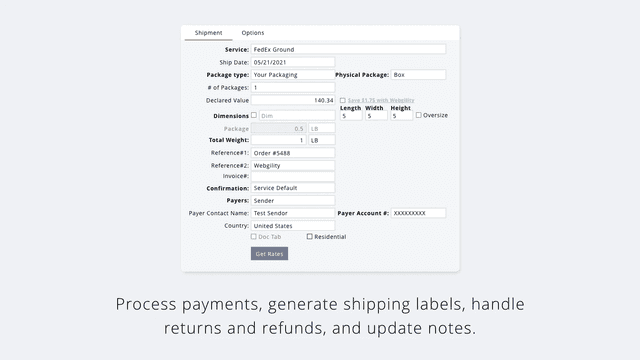
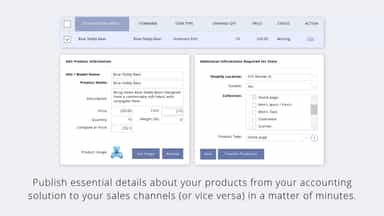
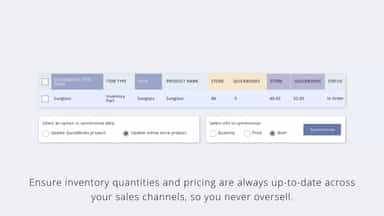
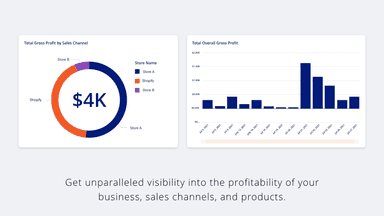
See every featureIf you're managing Shopify alongside Amazon, eBay, or Walmart and you're still manually entering orders into QuickBooks Desktop, your books are wrong and you know it. Webgility syncs every channel to QuickBooks Desktop automatically. Orders, inventory, payouts, fees, taxes, and reconciliation, all synced in real time, without a single manual entry.
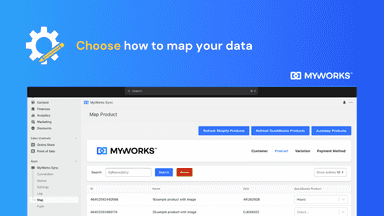
Simplify your ecommerce accounting with our powerful QuickBooks Online integration. Using QB Desktop or Xero? See our other Shopify apps. Seamlessly sync your data with QuickBooks: customers, orders, payments, payouts, purchase orders, products, inventory levels, pricing & more. Tailor to your workflow with features like automap, custom fields and advanced settings.
- Detailed accounting sync posts transaction events as individual line items.
- Shopify reconciliation matches bank deposits and payouts quickly and accurately.
- Accounting automation eliminates errors from manual bookkeeping.
- Multichannel inventory sync updates all product listings with each sale.
- Have peace of mind with up-to-date, accurate data in both Shopify and QuickBooks
- Sync individual order details with precision and accuracy
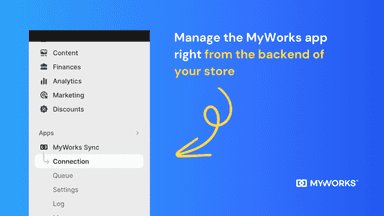
- Manage the sync directly from Shopify
- Advanced features like custom field mapping, transaction fee support and more


All the numbers
Every figure, side by side
A green dot marks the app ahead on a measured figure. Estimates, gaps and apps that leave no storefront trace never take the lead.
Adoption
| Measure |  Webgility x QuickBooks Desktop |  MyWorks Sync for QuickBooks |
|---|---|---|
| Detected stores | Not published | 5 |
| Net store change, 28 days | 0 | 0 |
| Stores added, 28 days | Not enough data | Not enough data |
| Big-brand share | Not enough data | Not enough data |
| Top store categories | Not published | Food, Beverages & Tobacco, Office Supplies, Religious & Ceremonial |
| Top store countries | Not published | Canada, United States |
Reviews
| Measure | Webgility x QuickBooks Desktop | MyWorks Sync for QuickBooks |
|---|---|---|
| App Store rating | 4.9 ★(ahead) | 4.6 ★ |
| App Store reviews | 524(ahead) | 59 |
| New reviews, 28 days | 12(ahead) | 2 |
| Reviewers a year or more in | 23%(ahead) | 4% |
Pricing
| Measure | Webgility x QuickBooks Desktop | MyWorks Sync for QuickBooks |
|---|---|---|
| Free plan | Not listed | Yes |
| Lowest paid monthly plan | $139/month | $24/month(ahead) |
| Longest free trial | 15 days | Not listed |
| Plans listed | 4 | 4 |
Listing
| Measure | Webgility x QuickBooks Desktop | MyWorks Sync for QuickBooks |
|---|---|---|
| Shopify category rank | #16 | #7(ahead) |
| Shopify App Charts | #7 on Featured by Shopify in Accounting | #9 in Accounting |
| Built for Shopify | No | Yes |
| Launched | May 30, 2013 | Nov 24, 2023 |
| Languages | 1 | 1 |
| Developer | Webgility | MyWorks |
FAQ
Webgility x QuickBooks Desktop and MyWorks Sync for QuickBooks: common questions
- Is Webgility x QuickBooks Desktop or MyWorks Sync for QuickBooks cheaper?
- Only MyWorks Sync for QuickBooks lists a free plan. Paid plans start at $139/month for Webgility x QuickBooks Desktop and $24/month for MyWorks Sync for QuickBooks. Shoplist compares base prices only between monthly plans in the same currency; usage charges and annual plans vary, so check each plan’s limits.
- Which has better reviews, Webgility x QuickBooks Desktop or MyWorks Sync for QuickBooks?
- On the Shopify App Store: Webgility x QuickBooks Desktop 4.9 from 524 reviews and MyWorks Sync for QuickBooks 4.6 from 59 reviews.
- What features does each app list that the other doesn’t?
- Webgility x QuickBooks Desktop lists 9 the others don’t mention, such as COGS tracking, Custom reports, Expense tracking, Income and balance. MyWorks Sync for QuickBooks lists 6 the others don’t mention, such as Automated alerts, Custom, Detailed logs, Error reports. A feature missing from a listing may still be supported; this compares what each App Store listing says.
- Where does this comparison’s data come from?
- Shoplist crawls Shopify storefronts to detect which apps each store runs, and reads each app’s Shopify App Store listing for reviews, pricing, features and integrations. Store counts are as of Nov 15, 2026 for Webgility x QuickBooks Desktop, Nov 18, 2026 for MyWorks Sync for QuickBooks; estimated figures are labeled.
How Shoplist compares apps
Store counts come from Shoplist’s crawl of Shopify storefronts, which detects the apps each store runs; they are as of Nov 15, 2026 for Webgility x QuickBooks Desktop, Nov 18, 2026 for MyWorks Sync for QuickBooks. Reviews, ratings, plans, features and integrations come from each app’s Shopify App Store listing. 28-day figures are labeled when estimated, and a figure that is missing or estimated never decides who leads. Read the methodology.