
Quarter: Badges & Labels vs WSP ‑ Product Badge
Two Shopify apps, side by side: detected stores, momentum, reviews, plans, listed features and who runs each. Store counts as of Nov 11, 2026 for Quarter, Nov 16, 2026 for WSP.
The short answer
- Only Quarter lists a free plan.
- Quarter lists 5 features WSP’s listing doesn’t mention, including Fonts, Landing pages, Manual position.
Head to head

Free
- · 1 badge per product
- · Custom text, colors, and shapes
- · Full preset library (30 badge presets)
- · Manual product & collection assignment
- · Up to 2 active badges
Pro
- · Automatic rules by tag or collection
- · Everything in Free
- · Priority support
- · Scheduled start and end dates
- · Stack up to 3 badges per product
- · Unlimited active badges
Coverage counts what each App Store listing names. Every feature, checked off app by app, is in Shoplist.
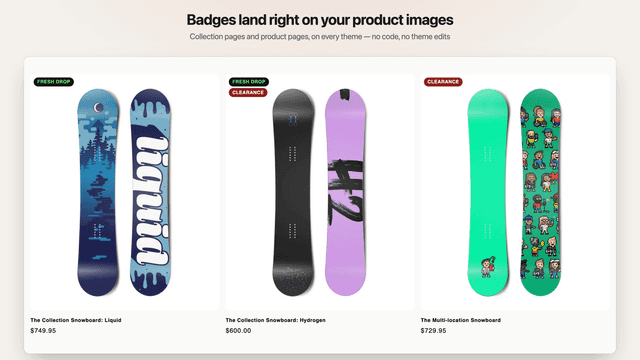
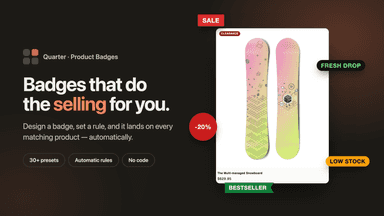
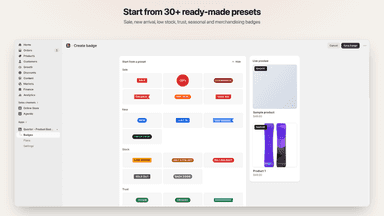
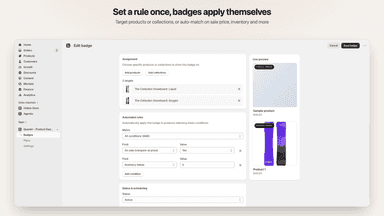
See every featureQuarter adds badges and labels to your product images so shoppers can see what is on sale, newly added, or running low without opening the product page. Pick a preset or design your own text, color, and shape, then place it anywhere on the image. Assign badges to individual products and collections, or let rules apply them automatically from tags, collections, sale status, inventory, and product age.
Product Badge lets merchants add badges such as Sale, New, Low stock, Top seller and custom labels to product images. Badges appear on collection, product, search and home pages. Merchants create rules, choose the style and position of each badge, and can schedule when it shows. Badges update automatically when prices, stock or collections change.
- Design badges with your own text, colors, shapes, and image placement
- Apply badges automatically by tag, collection, sale, stock level, and more
- Schedule badges to start and end on their own for sales and seasonal drops
- Show badges on collection grids, search results, and product pages
- Schedule badges to start and end on set dates
- Works as a theme app embed, no theme code edits
All the numbers
Every figure, side by side
A green dot marks the app ahead on a measured figure. Estimates, gaps and apps that leave no storefront trace never take the lead.
Adoption
| Measure |  Quarter | |
|---|---|---|
| Detected stores | Not published | Not published |
| Net store change, 28 days | 0 | 0 |
| Stores added, 28 days | Not enough data | Not enough data |
| Big-brand share | Not enough data | Not enough data |
| Top store categories | Not published | Not published |
| Top store countries | Not published | Not published |
Reviews
| Measure | Quarter | |
|---|---|---|
| App Store rating | Not published | Not published |
| App Store reviews | Not published | Not published |
| New reviews, 28 days | Not enough data | Not enough data |
| Reviewers a year or more in | Not enough data | Not enough data |
FAQ
Quarter and WSP: common questions
- Is Quarter or WSP cheaper?
- Only Quarter lists a free plan. Shoplist compares base prices only between monthly plans in the same currency; usage charges and annual plans vary, so check each plan’s limits.
- What features does each app list that the other doesn’t?
- Quarter lists 5 the others don’t mention, such as Fonts, Landing pages, Manual position, Scheduling. WSP lists 3 the others don’t mention, such as Animations, File upload, Tooltips. A feature missing from a listing may still be supported; this compares what each App Store listing says.
- Where does this comparison’s data come from?
- Shoplist crawls Shopify storefronts to detect which apps each store runs, and reads each app’s Shopify App Store listing for reviews, pricing, features and integrations. Store counts are as of Nov 11, 2026 for Quarter, Nov 16, 2026 for WSP; estimated figures are labeled.
How Shoplist compares apps
Store counts come from Shoplist’s crawl of Shopify storefronts, which detects the apps each store runs; they are as of Nov 11, 2026 for Quarter, Nov 16, 2026 for WSP. Reviews, ratings, plans, features and integrations come from each app’s Shopify App Store listing. 28-day figures are labeled when estimated, and a figure that is missing or estimated never decides who leads. Read the methodology.