

Plinth: AI Product Photos vs Pixelify
Two Shopify apps, side by side: detected stores, momentum, reviews, plans, listed features and who runs each. Store counts as of Oct 13, 2026 for Plinth, Sep 28, 2026 for Pixelify.
The short answer
- Only Plinth lists a free plan.
- Plinth lists 2 features Pixelify’s listing doesn’t mention, including Background removal, Custom backgrounds.
Head to head


Free
- · 3 AI scene credits, no card required
- · Publish scenes straight to the product
- · Unlimited procedural scenes, forever
Studio
- · 1 credit = one 1024px scene
- · 150 AI credits every month
- · 2048px and 4096px cost more credits
- · Unlimited procedural scenes, forever
Scale
- · 1 credit = one 1024px scene
- · 2048px and 4096px cost more credits
- · 500 AI credits every month
- · Unlimited procedural scenes, forever
Coverage counts what each App Store listing names. Every feature, checked off app by app, is in Shoplist.
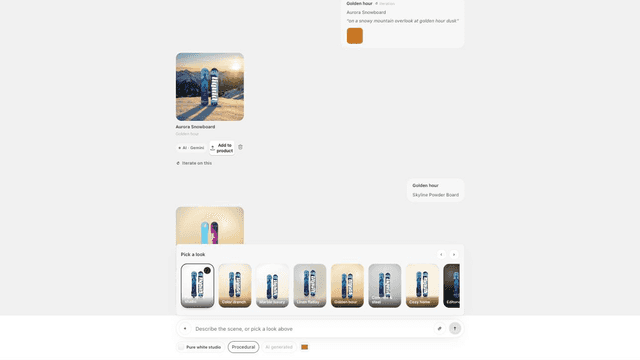
See every featurePlinth restages the product photos you already have. Pick a look — white studio, marble, linen flatlay, golden hour, café counter — or describe any scene in plain English. On studio and surface looks your product is never redrawn: Plinth cuts it from your own photo, generates the room around it, puts it back on top and relights it — so your shape, label and logo stay yours.
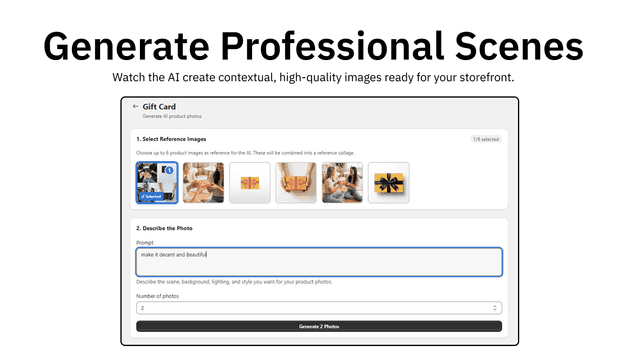
Create professional product images without photoshoots. ProductPix AI generates realistic backgrounds and lifestyle scenes to improve how your products look across your store. Replace backgrounds, apply consistent styles, and create multiple variations quickly. Manage and edit images in one place, and apply changes across multiple products to save time on manual editing.
- Composite real product photos onto scenes without altering the product
- Generate AI backgrounds from a text prompt or a library of presets
- Save finished scenes straight to the product's media from the admin
- Generate realistic studio and lifestyle backgrounds for product images
- Apply edits and generate variations across multiple products at once
- Update and publish images directly to your store




All the numbers
Every figure, side by side
A green dot marks the app ahead on a measured figure. Estimates, gaps and apps that leave no storefront trace never take the lead.
Adoption
| Measure |  Plinth |  Pixelify |
|---|---|---|
| Detected stores | Not published | Not published |
| Net store change, 28 days | 0 | 0 |
| Stores added, 28 days | Not enough data | Not enough data |
| Big-brand share | Not enough data | Not enough data |
| Top store categories | Not published | Not published |
| Top store countries | Not published | Not published |
Reviews
| Measure | Plinth | Pixelify |
|---|---|---|
| App Store rating | Not published | Not published |
| App Store reviews | Not published | Not published |
| New reviews, 28 days | Not enough data | Not enough data |
| Reviewers a year or more in | Not enough data | Not enough data |
FAQ
Plinth and Pixelify: common questions
- Is Plinth or Pixelify cheaper?
- Only Plinth lists a free plan. Shoplist compares base prices only between monthly plans in the same currency; usage charges and annual plans vary, so check each plan’s limits.
- What features does each app list that the other doesn’t?
- Plinth lists 2 the others don’t mention, such as Background removal, Custom backgrounds. A feature missing from a listing may still be supported; this compares what each App Store listing says.
- Where does this comparison’s data come from?
- Shoplist crawls Shopify storefronts to detect which apps each store runs, and reads each app’s Shopify App Store listing for reviews, pricing, features and integrations. Store counts are as of Oct 13, 2026 for Plinth, Sep 28, 2026 for Pixelify; estimated figures are labeled.
How Shoplist compares apps
Store counts come from Shoplist’s crawl of Shopify storefronts, which detects the apps each store runs; they are as of Oct 13, 2026 for Plinth, Sep 28, 2026 for Pixelify. Reviews, ratings, plans, features and integrations come from each app’s Shopify App Store listing. 28-day figures are labeled when estimated, and a figure that is missing or estimated never decides who leads. Read the methodology.