
PRO Schedule theme ‑ Boostapps vs Theme Stream
Two Shopify apps, side by side: detected stores, momentum, reviews, plans, listed features and who runs each. Store counts as of Oct 13, 2026.
The short answer
- Only PRO Schedule theme lists a free plan. Paid plans start at $7/month for PRO Schedule theme and $9/month for Theme Stream.
- Theme Stream lists 5 features PRO Schedule theme’s listing doesn’t mention, including Content syncing, Custom code, Mobile responsive.
Head to head


Free
- · 1 active theme schedule
- · 1 section visibility schedule
- · 7-day metrics retention
- · One-click rollback
- · Theme publish history
Starter
- · 10 active theme schedules
- · 10 section visibility schedules
- · 90-day metrics retention
- · English and Hebrew UI
- · One-click rollback
- · Preview before publish
Pro
- · Audit log (who changed what)
- · Bundle changes (atomic multi-step)
- · Conflict detection
- · Performance comparison view
- · Priority support
- · Shopify Flow integration
Starter
- · Full use of all features
- · Unlimited event scheduling
- · Up to 3 feeds for Standard plan stores
Streamer
- · All in Starter, Plus: Unlimited Streams
Coverage counts what each App Store listing names. Every feature, checked off app by app, is in Shoplist.
See every featureSchedule any theme change and see exactly how it performed. Publish a theme at a set date and time, show or hide any section without republishing, set up recurring schedules, and revert any change in one click. Every scheduled theme automatically tracks orders and revenue so you can compare which campaign actually moved the needle.
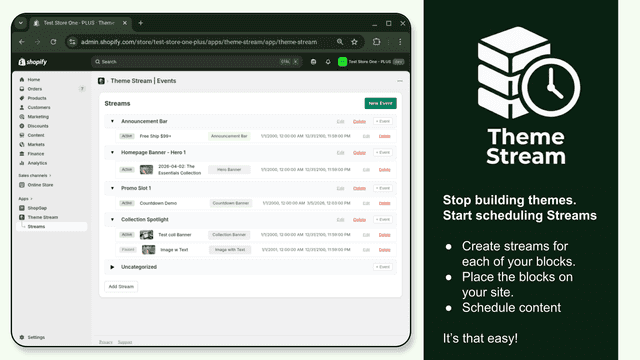
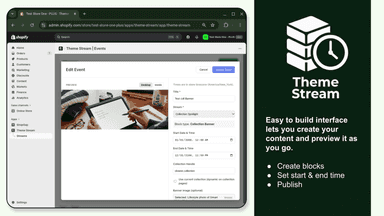
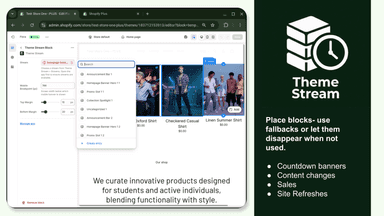
Theme Stream lets you schedule custom content for your online store. Create banners, announcement bars, countdown timers, and more, then set when each piece goes live and when it ends. Content appears automatically based on your schedule. - Create “streams” (e.g. homepage hero, collection banners, announcement bar). - Add blocks to each stream and set start and end dates.
- Visual calendar for theme publishes, sections, and banner swaps
- Section show or hide without republishing the entire theme
- Orders and revenue tracked automatically per scheduled theme
- One-click rollback of any scheduled change from full history
- Scheduled content- Set start and end dates for each block
- 7 block types
- Create separate streams for homepage, collections, and other areas.
- Responsive design


All the numbers
Every figure, side by side
A green dot marks the app ahead on a measured figure. Estimates, gaps and apps that leave no storefront trace never take the lead.
Adoption
| Measure |  PRO Schedule theme |  Theme Stream |
|---|---|---|
| Detected stores | Not published | Not published |
| Net store change, 28 days | 0 | 0 |
| Stores added, 28 days | Not enough data | Not enough data |
| Big-brand share | Not enough data | Not enough data |
| Top store categories | Not published | Not published |
| Top store countries | Not published | Not published |
Reviews
| Measure | PRO Schedule theme | Theme Stream |
|---|---|---|
| App Store rating | 5.0 ★ | Not published |
| App Store reviews | 1 | Not published |
| New reviews, 28 days | Not enough data | Not enough data |
| Reviewers a year or more in | Not enough data | Not enough data |
Pricing
| Measure | PRO Schedule theme | Theme Stream |
|---|---|---|
| Free plan | Yes | Not listed |
| Lowest paid monthly plan | $7/month(ahead) | $9/month |
| Longest free trial | 14 days | 7 days |
| Plans listed | 3 | 2 |
Listing
| Measure | PRO Schedule theme | Theme Stream |
|---|---|---|
| Shopify category rank | #397 | #361 |
| Shopify App Charts | Not on this week’s charts | Not on this week’s charts |
| Built for Shopify | No | No |
| Launched | May 5, 2026 | Apr 20, 2026 |
| Languages | 1 | 1 |
| Developer | Boost | Brand X Apps |
FAQ
PRO Schedule theme and Theme Stream: common questions
- Is PRO Schedule theme or Theme Stream cheaper?
- Only PRO Schedule theme lists a free plan. Paid plans start at $7/month for PRO Schedule theme and $9/month for Theme Stream. Shoplist compares base prices only between monthly plans in the same currency; usage charges and annual plans vary, so check each plan’s limits.
- What features does each app list that the other doesn’t?
- Theme Stream lists 5 the others don’t mention, such as Content syncing, Custom code, Mobile responsive, Templates. A feature missing from a listing may still be supported; this compares what each App Store listing says.
- Where does this comparison’s data come from?
- Shoplist crawls Shopify storefronts to detect which apps each store runs, and reads each app’s Shopify App Store listing for reviews, pricing, features and integrations. Store counts are as of Oct 13, 2026; estimated figures are labeled.
How Shoplist compares apps
Store counts come from Shoplist’s crawl of Shopify storefronts, which detects the apps each store runs; they are as of Oct 13, 2026. Reviews, ratings, plans, features and integrations come from each app’s Shopify App Store listing. 28-day figures are labeled when estimated, and a figure that is missing or estimated never decides who leads. Read the methodology.