

Pre Order Manager vs Preorderly • Preorder PreSale
Two Shopify apps, side by side: detected stores, momentum, reviews, plans, listed features and who runs each. Store counts as of Oct 24, 2026 for Pre Order Manager, Nov 8, 2026 for Preorderly • Preorder PreSale.
The short answer
- Paid plans start at $9.99/month for Pre Order Manager and $14.99/month for Preorderly • Preorder PreSale.
- Preorderly • Preorder PreSale lists 17 features Pre Order Manager’s listing doesn’t mention, including Availability date, Back orders, Badges.
Head to head


Pre-Order/Sold Out/Coming Soon/Backorder/Pre-sale/Out of Stock


- United States
- Canada
- Australia
Momentum
New reviews each month
Review pace is the clearest public read on how fast an app is winning new merchants.
Basic
- · Basic analytics dashboard
- · Email notifications
- · Order status tracking
- · Pre-order button customization
- · Up to 50 pre-order products
Pro
- · Advanced analytics dashboard
- · Custom pre-order messages
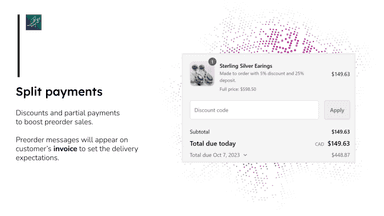
- · Deposit payment support
- · Email notifications
- · Pre-order button customization
- · Priority support
Advanced
- · Advanced analytics dashboard
- · Bulk product operations
- · Custom pre-order messages
- · Deposit payment support
- · Email notifications
- · Pre-order button customization
BASIC ($14.99)
- · All features + unlimited preorders
- · For stores on the Basic Shopify
- · Live chat support!
- · No hidden fees
SHOPIFY ($24.99)
- · All features + unlimited preorders
- · For stores on the Shopify pricing plan
- · Live chat support!
- · No hidden fees
ADVANCED ($32.99)
- · All features + unlimited preorders
- · Live chat support!
- · No hidden fees
- · On the Advanced Shopify pricing plan
PLUS ($44.99)
- · All features + unlimited preorders
- · Live chat support!
- · No hidden fees
- · On the Shopify Plus pricing plan
Coverage counts what each App Store listing names. Every feature, checked off app by app, is in Shoplist.
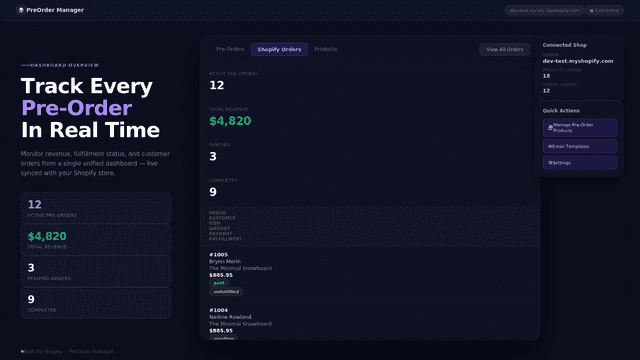
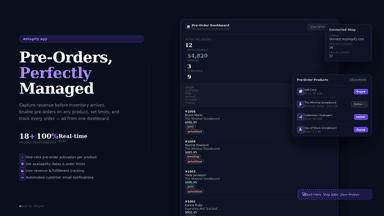
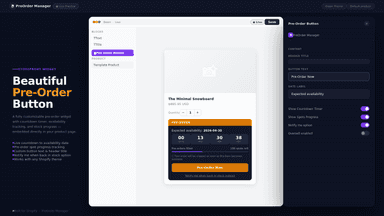
See every feature📝 App Description (Detailed) Overview This app allows merchants to enable pre-orders on their products and continue selling even when items are out of stock with the option to integrate wishkeeper app and StockPing app to add wishlist and back in stock reminder features. How it works The app provides a customizable pre-order button that replaces or works alongside the default add-to-cart button.
Stop losing sales to Out of stock. Preorderly turns unavailable and not-yet-launched products into pre-orders customers can buy today. Enable products one by one, by collection, or automatically by tag. Show a Ships by date and countdown, carried onto the order confirmation, and warn shoppers when a cart mixes pre-order and in-stock items.
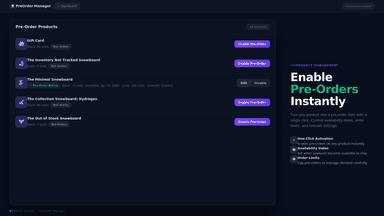
- Add a pre-order button to selected products
- Show a countdown timer to create urgency
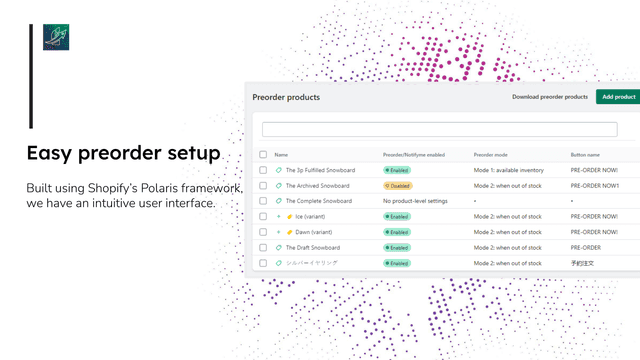
- Manage pre-order products from a simple dashboard
- Continue selling even when inventory is unavailable
- Customize preorder button/text for collections, products, and variants
- Schedule fulfillment and start/end times for preorder items with notification.
- Display preorder button/badge in homepage/collection page.
- Limit quantity per customer/product and tagging preorder items in order page


All the numbers
Every figure, side by side
A green dot marks the app ahead on a measured figure. Estimates, gaps and apps that leave no storefront trace never take the lead.
Adoption
| Measure |  Pre Order Manager |  Preorderly • Preorder PreSale |
|---|---|---|
| Detected stores | Not published | 221 |
| Net store change, 28 days | 0 | −1 |
| Stores added, 28 days | Not enough data | 5 |
| Big-brand share | Not enough data | 19% |
| Top store categories | Not published | Apparel & Accessories, Home & Garden, Sporting Goods |
| Top store countries | Not published | United States, Canada, Australia |
Reviews
| Measure | Pre Order Manager | Preorderly • Preorder PreSale |
|---|---|---|
| App Store rating | Not published | 4.6 ★ |
| App Store reviews | Not published | 73 |
| New reviews, 28 days | Not enough data | 0 |
| Reviewers a year or more in | Not enough data | Not enough data |
Pricing
| Measure | Pre Order Manager | Preorderly • Preorder PreSale |
|---|---|---|
| Free plan | Not listed | Not listed |
| Lowest paid monthly plan | $9.99/month(ahead) | $14.99/month |
| Longest free trial | 7 days | 14 days |
| Plans listed | 3 | 4 |
Listing
| Measure | Pre Order Manager | Preorderly • Preorder PreSale |
|---|---|---|
| Shopify category rank | #68 | #54(ahead) |
| Shopify App Charts | Not on this week’s charts | #19 in Pre-orders |
| Built for Shopify | No | Yes |
| Launched | May 13, 2026 | Jan 18, 2018 |
| Languages | 1 | 1 |
| Developer | KASWEBTECH SOLUTIONS PRIVATE LIMITED | Storefrontist2 |
FAQ
Pre Order Manager and Preorderly • Preorder PreSale: common questions
- Is Pre Order Manager or Preorderly • Preorder PreSale cheaper?
- Paid plans start at $9.99/month for Pre Order Manager and $14.99/month for Preorderly • Preorder PreSale. Shoplist compares base prices only between monthly plans in the same currency; usage charges and annual plans vary, so check each plan’s limits.
- What features does each app list that the other doesn’t?
- Preorderly • Preorder PreSale lists 17 the others don’t mention, such as Availability date, Back orders, Badges, Coming soon. A feature missing from a listing may still be supported; this compares what each App Store listing says.
- Where does this comparison’s data come from?
- Shoplist crawls Shopify storefronts to detect which apps each store runs, and reads each app’s Shopify App Store listing for reviews, pricing, features and integrations. Store counts are as of Oct 24, 2026 for Pre Order Manager, Nov 8, 2026 for Preorderly • Preorder PreSale; estimated figures are labeled.
How Shoplist compares apps
Store counts come from Shoplist’s crawl of Shopify storefronts, which detects the apps each store runs; they are as of Oct 24, 2026 for Pre Order Manager, Nov 8, 2026 for Preorderly • Preorder PreSale. Reviews, ratings, plans, features and integrations come from each app’s Shopify App Store listing. 28-day figures are labeled when estimated, and a figure that is missing or estimated never decides who leads. Read the methodology.