
POS Transfer Stock vs Thrive Inventory Management
Two Shopify apps, side by side: detected stores, momentum, reviews, plans, listed features and who runs each. Store counts as of Aug 5, 2026 for POS Transfer Stock, Oct 13, 2026 for Thrive Inventory Management.
The short answer
- Thrive Inventory Management lists 30 features POS Transfer Stock’s listing doesn’t mention, including Analytics, Auto-restock, Automated alerts.
Head to head


Multi-Location & E-Commerce Inventory Management & Analytics
Momentum
New reviews each month
Review pace is the clearest public read on how fast an app is winning new merchants.
Starter
- · Barcode Generation
- · COGS Tracking
- · Expiration Dates
- · Stock Counts
- · Stock Level Alerts
- · Up to 1,500 Transactions / Mo
Standard
- · Bundles
- · Invoicing
- · Min/Max Levels
- · Purchase Orders
- · Up to 2 total Locations / Integrations
- · Up to 3,000 transactions/mo
Professional
- · Scan-to-create functions
- · Standard Plus:
- · Stock Forecasting
- · Up to 10,000 transactions/mo
- · Up to 5 total Locations / Integrations
Elite
- · Intelligent stock forecasting
- · Pro Plus:
- · Up to 10 total Locations / Integrations
- · Up to 25,000 transactions/mo
Coverage counts what each App Store listing names. Every feature, checked off app by app, is in Shoplist.
See every featureManaging inventory across multiple retail locations usually means switching to the Shopify admin or handling transfers manually. This app lets your staff create, send, and receive stock transfers directly from Shopify POS. When one store runs low, staff can request stock from another location and process the transfer on the spot. Inventory levels update automatically at both locations, so your counts stay accurate.
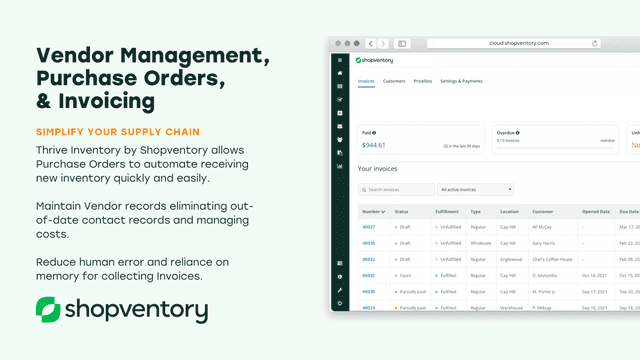
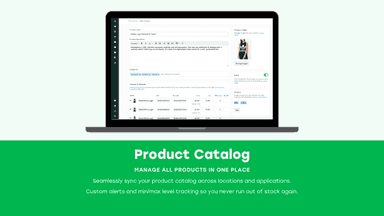
Get away from spreadsheets and workarounds with an inventory system that actually helps you run a healthy business. We go beyond just stock levels and purchase orders because Thrive Inventory was built for robust Shopify stock management. Manage all parts of your inventory, even if it’s really complicated, with tools like demand forecasting, multi-channel syncing, bundles, and component-level tracking.
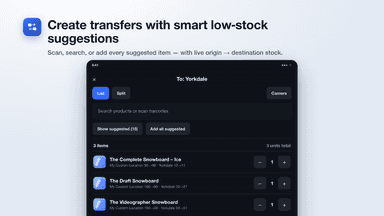
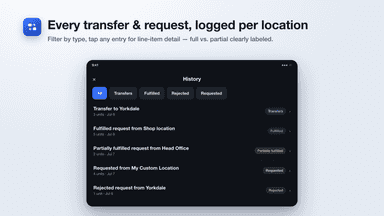
- Create and send stock transfers directly from Shopify POS
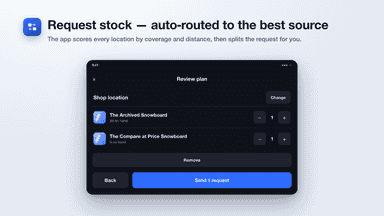
- Request stock from other locations, auto-routed to the best source
- Receive and count incoming stock by barcode, camera, or manual
- Get suggestions for products running low at each location
- Data-Rich Reporting by Location and Sales Channel
- Automate purchase orders to restock product
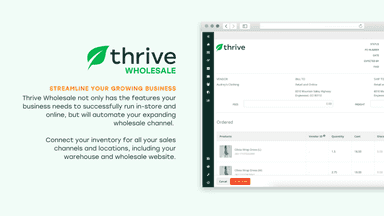
- Connect multiple Shopify accounts for an all-in-one experience
- Use a scanner to count, transfer and reorder product


All the numbers
Every figure, side by side
A green dot marks the app ahead on a measured figure. Estimates, gaps and apps that leave no storefront trace never take the lead.
Adoption
| Measure |  POS Transfer Stock |  Thrive Inventory Management |
|---|---|---|
| Detected stores | Not published | Not published |
| Net store change, 28 days | 0 | 0 |
| Stores added, 28 days | Not enough data | Not enough data |
| Big-brand share | Not enough data | Not enough data |
| Top store categories | Not published | Not published |
| Top store countries | Not published | Not published |
Reviews
| Measure | POS Transfer Stock | Thrive Inventory Management |
|---|---|---|
| App Store rating | Not published | 4.6 ★ |
| App Store reviews | Not published | 104 |
| New reviews, 28 days | Not enough data | 0 |
| Reviewers a year or more in | Not enough data | Not enough data |
Pricing
| Measure | POS Transfer Stock | Thrive Inventory Management |
|---|---|---|
| Free plan | Not listed | Not listed |
| Lowest paid monthly plan | No monthly plan listed | $59/month |
| Longest free trial | Not listed | 14 days |
| Plans listed | Not published | 4 |
Listing
| Measure | POS Transfer Stock | Thrive Inventory Management |
|---|---|---|
| Shopify category rank | Not enough data | #112 |
| Shopify App Charts | Not on this week’s charts | Not on this week’s charts |
| Built for Shopify | No | No |
| Launched | Aug 5, 2026 | Aug 2, 2017 |
| Languages | 1 | 1 |
| Developer | Branch Build | Shopventory Inc |
FAQ
POS Transfer Stock and Thrive Inventory Management: common questions
- What features does each app list that the other doesn’t?
- POS Transfer Stock lists 5 the others don’t mention, such as Barcode scanning, Inventory levels, Multi-location, Real-time sync. Thrive Inventory Management lists 30 the others don’t mention, such as Analytics, Auto-restock, Automated alerts, Automatic. A feature missing from a listing may still be supported; this compares what each App Store listing says.
- Where does this comparison’s data come from?
- Shoplist crawls Shopify storefronts to detect which apps each store runs, and reads each app’s Shopify App Store listing for reviews, pricing, features and integrations. Store counts are as of Aug 5, 2026 for POS Transfer Stock, Oct 13, 2026 for Thrive Inventory Management; estimated figures are labeled.
How Shoplist compares apps
Store counts come from Shoplist’s crawl of Shopify storefronts, which detects the apps each store runs; they are as of Aug 5, 2026 for POS Transfer Stock, Oct 13, 2026 for Thrive Inventory Management. Reviews, ratings, plans, features and integrations come from each app’s Shopify App Store listing. 28-day figures are labeled when estimated, and a figure that is missing or estimated never decides who leads. Read the methodology.