

POS Cafe: Coffee Shops & QSRs vs Price Tapper POS
Two Shopify apps, side by side: detected stores, momentum, reviews, plans, listed features and who runs each. Store counts as of Nov 4, 2026 for POS Cafe, Oct 13, 2026 for Price Tapper POS.
The short answer
- On the Shopify App Store: POS Cafe 5.0 from 29 reviews and Price Tapper POS 5.0 from 2 reviews.
- Paid plans start at $29/month for POS Cafe and $5/month for Price Tapper POS.
- POS Cafe lists 8 features Price Tapper POS’s listing doesn’t mention, including Auto-updates, Checkboxes, Custom pricing.
Head to head


Momentum
New reviews each month
Review pace is the clearest public read on how fast an app is winning new merchants.
Essential
- · 1 POS Location
- · Built for Shopify POS
- · Enable Extra Charge for Modifiers
- · No Additional Usage Fees
- · Unlimited Cafe Items
- · Unlimited Modifiers / Modifier Sets
Growth
- · 2 to 4 POS locations
- · Built for Shopify POS
- · Enable Extra Charge for Modifiers
- · No Additional Usage Fees
- · Unlimited Cafe Items
- · Unlimited Modifiers / Modifier Sets
Expansion
- · 5 to 9 POS locations
- · Built for Shopify POS
- · Enable Extra Charge for Modifiers
- · No Additional Usage Fees
- · Unlimited Cafe Items
- · Unlimited Modifiers / Modifier Sets
Enterprise
- · 10 to 20 POS locations
- · Built for Shopify POS
- · Enable Extra Charge for Modifiers
- · No Additional Usage Fees
- · Unlimited Cafe Items
- · Unlimited Modifiers / Modifier Sets
Single Store
- · Supports 25 titles for a POS location.
Multi-store
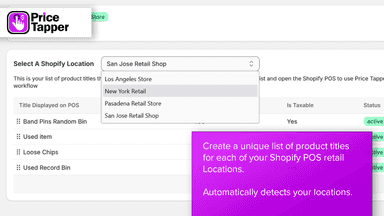
- · 10 POS locations & 500 product entries.
Unlimited
- · Unlimited locations and product entries
Coverage counts what each App Store listing names. Every feature, checked off app by app, is in Shoplist.
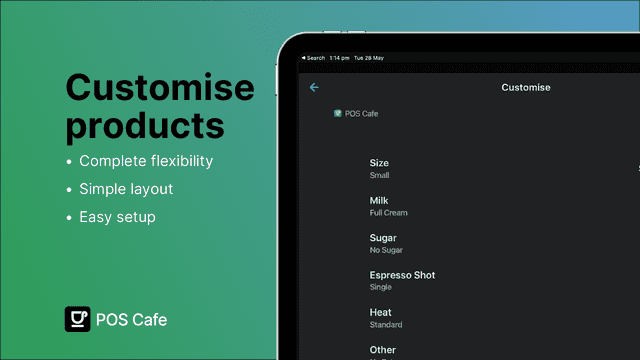
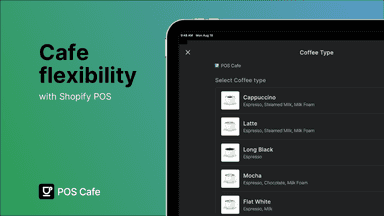
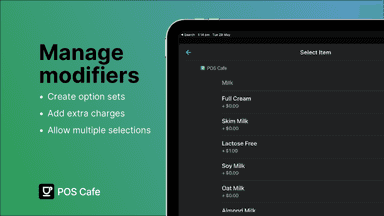
See every featurePOS Cafe adds coffee shop & quick-service tools to Shopify POS. Staff build each order with modifiers like sizes, milks and extras, with required or optional choices and extra charges. Each item is sent to its prep area via printed order tickets or Fresh KDS screens. Set up quick and efficient counter service, or run open tabs for table service.
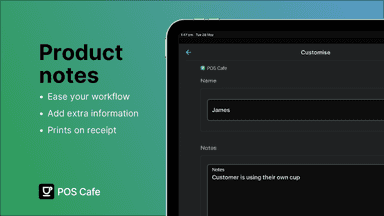
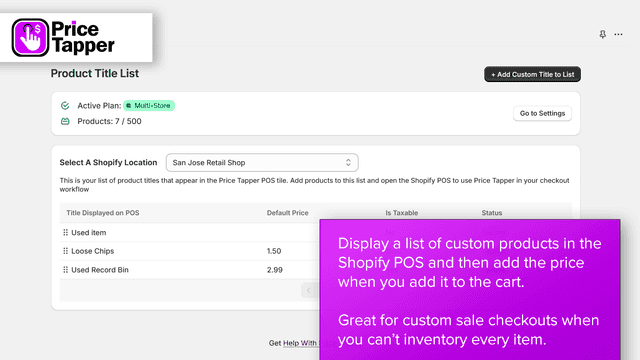
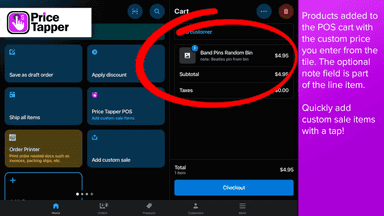
Add custom sale items by tapping on a predefined list of items. Quickly add a custom price and note for each product or setup percentage-based items for automatic calculations. You can also define a minimum and maximum value for any entry. This takes the Custom Sale tile to the next level. You can even provide default prices to make the process of adding custom items even faster!
- Customize Product Modifiers: Easily add options like milk type and sweeteners
- Unique Flexibility: Allow additional charges and multiple modifiers as necessary
- Built for POS: Ensures a reliable and seamless experience for you and your staff
- User-Friendly Interface: Simple design makes option management a breeze
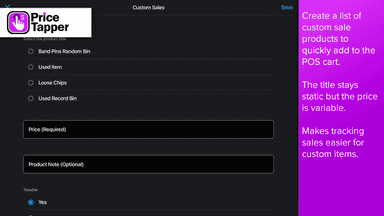
- Create a predefined list of products to add as a custom sale.
- Enter a custom price for the item when adding to the POS cart
- Add a note or description for the custom sale item.
- Set a default price that populates the product. Change it at anytime.
All the numbers
Every figure, side by side
A green dot marks the app ahead on a measured figure. Estimates, gaps and apps that leave no storefront trace never take the lead.
Adoption
| Measure |  POS Cafe |  Price Tapper POS |
|---|---|---|
| Detected stores | Not published | Not published |
| Net store change, 28 days | 0 | 0 |
| Stores added, 28 days | Not enough data | Not enough data |
| Big-brand share | Not enough data | Not enough data |
| Top store categories | Not published | Not published |
| Top store countries | Not published | Not published |
Reviews
| Measure | POS Cafe | Price Tapper POS |
|---|---|---|
| App Store rating | 5.0 ★ | 5.0 ★ |
| App Store reviews | 29(ahead) | 2 |
| New reviews, 28 days | 1 | Not enough data |
| Reviewers a year or more in | Not enough data | Not enough data |
Pricing
| Measure | POS Cafe | Price Tapper POS |
|---|---|---|
| Free plan | Not listed | Not listed |
| Lowest paid monthly plan | $29/month | $5/month(ahead) |
| Longest free trial | 21 days | 7 days |
| Plans listed | 4 | 3 |
Listing
| Measure | POS Cafe | Price Tapper POS |
|---|---|---|
| Shopify category rank | #58 | #99 |
| Shopify App Charts | Not on this week’s charts | Not on this week’s charts |
| Built for Shopify | Yes | No |
| Launched | Jun 17, 2024 | Oct 8, 2024 |
| Languages | 1 | 1 |
| Developer | POS Cafe | Sunrise Integration |
FAQ
POS Cafe and Price Tapper POS: common questions
- Is POS Cafe or Price Tapper POS cheaper?
- Paid plans start at $29/month for POS Cafe and $5/month for Price Tapper POS. Shoplist compares base prices only between monthly plans in the same currency; usage charges and annual plans vary, so check each plan’s limits.
- Which has better reviews, POS Cafe or Price Tapper POS?
- On the Shopify App Store: POS Cafe 5.0 from 29 reviews and Price Tapper POS 5.0 from 2 reviews.
- What features does each app list that the other doesn’t?
- POS Cafe lists 8 the others don’t mention, such as Auto-updates, Checkboxes, Custom pricing, Dynamic pricing. A feature missing from a listing may still be supported; this compares what each App Store listing says.
- Where does this comparison’s data come from?
- Shoplist crawls Shopify storefronts to detect which apps each store runs, and reads each app’s Shopify App Store listing for reviews, pricing, features and integrations. Store counts are as of Nov 4, 2026 for POS Cafe, Oct 13, 2026 for Price Tapper POS; estimated figures are labeled.
How Shoplist compares apps
Store counts come from Shoplist’s crawl of Shopify storefronts, which detects the apps each store runs; they are as of Nov 4, 2026 for POS Cafe, Oct 13, 2026 for Price Tapper POS. Reviews, ratings, plans, features and integrations come from each app’s Shopify App Store listing. 28-day figures are labeled when estimated, and a figure that is missing or estimated never decides who leads. Read the methodology.