

PixelTrim vs Pixly
Two Shopify apps, side by side: detected stores, momentum, reviews, plans, listed features and who runs each. Store counts as of Nov 8, 2026 for PixelTrim, Oct 13, 2026 for Pixly.
The short answer
- Only Pixly lists a free plan. Paid plans start at $30/month for PixelTrim and $19/month for Pixly.
- Pixly lists 9 features PixelTrim’s listing doesn’t mention, including Auto-optimization, Background removal, Cropping.
Head to head


Basic
- · AI Alt Text Suggestions OpenAI + Claude
- · Automatic WebP Conversion
- · Before/After Metrics
- · Bulk Processing
- · Core Web Vitals (LCP, FID, CLS)
- · Page Speed Impact Analysis
Free
- · 1:1 square crop and rotate
- · 69 tokens / month
- · AI renaming and alt text
- · AI upscaling for low-res images
- · Bulk approve and rotate
- · Shopify sync (1 store)
Starter Plan
- · 1,000 tokens / month
- · 1:1 square crop and rotate
- · AI renaming and alt text
- · AI upscaling for low-res images
- · Bulk approve and rotate
- · Shopify sync (1 store)
Growth Plan
- · 2,500 tokens / month
- · Background removal
- · Everything in Starter
- · Priority processing queue
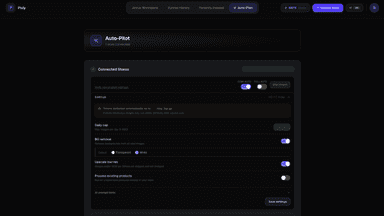
- · Semi-Autopilot up to 100 images/d
- · Store Audit: scan your full catalog
Scale Plan
- · 6,000 tokens / month
- · CSV export of all image data
- · Everything in Growth
- · Full Auto-Pilot: up to 500 images/day
- · Priority support
- · Semi-auto mode: review before sync
Coverage counts what each App Store listing names. Every feature, checked off app by app, is in Shoplist.
See every featurePixelTrim helps you run a smooth store without sacrificing image quality. It compresses your product images and converts them to modern WebP format, reducing the large file sizes that slow down pages. You can optimize images in bulk or one product at a time, while keeping the original quality. PixelTrim also writes clear, descriptive alt text for your images using AI, improving accessibility and search visibility.
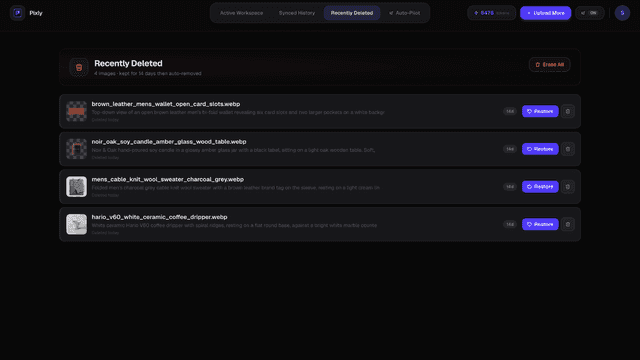
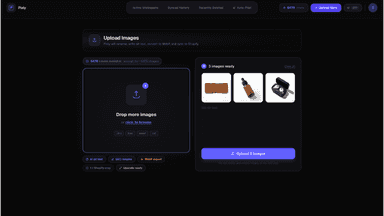
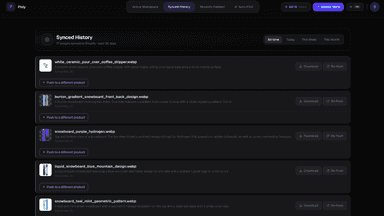
Product images often go live with blank alt text, generic filenames, and heavy JPEG files. That makes them harder to find in image search and slows your store. Pixly uses AI to read each photo, propose alt text and descriptive filenames, turn to WebP, and crop to a consistent square. You review every suggestion and approve in bulk, then sync approved images back to your catalog.
- Automatic image compression and WebP conversion while preserving quality
- Bulk optimize all product images or fine-tune them one product at a time
- AI-generated alt text for images to support SEO and accessibility
- AI writes alt text and filenames based on what is actually in each photo.
- Review and approve every image before anything goes live in your store
- Auto-Pilot queues new product images for optimization as you add them.
- Store Audit scans your catalog for missing alt text and heavy image files.


All the numbers
Every figure, side by side
A green dot marks the app ahead on a measured figure. Estimates, gaps and apps that leave no storefront trace never take the lead.
Adoption
| Measure |  PixelTrim |  Pixly |
|---|---|---|
| Detected stores | Not published | Not published |
| Net store change, 28 days | 0 | 0 |
| Stores added, 28 days | Not enough data | Not enough data |
| Big-brand share | Not enough data | Not enough data |
| Top store categories | Not published | Not published |
| Top store countries | Not published | Not published |
Reviews
| Measure | PixelTrim | Pixly |
|---|---|---|
| App Store rating | 5.0 ★ | Not published |
| App Store reviews | 2 | Not published |
| New reviews, 28 days | Not enough data | Not enough data |
| Reviewers a year or more in | Not enough data | Not enough data |
FAQ
PixelTrim and Pixly: common questions
- Is PixelTrim or Pixly cheaper?
- Only Pixly lists a free plan. Paid plans start at $30/month for PixelTrim and $19/month for Pixly. Shoplist compares base prices only between monthly plans in the same currency; usage charges and annual plans vary, so check each plan’s limits.
- What features does each app list that the other doesn’t?
- PixelTrim lists 2 the others don’t mention, such as AI generation, Generative fill. Pixly lists 9 the others don’t mention, such as Auto-optimization, Background removal, Cropping, Download. A feature missing from a listing may still be supported; this compares what each App Store listing says.
- Where does this comparison’s data come from?
- Shoplist crawls Shopify storefronts to detect which apps each store runs, and reads each app’s Shopify App Store listing for reviews, pricing, features and integrations. Store counts are as of Nov 8, 2026 for PixelTrim, Oct 13, 2026 for Pixly; estimated figures are labeled.
How Shoplist compares apps
Store counts come from Shoplist’s crawl of Shopify storefronts, which detects the apps each store runs; they are as of Nov 8, 2026 for PixelTrim, Oct 13, 2026 for Pixly. Reviews, ratings, plans, features and integrations come from each app’s Shopify App Store listing. 28-day figures are labeled when estimated, and a figure that is missing or estimated never decides who leads. Read the methodology.