
Picsio: Bulk Image Upload vs Pixfolder: Bulk Image Upload
Two Shopify apps, side by side: detected stores, momentum, reviews, plans, listed features and who runs each. Store counts as of Sep 3, 2026 for Picsio, Nov 12, 2026 for Pixfolder.
The short answer
- Only Pixfolder lists a free plan.
Head to head

Store importer to bulk upload product images from Pics.io
Momentum
New reviews each month
Review pace is the clearest public read on how fast an app is winning new merchants.
Free
- · 50 AI alt texts per month
- · 50 images per month
- · Folder matching, variant images and dash
- · Image optimization and SEO file names
Starter
- · 1,000 AI alt texts per month
- · 1,000 images per month
- · All features
- · Image optimization and SEO file names
- · Optional image credits from $19
Pro
- · 5,000 AI alt texts per month
- · All features
- · Image credits for more AI alt texts
- · Image optimization and SEO file names
- · Unlimited images
Coverage counts what each App Store listing names. Every feature, checked off app by app, is in Shoplist.
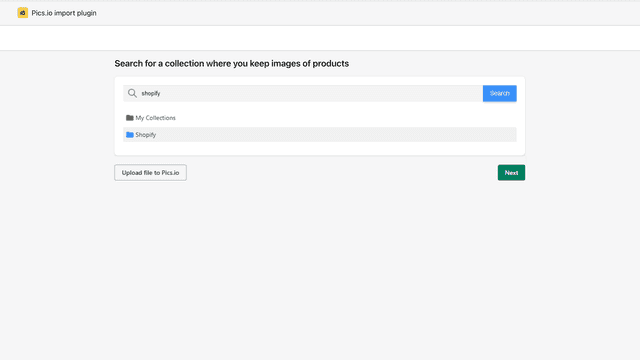
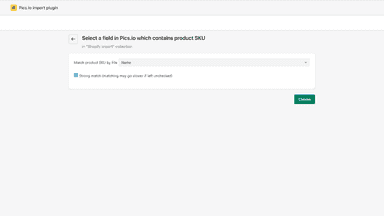
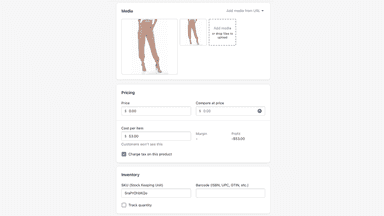
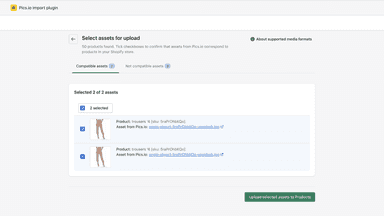
See every featureTogether with Pics.io digital asset management (DAM) system, this plugin becomes a quick bulk image uploader! Subscribe to any Pics.io pricing plan and connect your GDrive or Amazon S3 bucket with product photos. Originals stay in your storage. Now, you only need to add SKUs to images’ metadata in custom fields in Pics.io DAM, or in files’ names.
Uploading photos product by product takes hours. With Pixfolder you prepare one subfolder per product, named after its title, handle or SKU, and select the main folder. The app matches every folder to its product, asks you to confirm partial matches and uploads all the images in one go. Photos are resized, compressed, ordered, sent to their variants by subfolder or file name, renamed for SEO and given an alt text.
- Bulk image upload from Google Drive or Amazon S3
- Library Organisation and Tagging
- Matching by SKU in file names or custom fields
- Match folders to products by title, handle, SKU or part of the title
- Send photos to their variants from a subfolder or the file name
- Add to current images, replace them or fill only products without images
- Image optimization: resized, compressed, renamed for SEO, with AI alt text
All the numbers
Every figure, side by side
A green dot marks the app ahead on a measured figure. Estimates, gaps and apps that leave no storefront trace never take the lead.
Adoption
| Measure |  Picsio | |
|---|---|---|
| Detected stores | Not published | Not published |
| Net store change, 28 days | 0 | 0 |
| Stores added, 28 days | Not enough data | Not enough data |
| Big-brand share | Not enough data | Not enough data |
| Top store categories | Not published | Not published |
| Top store countries | Not published | Not published |
Reviews
| Measure | Picsio | |
|---|---|---|
| App Store rating | 1.6 ★ | Not published |
| App Store reviews | 9 | Not published |
| New reviews, 28 days | 0 | Not enough data |
| Reviewers a year or more in | Not enough data | Not enough data |
FAQ
Picsio and Pixfolder: common questions
- Is Picsio or Pixfolder cheaper?
- Only Pixfolder lists a free plan. Shoplist compares base prices only between monthly plans in the same currency; usage charges and annual plans vary, so check each plan’s limits.
- Where does this comparison’s data come from?
- Shoplist crawls Shopify storefronts to detect which apps each store runs, and reads each app’s Shopify App Store listing for reviews, pricing, features and integrations. Store counts are as of Sep 3, 2026 for Picsio, Nov 12, 2026 for Pixfolder; estimated figures are labeled.
How Shoplist compares apps
Store counts come from Shoplist’s crawl of Shopify storefronts, which detects the apps each store runs; they are as of Sep 3, 2026 for Picsio, Nov 12, 2026 for Pixfolder. Reviews, ratings, plans, features and integrations come from each app’s Shopify App Store listing. 28-day figures are labeled when estimated, and a figure that is missing or estimated never decides who leads. Read the methodology.