

Pickzilla vs SplitFlow ‑ Order Splitter
Two Shopify apps, side by side: detected stores, momentum, reviews, plans, listed features and who runs each. Store counts as of Oct 16, 2026 for Pickzilla, Oct 13, 2026 for SplitFlow.
The short answer
- Only SplitFlow lists a free plan.
- Pickzilla lists 2 features SplitFlow’s listing doesn’t mention, including Order processing, Templates.
Head to head


Free
- · 50 orders split / month
- · AI drafts rules from your own words
- · Split by vendor, SKU, tag, collection
- · Step-by-step details for every order
- · Supplier portal: 1 supplier
- · Weight and item-count shipment limits
Starter
- · 300 orders split / month
- · Everything in Free
- · Ship from a location
- · Shopify Flow action “Split order”
- · Supplier portal: up to 5 suppliers
Growth
- · 3,000 orders split / month
- · Everything in Free
- · Ship from a location
- · Shopify Flow action “Split order”
- · Supplier portal: unlimited suppliers
Pro
- · Everything in Free
- · Ship from a location
- · Shopify Flow action “Split order”
- · Supplier portal: unlimited suppliers
- · Unlimited orders split
Coverage counts what each App Store listing names. Every feature, checked off app by app, is in Shoplist.
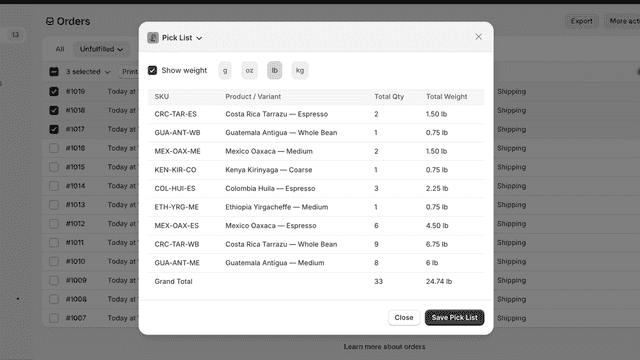
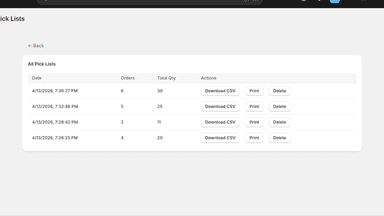
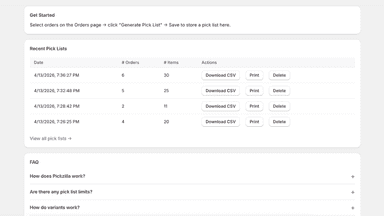
See every featurePickzilla aggregates order line items by SKU into a clean pick list. Select orders from the Orders page, review combined quantities, and save, print, or download as CSV. Saved pick lists are stored with a timestamp and order count for reference. Products with weights display per-SKU totals in g, kg, oz, or lb. No setup required. Works with any catalog including variants.
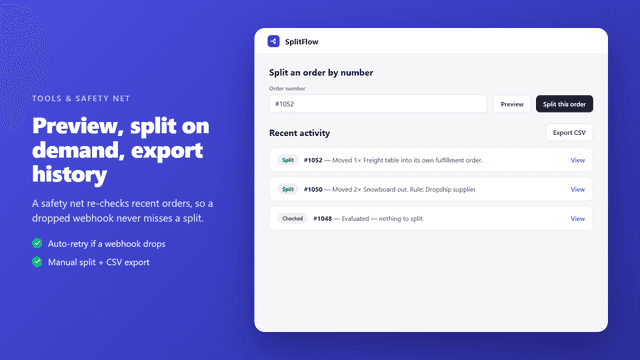
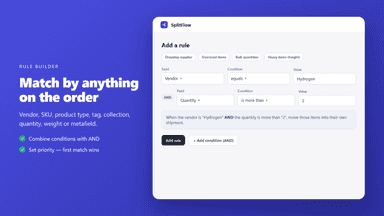
SplitFlow automatically moves an order's items into their own fulfillment orders based on rules you set — by vendor, SKU, product type, tag, collection, weight, metafield or line quantity — and splits any shipment over your weight or item limit into parcels that fit. Great for dropshipping, pre-orders, freight and multi-vendor stores.
- Generate pick lists from a range of orders in one click
- Items aggregated by SKU with combined quantities
- Save, print, or download pick lists as CSV
- Display weights per SKU in g, kg, oz, or lb
- Auto-split by vendor, SKU, type, tag, collection, quantity, weight or metafield
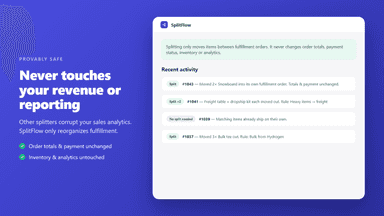
- Never touches revenue, payment, inventory or analytics — reporting stays clean
- Safety net re-checks recent orders so a dropped webhook never misses a split

All the numbers
Every figure, side by side
A green dot marks the app ahead on a measured figure. Estimates, gaps and apps that leave no storefront trace never take the lead.
Adoption
| Measure |  Pickzilla |  SplitFlow |
|---|---|---|
| Detected stores | Not published | Not published |
| Net store change, 28 days | 0 | 0 |
| Stores added, 28 days | Not enough data | Not enough data |
| Big-brand share | Not enough data | Not enough data |
| Top store categories | Not published | Not published |
| Top store countries | Not published | Not published |
Reviews
| Measure | Pickzilla | SplitFlow |
|---|---|---|
| App Store rating | 5.0 ★ | Not published |
| App Store reviews | 1 | Not published |
| New reviews, 28 days | Not enough data | Not enough data |
| Reviewers a year or more in | Not enough data | Not enough data |
FAQ
Pickzilla and SplitFlow: common questions
- Is Pickzilla or SplitFlow cheaper?
- Only SplitFlow lists a free plan. Shoplist compares base prices only between monthly plans in the same currency; usage charges and annual plans vary, so check each plan’s limits.
- What features does each app list that the other doesn’t?
- Pickzilla lists 2 the others don’t mention, such as Order processing, Templates. SplitFlow lists 1 the others don’t mention, such as Conditional logic. A feature missing from a listing may still be supported; this compares what each App Store listing says.
- Where does this comparison’s data come from?
- Shoplist crawls Shopify storefronts to detect which apps each store runs, and reads each app’s Shopify App Store listing for reviews, pricing, features and integrations. Store counts are as of Oct 16, 2026 for Pickzilla, Oct 13, 2026 for SplitFlow; estimated figures are labeled.
How Shoplist compares apps
Store counts come from Shoplist’s crawl of Shopify storefronts, which detects the apps each store runs; they are as of Oct 16, 2026 for Pickzilla, Oct 13, 2026 for SplitFlow. Reviews, ratings, plans, features and integrations come from each app’s Shopify App Store listing. 28-day figures are labeled when estimated, and a figure that is missing or estimated never decides who leads. Read the methodology.