

PhotoBoost AI vs Revlify: AI Photo Angle Fixer
Two Shopify apps, side by side: detected stores, momentum, reviews, plans, listed features and who runs each. Store counts as of Oct 13, 2026.
The short answer
- On the Shopify App Store: PhotoBoost AI 5.0 from 4 reviews and Revlify 5.0 from 1 reviews.
- Both list a free plan. Paid plans start at $9.99/month for PhotoBoost AI and $9.90/month for Revlify.
- PhotoBoost AI lists 1 features Revlify’s listing doesn’t mention, including Custom backgrounds.
Head to head


Momentum
New reviews each month
Review pace is the clearest public read on how fast an app is winning new merchants.
Beginner
- · 10 image generations/month
- · Admin Block Extension
Professional
- · 5 image to video every month
- · Admin Block Extension
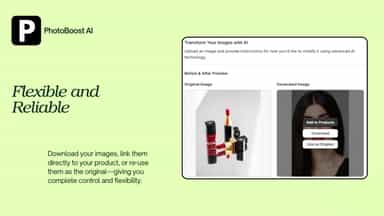
- · Link to products directly
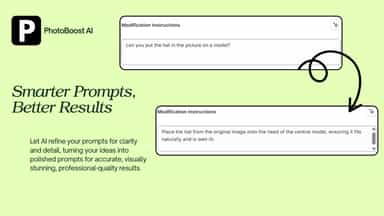
- · Prompt Enhancer
- · Unlimited image generations/month
5 credits/month
- · 5 image credits per month
- · Basic AI background removal
- · Watermark on generated images
80 credits/month
- · 80 image credits per month
- · No watermark
- · Standard 1024px output
80 credits
- · 1024px output
- · 80 image credits per month
- · Bulk image processing
- · Enhanced AI with better accuracy
- · No watermark
200 credits + 2K
- · 200 image credits per month
- · Bulk image processing
- · Enhanced AI with better accuracy
- · High-resolution 2048px output
- · No watermark
Coverage counts what each App Store listing names. Every feature, checked off app by app, is in Shoplist.
See every featureTransform basic product photos into professional images and dynamic 4-second videos without expensive photoshoots or video productions. Upload your flat product photo and our AI generates stunning visuals for your products. Save thousands on photography and videography while maintaining consistent imagery across your store. Turn browsers into buyers with pro-level product photos and videos.
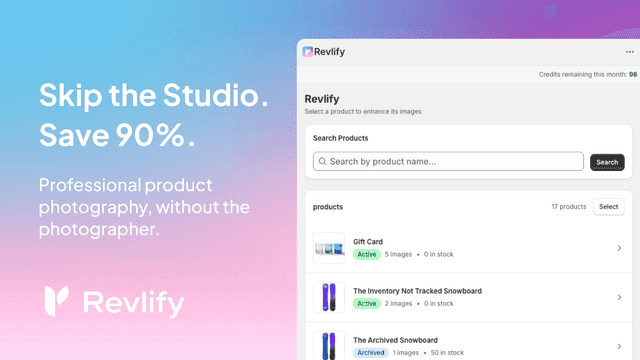
Revlify goes beyond simple background removal to completely rebuild your product images. While standard tools just erase the background, our AI fixes the photo itself. It automatically corrects tilted angles to create a perfect front view, turning casual phone snaps into professional catalog photography. It even removes holding hands and reconstructs missing details seamlessly.
- Transform product photos into professional model-worn images
- One-click integration with your Shopify product listings
- Simple text instructions to guide the AI transformation
- Straightens tilted shots into front-facing images. Only we do this.
- Remove messy backgrounds instantly. Clean white, ready to sell.
- Keeps exact product colors. No AI color-shifting or tints.
- Adds realistic contact shadows. Products look grounded.





All the numbers
Every figure, side by side
A green dot marks the app ahead on a measured figure. Estimates, gaps and apps that leave no storefront trace never take the lead.
Adoption
| Measure |  PhotoBoost AI |  Revlify |
|---|---|---|
| Detected stores | Not published | Not published |
| Net store change, 28 days | 0 | 0 |
| Stores added, 28 days | Not enough data | Not enough data |
| Big-brand share | Not enough data | Not enough data |
| Top store categories | Not published | Not published |
| Top store countries | Not published | Not published |
Reviews
| Measure | PhotoBoost AI | Revlify |
|---|---|---|
| App Store rating | 5.0 ★ | 5.0 ★ |
| App Store reviews | 4(ahead) | 1 |
| New reviews, 28 days | Not enough data | Not enough data |
| Reviewers a year or more in | Not enough data | Not enough data |
Pricing
| Measure | PhotoBoost AI | Revlify |
|---|---|---|
| Free plan | Yes | Yes |
| Lowest paid monthly plan | $9.99/month | $9.90/month(ahead) |
| Longest free trial | Not listed | Not listed |
| Plans listed | 2 | 4 |
Listing
| Measure | PhotoBoost AI | Revlify |
|---|---|---|
| Shopify category rank | #152(ahead) | #259 |
| Shopify App Charts | Not on this week’s charts | Not on this week’s charts |
| Built for Shopify | No | No |
| Launched | Apr 9, 2025 | Dec 19, 2025 |
| Languages | 1 | 8 |
| Developer | boostshoplimited | GO FORWARD Inc. |
FAQ
PhotoBoost AI and Revlify: common questions
- Is PhotoBoost AI or Revlify cheaper?
- Both list a free plan. Paid plans start at $9.99/month for PhotoBoost AI and $9.90/month for Revlify. Shoplist compares base prices only between monthly plans in the same currency; usage charges and annual plans vary, so check each plan’s limits.
- Which has better reviews, PhotoBoost AI or Revlify?
- On the Shopify App Store: PhotoBoost AI 5.0 from 4 reviews and Revlify 5.0 from 1 reviews.
- What features does each app list that the other doesn’t?
- PhotoBoost AI lists 1 the others don’t mention, such as Custom backgrounds. Revlify lists 1 the others don’t mention, such as Auto-optimization. A feature missing from a listing may still be supported; this compares what each App Store listing says.
- Where does this comparison’s data come from?
- Shoplist crawls Shopify storefronts to detect which apps each store runs, and reads each app’s Shopify App Store listing for reviews, pricing, features and integrations. Store counts are as of Oct 13, 2026; estimated figures are labeled.
How Shoplist compares apps
Store counts come from Shoplist’s crawl of Shopify storefronts, which detects the apps each store runs; they are as of Oct 13, 2026. Reviews, ratings, plans, features and integrations come from each app’s Shopify App Store listing. 28-day figures are labeled when estimated, and a figure that is missing or estimated never decides who leads. Read the methodology.