

PayoutWatch vs SyncTools for QuickBooks Xero
Two Shopify apps, side by side: detected stores, momentum, reviews, plans, listed features and who runs each. Store counts as of Oct 14, 2026.
The short answer
- Only PayoutWatch lists a free plan. Paid plans start at $19/month for PayoutWatch and $19/month for SyncTools for QuickBooks Xero.
- SyncTools for QuickBooks Xero lists 12 features PayoutWatch’s listing doesn’t mention, including Accounts receivable, COGS tracking, Daily sales summary.
Head to head


Momentum
New reviews each month
Review pace is the clearest public read on how fast an app is winning new merchants.
Free
- · 25 payouts per month
- · Exact match reconciliation
- · Multi-format bank CSV upload
- · Stripe Connect (read-only)
Starter
- · 150 payouts per month
- · Batch-sum matching
- · Fuzzy matching (±1¢ tolerance)
- · Manual resolve queue
- · Plain-English variance reports
Growth
- · 1,000 payouts per month
- · Everything in Starter
- · Multi-currency support
- · Priority email support
Pro
- · Dedicated onboarding session
- · Everything in Growth
- · Priority Slack support
- · Unlimited payouts
Lite
- · 1 Shopify Store, 2 Additional Users
- · Gift card Sync, Group by Country
- · Group by Payment Gateway, Sales Channel
- · Summarised Orders sync (Manual & Auto)
- · Sync 3 months History, Categorize data
- · Sync Individual Products, Customer and
Basic
- · 2 QuickBooks Accounts
- · 2 Shopify Store
- · 3 Additional Users
- · 6 Months history
- · Everything in Lite+
- · Summarized COGS (Daily & Monthly)
Standard
- · 12 Months history, 5 Shopify Store
- · Categorised Orders based on Saleschannel
- · Deferred revenue feature
- · Everything in Basic+
- · Group by product category
- · Sync Payout and fees for orders
Plus
- · Everything in Standard+
- · Unlimited Backdated history
- · Unlimited Shopify Stores
- · Up To 5000 Orders/Month
Coverage counts what each App Store listing names. Every feature, checked off app by app, is in Shoplist.
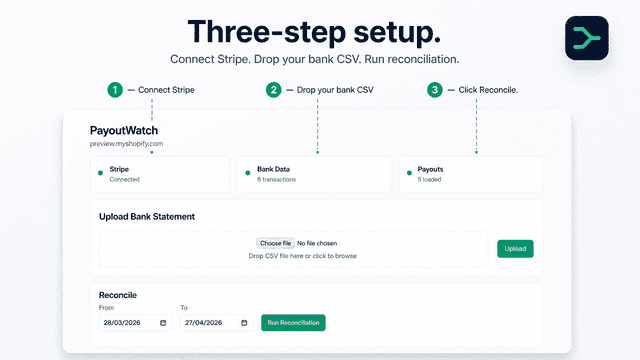
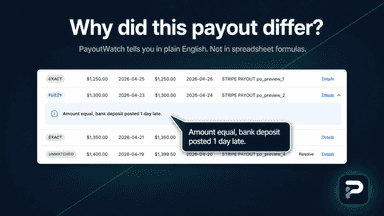
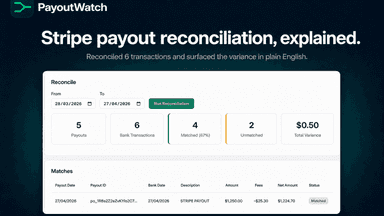
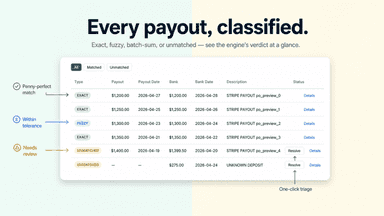
See every featurePayoutWatch helps Shopify merchants reconcile Stripe payouts against bank deposits and account for fees, rounding differences, and currency conversions. A 4-pass matching engine combines exact, fuzzy (±1¢ tolerance), and batch-sum matching, then routes anything unresolved into a clear manual queue. Every variance gets a plain-English explanation.
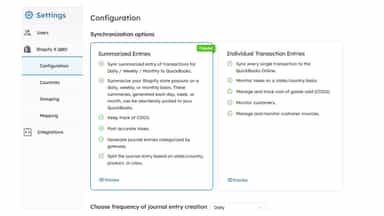
SyncTools simplifies Shopify bookkeeping by syncing sales, inventory, taxes, fees, and gift cards from Shopify, eBay, Amazon, Linnworks & POS. It connects multiple stores to your accounting platform and manages multiple currencies, including crypto orders.
- 4-pass matching engine: exact, fuzzy (±1¢ tolerance), batch-sum, manual queue
- Plain-English variance reports that explain every payout discrepancy
- Auto-detected multi-format bank CSV (Chase, BofA, Wells Fargo, Revolut)
- Read-only Stripe Connect — your store and customer data stay private
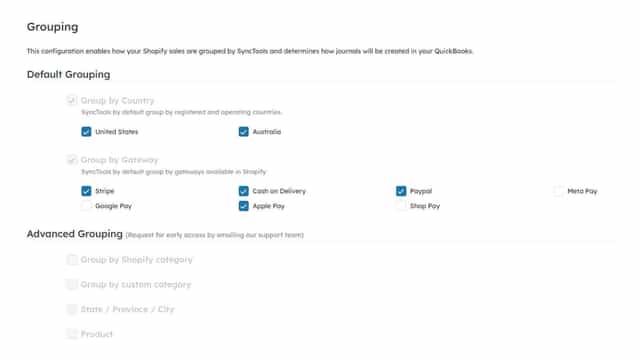
- Organize syncs by country, payment gateway, or sales channel for tailored report
- Attach complete order history as an Excel file to each QuickBooks transaction.
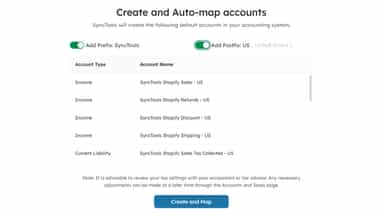
- Map Shopify transactions to QuickBooks accounts and taxes for precise reporting.
- Built-in customization facility to cater your unique QuickBooks accounting needs
All the numbers
Every figure, side by side
A green dot marks the app ahead on a measured figure. Estimates, gaps and apps that leave no storefront trace never take the lead.
Adoption
| Measure |  PayoutWatch |  SyncTools for QuickBooks Xero |
|---|---|---|
| Detected stores | Not published | Not published |
| Net store change, 28 days | 0 | 0 |
| Stores added, 28 days | Not enough data | Not enough data |
| Big-brand share | Not enough data | Not enough data |
| Top store categories | Not published | Not published |
| Top store countries | Not published | Not published |
Reviews
| Measure | PayoutWatch | SyncTools for QuickBooks Xero |
|---|---|---|
| App Store rating | Not published | 5.0 ★ |
| App Store reviews | Not published | 5 |
| New reviews, 28 days | Not enough data | 0 |
| Reviewers a year or more in | Not enough data | Not enough data |
Pricing
| Measure | PayoutWatch | SyncTools for QuickBooks Xero |
|---|---|---|
| Free plan | Yes | Not listed |
| Lowest paid monthly plan | $19/month | $19/month |
| Longest free trial | 14 days | 30 days |
| Plans listed | 4 | 4 |
Listing
| Measure | PayoutWatch | SyncTools for QuickBooks Xero |
|---|---|---|
| Shopify category rank | #246 | #122(ahead) |
| Shopify App Charts | Not on this week’s charts | Not on this week’s charts |
| Built for Shopify | No | No |
| Launched | May 21, 2026 | Jun 13, 2024 |
| Languages | 1 | 1 |
| Developer | PE Bulgakov Daniil Sergeevich | Synctools Pte. Ltd. |
FAQ
PayoutWatch and SyncTools for QuickBooks Xero: common questions
- Is PayoutWatch or SyncTools for QuickBooks Xero cheaper?
- Only PayoutWatch lists a free plan. Paid plans start at $19/month for PayoutWatch and $19/month for SyncTools for QuickBooks Xero. Shoplist compares base prices only between monthly plans in the same currency; usage charges and annual plans vary, so check each plan’s limits.
- What features does each app list that the other doesn’t?
- PayoutWatch lists 2 the others don’t mention, such as Billing and invoicing, Income and balance. SyncTools for QuickBooks Xero lists 12 the others don’t mention, such as Accounts receivable, COGS tracking, Daily sales summary, Expense tracking. A feature missing from a listing may still be supported; this compares what each App Store listing says.
- Where does this comparison’s data come from?
- Shoplist crawls Shopify storefronts to detect which apps each store runs, and reads each app’s Shopify App Store listing for reviews, pricing, features and integrations. Store counts are as of Oct 14, 2026; estimated figures are labeled.
How Shoplist compares apps
Store counts come from Shoplist’s crawl of Shopify storefronts, which detects the apps each store runs; they are as of Oct 14, 2026. Reviews, ratings, plans, features and integrations come from each app’s Shopify App Store listing. 28-day figures are labeled when estimated, and a figure that is missing or estimated never decides who leads. Read the methodology.