Payment Rules: Hide & Rename vs PayLock
Two Shopify apps, side by side: detected stores, momentum, reviews, plans, listed features and who runs each. Store counts as of Nov 9, 2026 for Payment Rules, Oct 13, 2026 for PayLock.
The short answer
- Only Payment Rules lists a free plan. Paid plans start at $2.99/month for Payment Rules and $3.99/month for PayLock.
Head to head


Momentum
New reviews each month
Review pace is the clearest public read on how fast an app is winning new merchants.
Free
- · Hide payment methods
- · Live preview & safety check
- · Sort payment methods
- · Up to 3 payment rules
- · “PayPal first” template
Basic
- · CSV export of your rules
- · Country, cart total & product rules
- · Everything in Free
- · Rename payment methods
- · Scheduled rules
- · Up to 25 payment rules
Pro
- · B2B conditions
- · Everything in Basic
- · Metafield conditions
- · Priority support
- · Unlimited payment rules
Standard
Coverage counts what each App Store listing names. Every feature, checked off app by app, is in Shoplist.
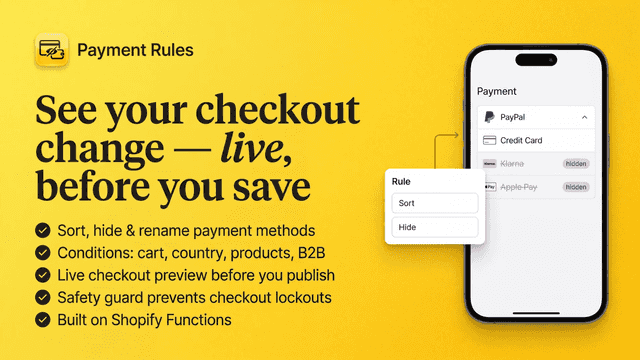
See every featurePayment Rules moves PayPal to the top of your checkout payment list. Start from the “PayPal first” template, check the preview and save. Checkout normally preselects the first method in the list. You can also sort any other method, hide methods such as Cash on Delivery by country, cart total, products or B2B customers, and rename methods for clarity. A safety check warns you before a rule would hide every method.
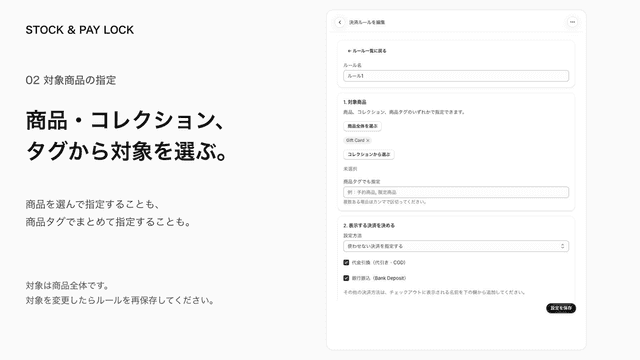
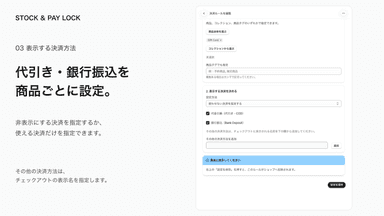
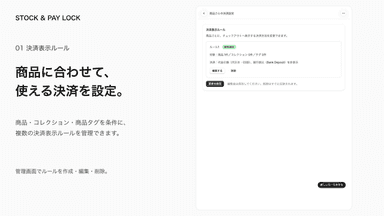
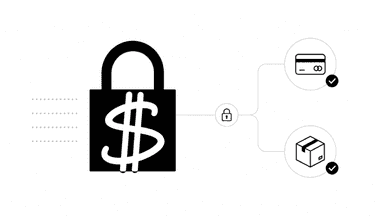
PayLock lets you control which payment methods appear at checkout for specific products, collections, or product tags. Hide selected methods or show only the ones you choose. Set rules for cash on delivery and bank deposit, and register additional payment method names to reuse across rules. Create, edit, and delete rules from Shopify admin. Registration does not activate a payment service.
- Hide, rename or reorder any payment method at checkout
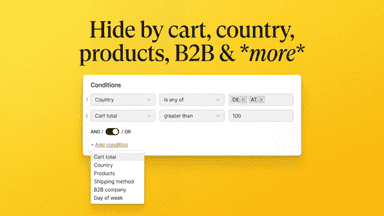
- Target rules by country, cart total, products, B2B, schedule and more
- Live preview shows the exact checkout result before you save
- Safety check and conflict detection prevent broken checkouts
- 商品・コレクション・タグごとに決済方法の表示を制御
- 代金引換と銀行振込を分かりやすい選択肢から設定
- 複数の決済表示ルールを作成・編集・削除して管理


All the numbers
Every figure, side by side
A green dot marks the app ahead on a measured figure. Estimates, gaps and apps that leave no storefront trace never take the lead.
Adoption
| Measure |  Payment Rules |  PayLock |
|---|---|---|
| Detected stores | Not published | Not published |
| Net store change, 28 days | 0 | 0 |
| Stores added, 28 days | Not enough data | Not enough data |
| Big-brand share | Not enough data | Not enough data |
| Top store categories | Not published | Not published |
| Top store countries | Not published | Not published |
Reviews
| Measure | Payment Rules | PayLock |
|---|---|---|
| App Store rating | 5.0 ★ | Not published |
| App Store reviews | 3 | Not published |
| New reviews, 28 days | Not enough data | Not enough data |
| Reviewers a year or more in | Not enough data | Not enough data |
Pricing
| Measure | Payment Rules | PayLock |
|---|---|---|
| Free plan | Yes | Not listed |
| Lowest paid monthly plan | $2.99/month(ahead) | $3.99/month |
| Longest free trial | 7 days | 7 days |
| Plans listed | 3 | 1 |
Listing
| Measure | Payment Rules | PayLock |
|---|---|---|
| Shopify category rank | #16(ahead) | #113 |
| Shopify App Charts | Not on this week’s charts | Not on this week’s charts |
| Built for Shopify | No | No |
| Launched | Jul 16, 2026 | Sep 28, 2026 |
| Languages | 7 | 1 |
| Developer | Appsentials | 株式会社HAYABUSA |
FAQ
Payment Rules and PayLock: common questions
- Is Payment Rules or PayLock cheaper?
- Only Payment Rules lists a free plan. Paid plans start at $2.99/month for Payment Rules and $3.99/month for PayLock. Shoplist compares base prices only between monthly plans in the same currency; usage charges and annual plans vary, so check each plan’s limits.
- Where does this comparison’s data come from?
- Shoplist crawls Shopify storefronts to detect which apps each store runs, and reads each app’s Shopify App Store listing for reviews, pricing, features and integrations. Store counts are as of Nov 9, 2026 for Payment Rules, Oct 13, 2026 for PayLock; estimated figures are labeled.
How Shoplist compares apps
Store counts come from Shoplist’s crawl of Shopify storefronts, which detects the apps each store runs; they are as of Nov 9, 2026 for Payment Rules, Oct 13, 2026 for PayLock. Reviews, ratings, plans, features and integrations come from each app’s Shopify App Store listing. 28-day figures are labeled when estimated, and a figure that is missing or estimated never decides who leads. Read the methodology.