

PayFlow Payment Rules vs PayShift Hide Payment Shipping
Two Shopify apps, side by side: detected stores, momentum, reviews, plans, listed features and who runs each. Store counts as of Oct 13, 2026 for PayFlow Payment Rules, Oct 20, 2026 for PayShift Hide Payment Shipping.
The short answer
- Only PayShift Hide Payment Shipping lists a free plan. Paid plans start at $10/month for PayFlow Payment Rules and $3.99/month for PayShift Hide Payment Shipping.
- PayFlow Payment Rules lists 2 features PayShift Hide Payment Shipping’s listing doesn’t mention, including Payment messages, Personalized messages.
Head to head


Momentum
New reviews each month
Review pace is the clearest public read on how fast an app is winning new merchants.
Basic
- · Custom Payment Names
- · Location-Based Payment Rules
- · Multiple City Conditions
- · Show or Hide Payment Methods
Free
- · Applies to all checkouts, no conditions
- · Live & Whatsapp support
- · Rename, hide & reorder payment methods
- · Rename, hide & reorder shipping methods
- · Unlimited rules
Pro
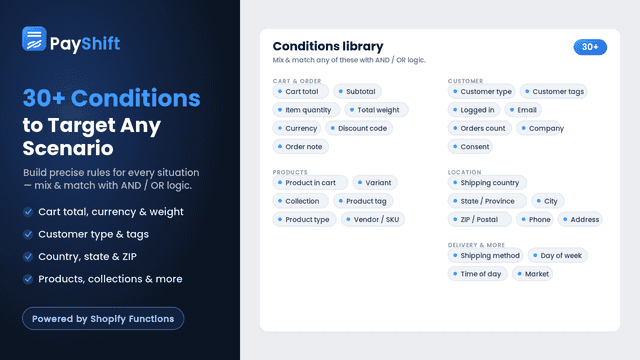
- · 30+ conditions: shipping, cart, country
- · AND/OR logic for complex rules
- · Apply rules only when conditions match
- · Everything in Free
- · Live & Whatsapp support
Coverage counts what each App Store listing names. Every feature, checked off app by app, is in Shoplist.
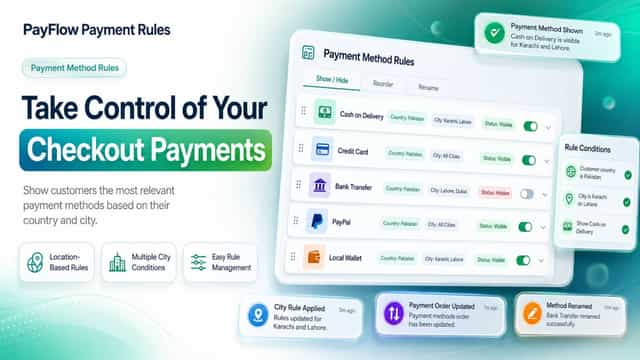
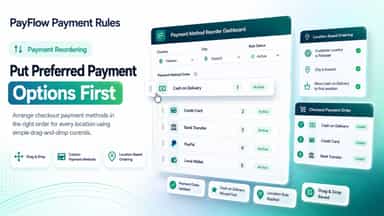
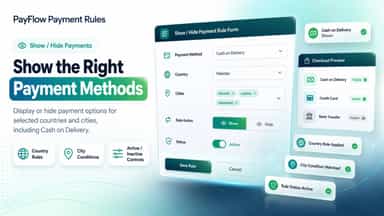
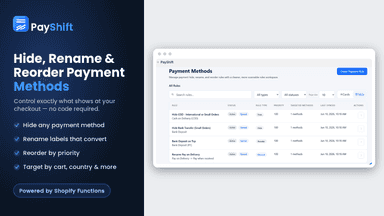
See every featureCustomize checkout payment methods with location-based rules. Show or hide payment options by country and city, reorder methods to prioritize preferred choices, and rename labels for clearer or localized checkout messaging. Create multiple rules, apply them to several cities, and activate or pause each rule anytime from one simple dashboard no coding required.
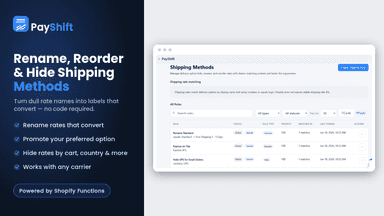
PayShift gives you full control over your Shopify checkout without touching code. Hide any payment or shipping method, for example, hide a payment method based on the shipping method selected, rename unclear rates into labels that convert, and reorder options to guide customers to your preferred choice.
- Location-Based Payment Rules
- Show or Hide Payment Methods
- Custom Payment Names
- Multiple City Conditions
- Hide any payment or shipping method at checkout in seconds
- Rename unclear payment & shipping names into clear labels
- Reorder any methods to put your preferred option first
- Target rules with 30+ conditions and flexible AND/OR logic


All the numbers
Every figure, side by side
A green dot marks the app ahead on a measured figure. Estimates, gaps and apps that leave no storefront trace never take the lead.
Adoption
| Measure |  PayFlow Payment Rules |  PayShift Hide Payment Shipping |
|---|---|---|
| Detected stores | Not published | Not published |
| Net store change, 28 days | 0 | 0 |
| Stores added, 28 days | Not enough data | Not enough data |
| Big-brand share | Not enough data | Not enough data |
| Top store categories | Not published | Not published |
| Top store countries | Not published | Not published |
Reviews
| Measure | PayFlow Payment Rules | PayShift Hide Payment Shipping |
|---|---|---|
| App Store rating | Not published | 5.0 ★ |
| App Store reviews | Not published | 4 |
| New reviews, 28 days | Not enough data | Not enough data |
| Reviewers a year or more in | Not enough data | Not enough data |
Pricing
| Measure | PayFlow Payment Rules | PayShift Hide Payment Shipping |
|---|---|---|
| Free plan | Not listed | Yes |
| Lowest paid monthly plan | $10/month | $3.99/month(ahead) |
| Longest free trial | Not listed | 7 days |
| Plans listed | 1 | 2 |
Listing
| Measure | PayFlow Payment Rules | PayShift Hide Payment Shipping |
|---|---|---|
| Shopify category rank | #102 | #34 |
| Shopify App Charts | Not on this week’s charts | Not on this week’s charts |
| Built for Shopify | No | No |
| Launched | Aug 27, 2026 | Jun 22, 2026 |
| Languages | 1 | 1 |
| Developer | Mean3 Pvt Ltd | CognitioLab |
FAQ
PayFlow Payment Rules and PayShift Hide Payment Shipping: common questions
- Is PayFlow Payment Rules or PayShift Hide Payment Shipping cheaper?
- Only PayShift Hide Payment Shipping lists a free plan. Paid plans start at $10/month for PayFlow Payment Rules and $3.99/month for PayShift Hide Payment Shipping. Shoplist compares base prices only between monthly plans in the same currency; usage charges and annual plans vary, so check each plan’s limits.
- What features does each app list that the other doesn’t?
- PayFlow Payment Rules lists 2 the others don’t mention, such as Payment messages, Personalized messages. PayShift Hide Payment Shipping lists 2 the others don’t mention, such as Widget placement, Widget text. A feature missing from a listing may still be supported; this compares what each App Store listing says.
- Where does this comparison’s data come from?
- Shoplist crawls Shopify storefronts to detect which apps each store runs, and reads each app’s Shopify App Store listing for reviews, pricing, features and integrations. Store counts are as of Oct 13, 2026 for PayFlow Payment Rules, Oct 20, 2026 for PayShift Hide Payment Shipping; estimated figures are labeled.
How Shoplist compares apps
Store counts come from Shoplist’s crawl of Shopify storefronts, which detects the apps each store runs; they are as of Oct 13, 2026 for PayFlow Payment Rules, Oct 20, 2026 for PayShift Hide Payment Shipping. Reviews, ratings, plans, features and integrations come from each app’s Shopify App Store listing. 28-day figures are labeled when estimated, and a figure that is missing or estimated never decides who leads. Read the methodology.