

File Upload by PartyKit vs UploadFlow: AI File Upload
Two Shopify apps, side by side: detected stores, momentum, reviews, plans, listed features and who runs each. Store counts as of Oct 13, 2026.
The short answer
- Both list a free plan. Paid plans start at $9/month for File Upload by PartyKit and $9.99/month for UploadFlow.
- UploadFlow lists 6 features File Upload by PartyKit’s listing doesn’t mention, including Excel, File download, Malware protection.
Head to head


Momentum
New reviews each month
Review pace is the clearest public read on how fast an app is winning new merchants.
Free
- · 50 customer uploads per month
- · AI moderation (NSFWJS) included
- · Files in Shopify Files (default)
- · Storefront block, no theme edits
Starter
- · 500 customer uploads per month
- · Hold-for-review queue
- · In-browser cropper with aspect lock
- · Photo guidelines per product
Pro
- · 2,500 customer uploads per month
- · PDF preview built in
- · Per-file fees via cart_transform
- · Per-variant aspect overrides
Studio
- · BYO S3 / R2 / Drive / Dropbox
- · Priority email support
- · Sidecar JSON for AI workflows
- · Unlimited customer uploads
UploadFlow Free
- · 25 uploads/month
- · 500 MB storage
- · Admin review
- · Ask-for-file links
- · Product & cart uploads
UploadFlow Pro
- · 10 GB storage
- · AI validation
- · OCR
- · Priority workflow features
- · Public API
- · Unlimited uploads
Coverage counts what each App Store listing names. Every feature, checked off app by app, is in Shoplist.
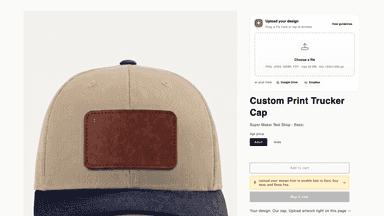
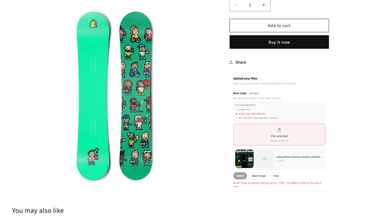
See every featureLet your customers attach photos, designs, SVGs and PDFs directly to any product on its page — no email back-and-forth, no checkout extensions. Built for UV printers, hat-bar parties, sublimation shops, designers, and any creative store where the customer brings the artwork.
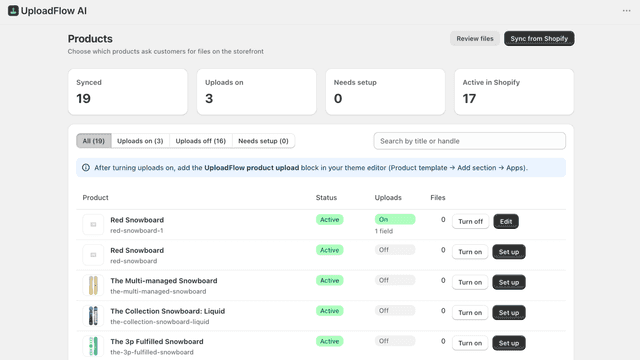
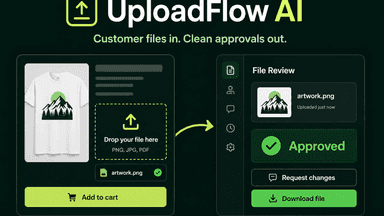
UploadFlow AI lets shoppers attach artwork, documents, and print files on your product or cart page—then you review everything in Shopify admin. Enable uploads per product, set file rules (types, size, required), and approve, reject, or request changes. Send an Ask-for-file link when a customer needs to replace a file.
- Customers upload art straight from the PDP — no emails, no send your file later
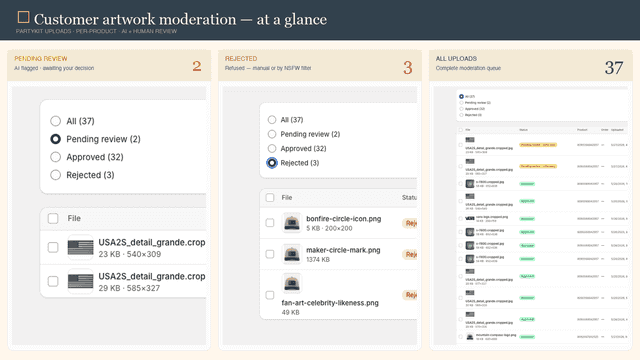
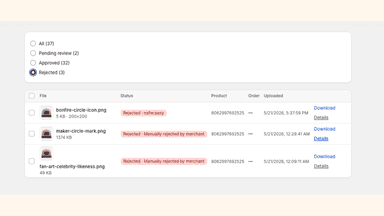
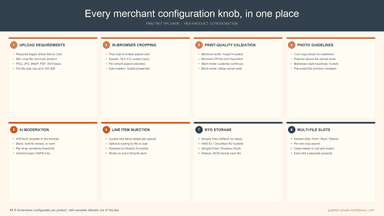
- AI blocks NSFW + low-res images before you waste ink. Hold-for-review queue.
- Per-file fees applied at checkout via Shopify Functions — no manual invoices.
- BYO storage: Shopify Files, AWS S3, Cloudflare R2, Google Drive, or Dropbox.
- Collect customer files on product and cart pages with theme blocks
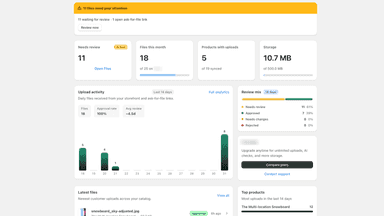
- Review uploads in admin—approve, reject, or request changes
- Ask-for-file links when a customer needs to replace a file
- Per-product upload fields with type, size, and required rules
All the numbers
Every figure, side by side
A green dot marks the app ahead on a measured figure. Estimates, gaps and apps that leave no storefront trace never take the lead.
Adoption
| Measure |  File Upload by PartyKit |  UploadFlow |
|---|---|---|
| Detected stores | Not published | Not published |
| Net store change, 28 days | 0 | 0 |
| Stores added, 28 days | Not enough data | Not enough data |
| Big-brand share | Not enough data | Not enough data |
| Top store categories | Not published | Not published |
| Top store countries | Not published | Not published |
Reviews
| Measure | File Upload by PartyKit | UploadFlow |
|---|---|---|
| App Store rating | 5.0 ★ | Not published |
| App Store reviews | 2 | Not published |
| New reviews, 28 days | Not enough data | Not enough data |
| Reviewers a year or more in | Not enough data | Not enough data |
Pricing
| Measure | File Upload by PartyKit | UploadFlow |
|---|---|---|
| Free plan | Yes | Yes |
| Lowest paid monthly plan | $9/month(ahead) | $9.99/month |
| Longest free trial | 14 days | 7 days |
| Plans listed | 4 | 2 |
Listing
| Measure | File Upload by PartyKit | UploadFlow |
|---|---|---|
| Shopify category rank | #64(ahead) | #179 |
| Shopify App Charts | Not on this week’s charts | Not on this week’s charts |
| Built for Shopify | No | No |
| Launched | May 29, 2026 | Aug 12, 2026 |
| Languages | 1 | 1 |
| Developer | Tumbly Haus Creative | Pacific Softwares |
FAQ
File Upload by PartyKit and UploadFlow: common questions
- Is File Upload by PartyKit or UploadFlow cheaper?
- Both list a free plan. Paid plans start at $9/month for File Upload by PartyKit and $9.99/month for UploadFlow. Shoplist compares base prices only between monthly plans in the same currency; usage charges and annual plans vary, so check each plan’s limits.
- What features does each app list that the other doesn’t?
- File Upload by PartyKit lists 1 the others don’t mention, such as Preview. UploadFlow lists 6 the others don’t mention, such as Excel, File download, Malware protection, PSD. A feature missing from a listing may still be supported; this compares what each App Store listing says.
- Where does this comparison’s data come from?
- Shoplist crawls Shopify storefronts to detect which apps each store runs, and reads each app’s Shopify App Store listing for reviews, pricing, features and integrations. Store counts are as of Oct 13, 2026; estimated figures are labeled.
How Shoplist compares apps
Store counts come from Shoplist’s crawl of Shopify storefronts, which detects the apps each store runs; they are as of Oct 13, 2026. Reviews, ratings, plans, features and integrations come from each app’s Shopify App Store listing. 28-day figures are labeled when estimated, and a figure that is missing or estimated never decides who leads. Read the methodology.