
OrderPad ‑ Quick Order Form vs Tablely ‑ Bulk Order Form
Two Shopify apps, side by side: detected stores, momentum, reviews, plans, listed features and who runs each. Store counts as of Oct 14, 2026 for OrderPad, Nov 14, 2026 for Tablely.
The short answer
- Both list a free plan. Paid plans start at $19/month for OrderPad and $4.99/month for Tablely.
- Tablely lists 6 features OrderPad’s listing doesn’t mention, including Custom pricing, Customer groups, Customer tagging.
Head to head

Free
- · 1 product group
- · Inventory status badges
- · Native Shopify B2B catalog pricing
- · Quick order table on product pages
Growth
- · Analytics dashboard
- · Incremental step quantities
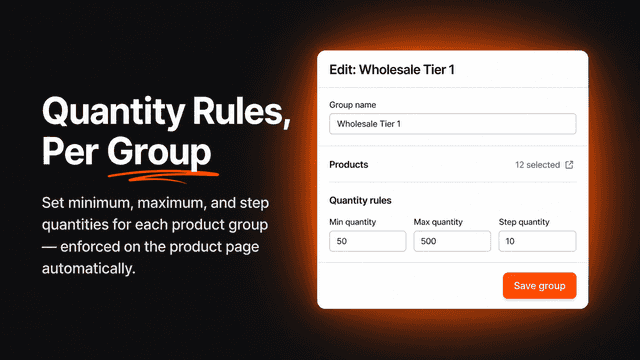
- · MOQ & quantity rules per product group
- · Native Shopify B2B catalog pricing
- · Quick order table on product pages
- · Table & grid layouts
Scale
- · 200 notification emails/month
- · Auto-approval rules
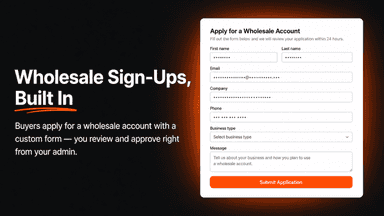
- · B2B self-service registration form
- · Everything in Growth
- · One-click reorder from saved templates
- · Priority support
Free
- · Min, max and step rules
- · Table layout
- · Up to 3 products
Pro Monthly
- · B2B gating and applications
- · CSV, reorder and quotes
- · Grid, list and matrix layouts
- · Tiered and wholesale pricing
- · Unlimited products and tables
Pro Annual
- · B2B gating and applications
- · CSV, reorder and quotes
- · Grid, list and matrix layouts
- · Tiered and wholesale pricing
- · Unlimited products and tables
Coverage counts what each App Store listing names. Every feature, checked off app by app, is in Shoplist.
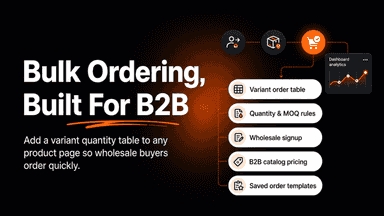
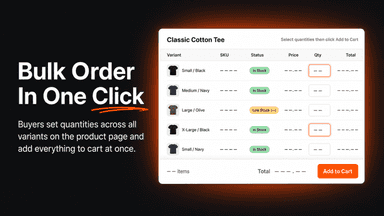
See every featureOrderPad adds a quick order form to your product pages, letting B2B buyers view all variants in a table and add multiple quantities in one click. Set minimum, maximum, and step quantity rules per product group to enforce wholesale order requirements. Enable a self-service registration form so new wholesale applicants can apply and get approved directly into your catalog. Buyers can save and reorder from templates.
Tablely puts every variant of a product into one order table, so buyers fill in quantities and add the whole order in one click. Set minimums, case-pack steps and stock limits per variant; show prices with or without VAT; apply tiered or wholesale pricing; and gate the table to tagged B2B customers with a distributor application form. Every add to cart gives a clear result, never a silent failure.
- Add a variant table to any product page for bulk ordering
- Set quantity rules and minimum order requirements per group
- Let buyers apply for wholesale accounts with a custom form
- Show B2B catalog prices automatically for logged-in buyers
- Order every variant from one table, grid, list or matrix.
- Set per-variant minimums, case-pack steps and stock limits.
- Show prices with or without VAT, plus tiered quantity breaks.
- Gate the table and show wholesale prices to tagged B2B customers.
All the numbers
Every figure, side by side
A green dot marks the app ahead on a measured figure. Estimates, gaps and apps that leave no storefront trace never take the lead.
Adoption
| Measure |  OrderPad | |
|---|---|---|
| Detected stores | Not published | Not published |
| Net store change, 28 days | 0 | 0 |
| Stores added, 28 days | Not enough data | Not enough data |
| Big-brand share | Not enough data | Not enough data |
| Top store categories | Not published | Not published |
| Top store countries | Not published | Not published |
Reviews
| Measure | OrderPad | |
|---|---|---|
| App Store rating | Not published | Not published |
| App Store reviews | Not published | Not published |
| New reviews, 28 days | Not enough data | Not enough data |
| Reviewers a year or more in | Not enough data | Not enough data |
FAQ
OrderPad and Tablely: common questions
- Is OrderPad or Tablely cheaper?
- Both list a free plan. Paid plans start at $19/month for OrderPad and $4.99/month for Tablely. Shoplist compares base prices only between monthly plans in the same currency; usage charges and annual plans vary, so check each plan’s limits.
- What features does each app list that the other doesn’t?
- OrderPad lists 2 the others don’t mention, such as Price locking, Signup form. Tablely lists 6 the others don’t mention, such as Custom pricing, Customer groups, Customer tagging, Tiered pricing. A feature missing from a listing may still be supported; this compares what each App Store listing says.
- Where does this comparison’s data come from?
- Shoplist crawls Shopify storefronts to detect which apps each store runs, and reads each app’s Shopify App Store listing for reviews, pricing, features and integrations. Store counts are as of Oct 14, 2026 for OrderPad, Nov 14, 2026 for Tablely; estimated figures are labeled.
How Shoplist compares apps
Store counts come from Shoplist’s crawl of Shopify storefronts, which detects the apps each store runs; they are as of Oct 14, 2026 for OrderPad, Nov 14, 2026 for Tablely. Reviews, ratings, plans, features and integrations come from each app’s Shopify App Store listing. 28-day figures are labeled when estimated, and a figure that is missing or estimated never decides who leads. Read the methodology.